Knowledge Base
Upload documents, crawl websites, and watch your AI agents answer questions with perfect accuracy
Stop feeding your AI outdated information. Our Knowledge Base lets you upload company documents, crawl entire websites, or paste custom text then instantly connect it to any AI agent. No retraining, no hardcoding, no hallucinations. Just accurate, real-time answers that scale with your business. Upload product manuals, FAQ documents, pricing sheets, or website content. The AI automatically references this information during conversations pulling exact details in under 100ms.
What Makes This Feature Special
Discover the powerful capabilities that drive real business results
Upload Documents in Multiple Formats
Drop in your PDFs, Word docs, or text files up to 10MB each. The AI reads, understands, and retrieves information instantly during conversations. Supported formats: PDF, DOCX, DOC, TXT. No limit on number of documents.
Crawl Entire Websites with Review Control
Enter a URL and choose crawl depth: Quick (single page), Standard (page + 1 level, 10-50 pages), or Deep (page + 2 levels, 50-200+ pages). Review crawled pages before confirming, edit text, exclude pages you don't want.
Real-Time Retrieval Under 100ms
Information pulls from your Knowledge Base in under 100ms. Conversations stay fast and natural – no awkward pauses while the AI 'thinks'. Optimized for production-scale concurrent retrievals.
One Document, Unlimited Agents
Create one Knowledge Base, connect it to multiple AI agents. Update once, and every agent has the latest information. Perfect for companies with multiple products, departments, or teams.
Get started with this feature in a few simple steps
Everything you need to transform your voice operations from start to finish
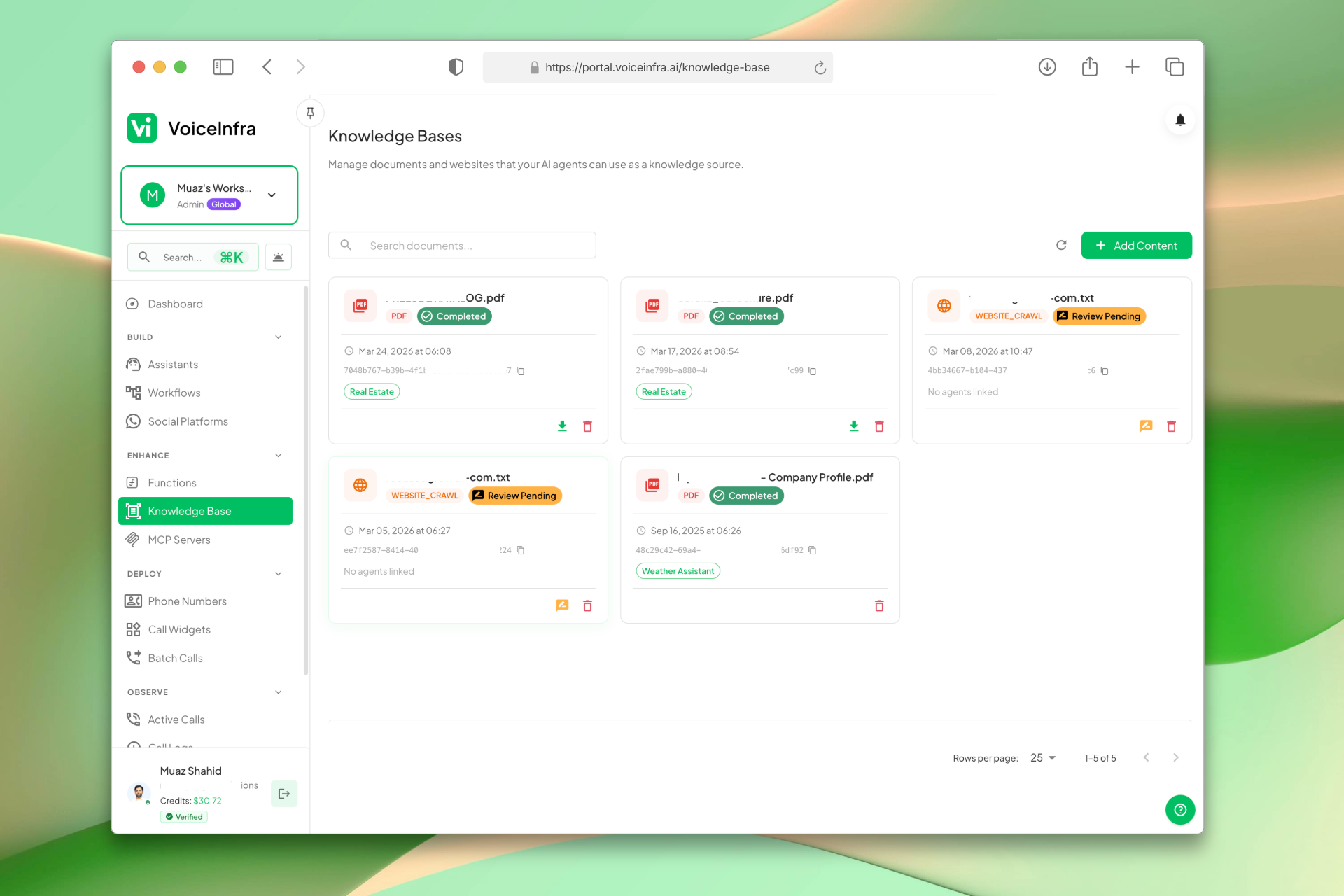
Manage All Your Knowledge Sources
The Knowledge Bases dashboard lists every document and website source you've added. See processing status at a glance: Completed, Review Pending, or Failed. Add new content with one click: upload PDFs, Word docs, or text files, or crawl a website URL.
- Upload PDFs, DOCX, and TXT files
- Add website URLs to crawl
- Status per document: Completed, Review Pending, Failed
- Connect any document to any AI agent
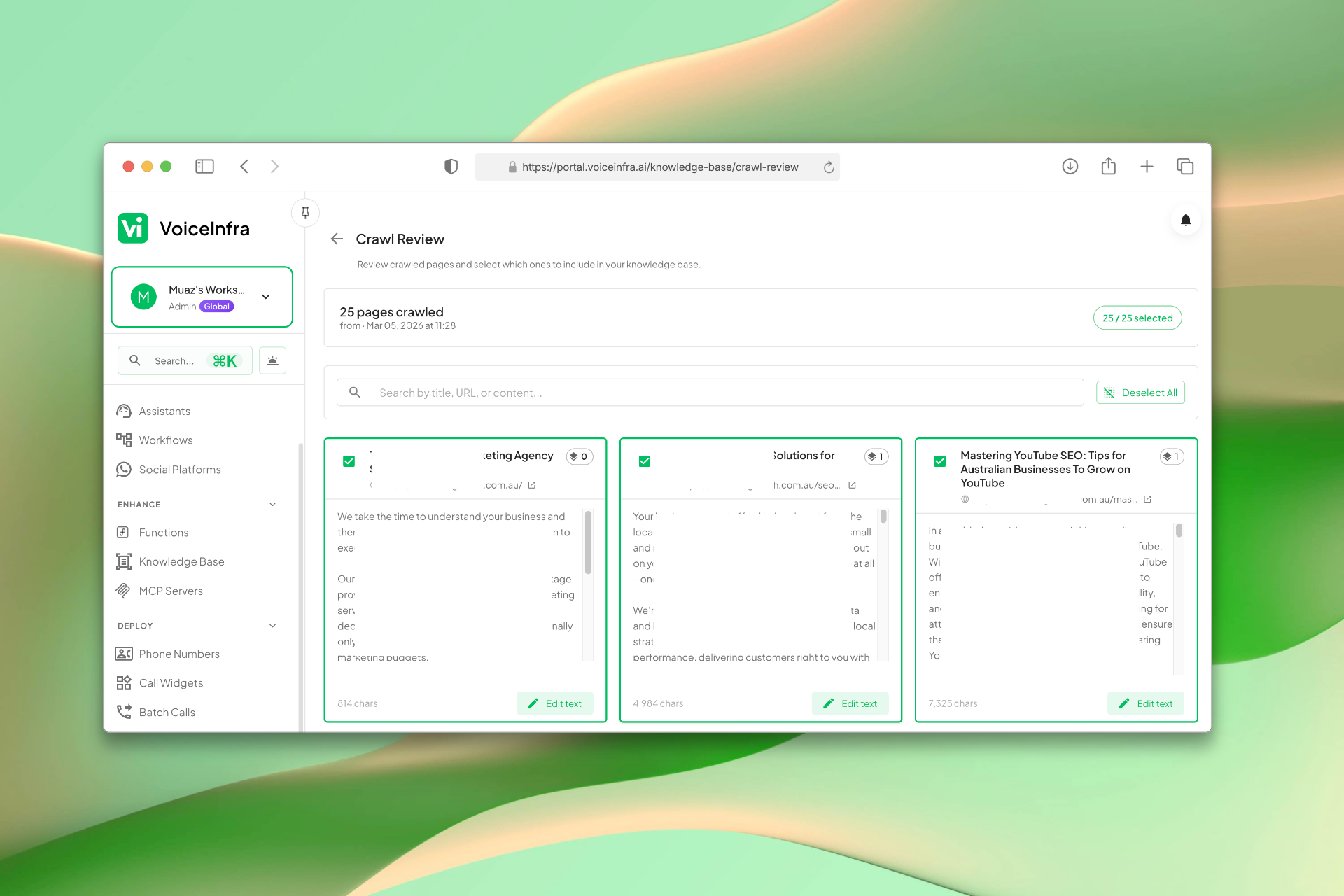
Review Crawled Pages Before Confirming
After crawling a website, review every extracted page before it's added to your knowledge base. See page titles, URLs, and full content previews. Edit any text, discard pages you don't want, and confirm only what's relevant. Full control over what your AI learns.
- Review all crawled pages and their content
- Edit extracted text before confirming
- Discard irrelevant pages individually or all at once
- Search through crawled pages to find specific content
Transform Your Business
Discover the measurable impact and advantages that drive real business growth
No More AI Hallucinations Accurate, documented answers every time
No More Outdated Responses Update documents anytime, agents auto-sync
No More 'I Don't Have Access to That' AI references your actual content
Multiple Upload Methods Files, websites, or custom text
Review Before Publishing See exactly what the AI will learn
Edit Crawled Content Fix or customize extracted text
Real-Time Updates Change a document, AI knows instantly
Multi-Agent Support One document, unlimited agents
Fast Retrieval Under 100ms, conversations stay natural
Status Tracking Know exactly what's processing
Error Handling Clear messages if something fails
No Hardcoding No developer needed to add information
Encrypted Storage AES-256 encryption at rest and in transit
99.9% Uptime SLA Enterprise-grade reliability
Industry Solutions
Discover how this feature powers tailored solutions across industries
AI Phone System for SaaS Companies 24/7 Customer Support & Technical Assistance
Build a Voice AI agent for your SaaS business. Handle customer support, technical troubleshooting, and onboarding around the clock.
Explore SolutionAI Phone System for Technical Support 24/7 Troubleshooting & Issue Resolution
Build a Voice AI agent for your technical support center. Handle troubleshooting, ticketing, and escalation around the clock.
Explore SolutionAI Legal Practice Automation 24/7 Intake, Case Evaluation & Support
Build a Voice AI agent for your legal practice. Handle client intake, case evaluation, and support around the clock.
Explore SolutionSee How Our Customers Use This
Real businesses getting real results with this feature. Read their stories.
How a School Replaced Their Front Desk with a VoiceInfra AI Agent on 3CX
A school in Victoria, Australia deployed a VoiceInfra AI agent on 3CX to handle reception calls, after-hours inquiries, and parent FAQs
Read Success StoryHow a US City Government Self-Deployed a VoiceInfra AI Agent on Their 3CX Phone System
A municipal government in Arkansas deployed a VoiceInfra AI agent on 3CX, self-configured, self-funded, no vendor involvement
Read Success StoryStill have questions about Knowledge Base? Just ask.
The people who built this feature answer every question in plain English. Want to see it running on your own setup instead? Tick the box and we'll include a live demo.
- Answered by the people who built it
- Live demo on your setup, if you want one
- A reply within one business day
Technical Specifications
Enterprise-grade infrastructure built for reliability and scale
PDF, DOCX, DOC, TXT
Multiple file formats up to 10MB
Multi-Level Crawling
Quick/Standard/Deep options
<100ms Retrieval
Real-time information access
AES-256 Encryption
Secure storage & transmission
Frequently Asked Questions
Find answers to common questions about this feature
Continue Exploring VoiceInfra
Discover more ways VoiceInfra can transform your voice AI experience
Integrations & Provider API Keys
Manage your workspace integrations in one place. Connect Cal.com, Calendly, Google Workspace, and Microsoft 365 with one-click OAuth. Add your own API keys for 17+ AI providers including OpenAI, Anthropic, ElevenLabs, and Deepgram. Override platform defaults, control costs, and route usage to your own accounts.
Explore FeatureNo-Code AI Voice Agents
Design intelligent AI voice assistants using a simple step-by-step wizard. Define how your agent should behave, attach knowledge resources, configure call routing, and deploy ready-to-use assistants. No prompt engineering or coding skills needed.
Explore FeatureCall Analytics & Intelligence
Stop guessing about your voice operations. VoiceInfra's Enterprise Call Analytics transforms raw call data into actionable business intelligence, helping you reduce costs by 40%, improve customer satisfaction, and scale operations with confidence. Built for enterprises that prioritize operational excellence and competitive advantage.
Explore FeatureReady to transform your operations?
Contact our sales team to see how the platform works for your industry.