Batch Calling Campaigns
Launch AI calling campaigns to multiple numbers. Schedule calls, upload contacts via CSV, and automate conversations.
Create outbound calling campaigns in 3 simple steps. Define your campaign name and caller ID, choose when to start (immediately or scheduled), and add phone numbers manually or via CSV import. CSV uploads support per-call variables like name and company for personalized AI conversations. Maximum 100 numbers per batch.
What Makes This Feature Special
Discover the powerful capabilities that drive real business results
3-Step Campaign Wizard
Guided workflow: Campaign Details → Schedule → Phone Numbers. Step validation ensures everything is ready before you launch. Edit any step using the Back button without losing data.
Flexible Scheduling
Start Immediately to queue calls within seconds, or Schedule for Later with exact date, time, and timezone. Optimizes answer rates by calling during business hours in the recipient's region.
CSV Bulk Import with Variables
Upload contacts in bulk using CSV. Columns like name, company, or appointment_time become per-call variables. AI injects them into prompts for personalized conversations at scale.
Personalized AI Conversations
Each call uses CSV data to start naturally: 'Hello {{name}}, following up on your January webinar inquiry.' No generic scripts. Every caller hears a tailored message.
Get started with this feature in a few simple steps
Everything you need to transform your voice operations from start to finish
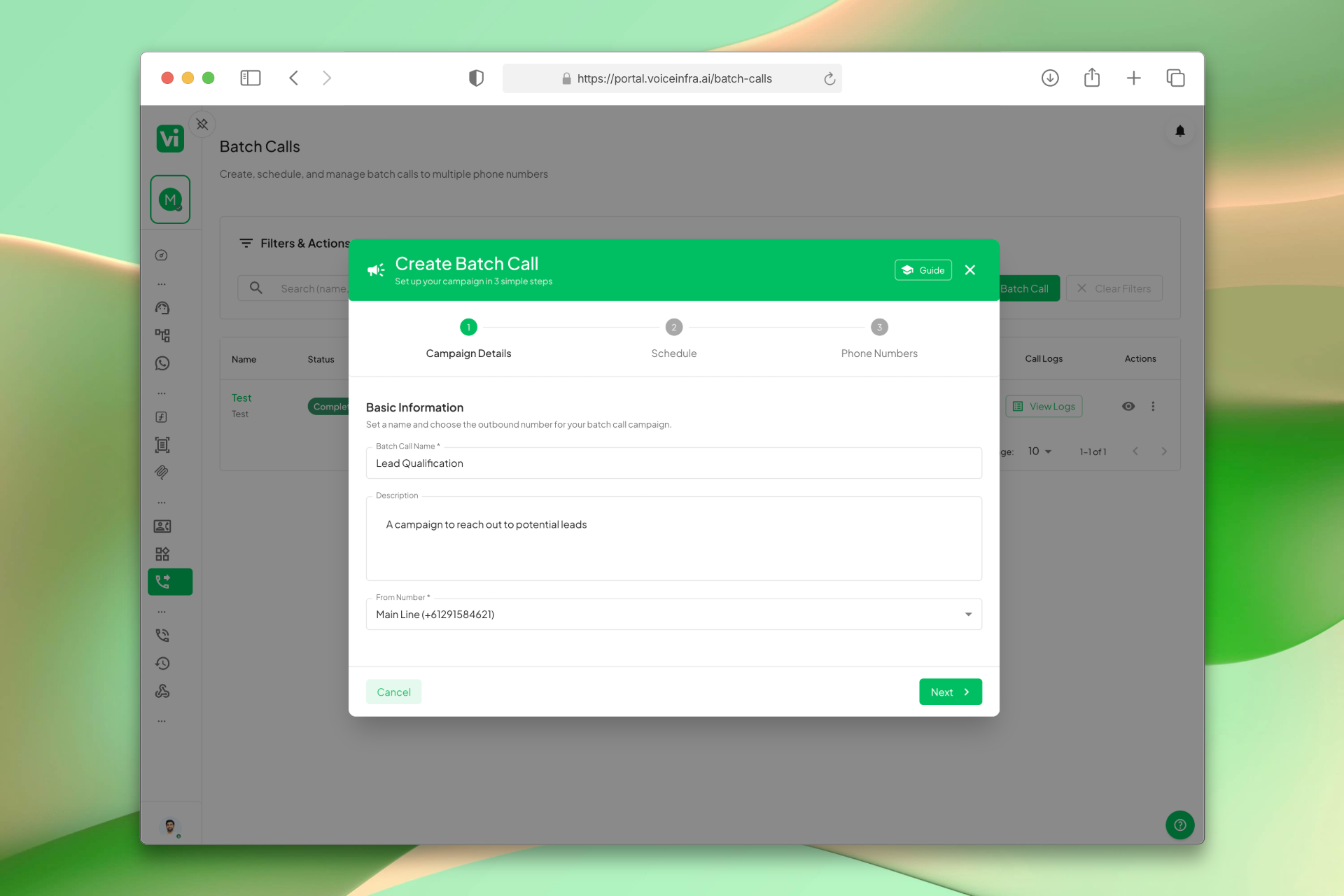
3-Step Campaign Wizard
Create batch calling campaigns in a guided 3-step workflow: Campaign Details, Schedule, and Phone Numbers. Step validation ensures everything is complete before you launch. Use the Back button to revisit any step without losing data.
- Campaign Details, Schedule, Phone Numbers
- Step validation before submission
- Back button to edit without data loss
- Clear progress indicators
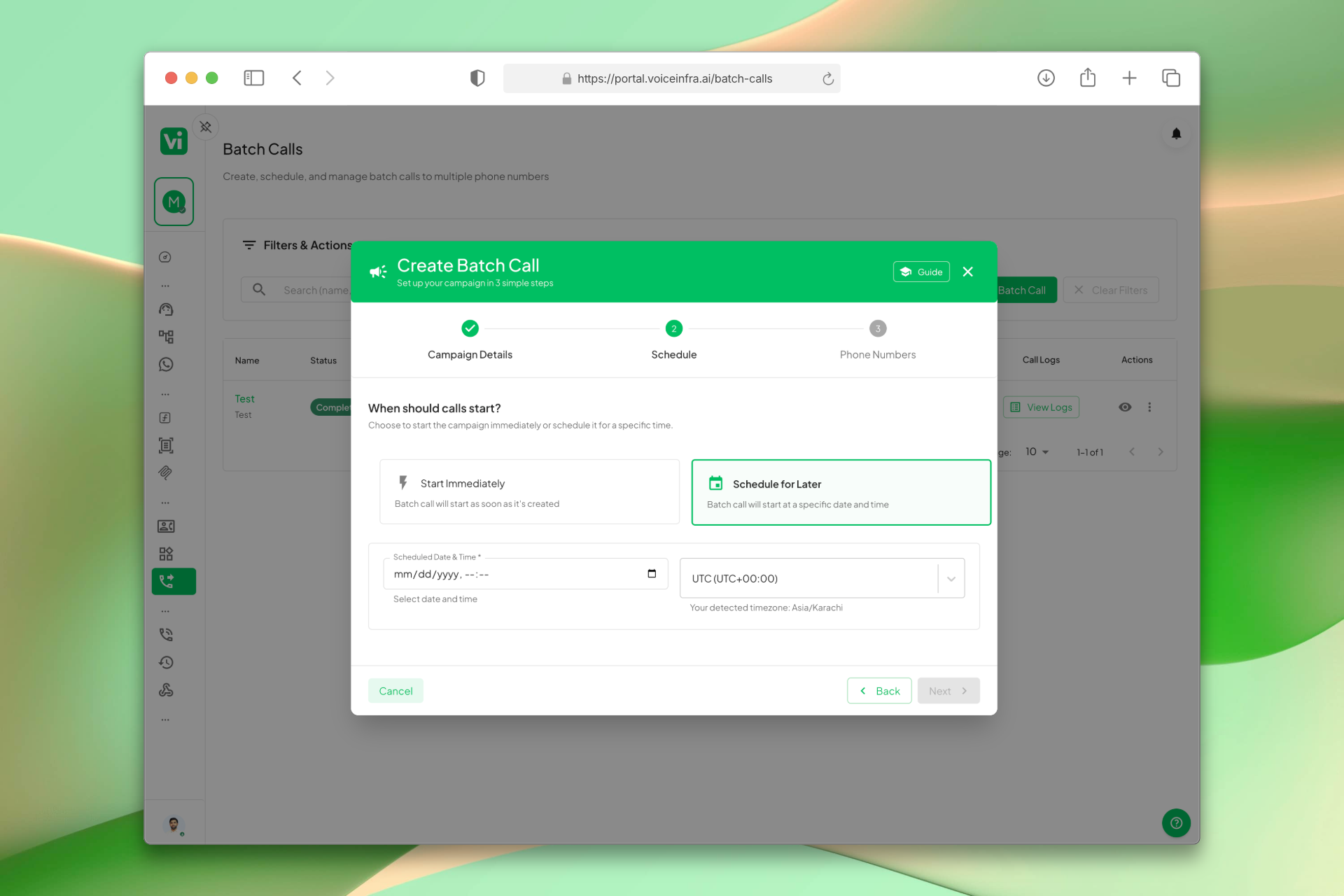
Flexible Scheduling & Timezone Support
Choose Start Immediately to queue calls within seconds, or Schedule for Later with exact date, time, and timezone. Timezone dropdown is searchable and defaults to your browser's setting. Schedule during business hours for best answer rates.
- Start Immediately option
- Schedule for Later with date/time
- Searchable timezone dropdown
- Optimize for recipient's business hours
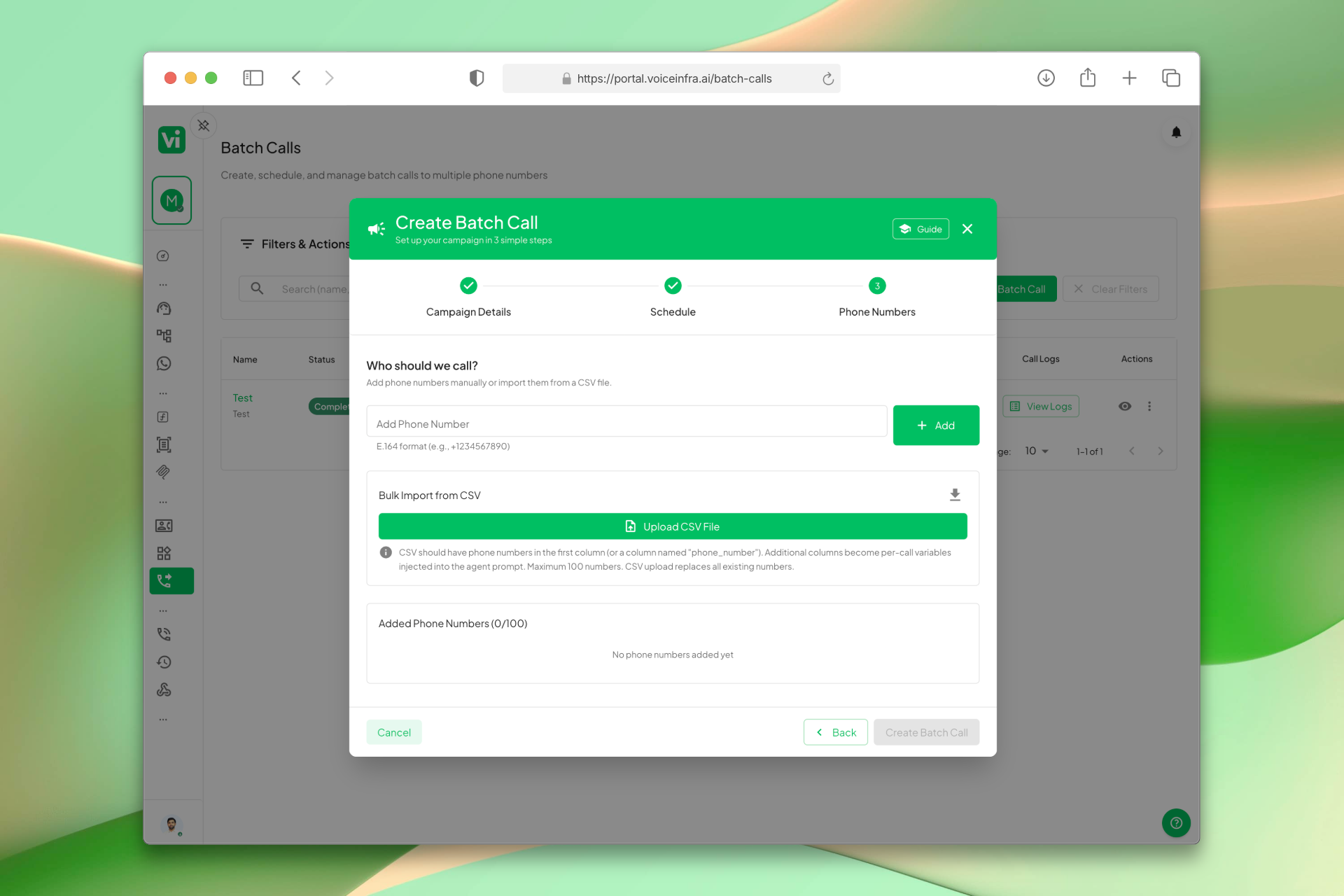
CSV Bulk Import with Per-Call Variables
Upload contacts in bulk using CSV. The first column (or phone_number) contains numbers; all other columns become per-call variables. AI injects variables like name, company, or appointment_time into prompts for personalized conversations at scale.
- CSV format: phone_number,name,company
- Per-call variable injection
- Download pre-formatted template
- Maximum 100 numbers per batch
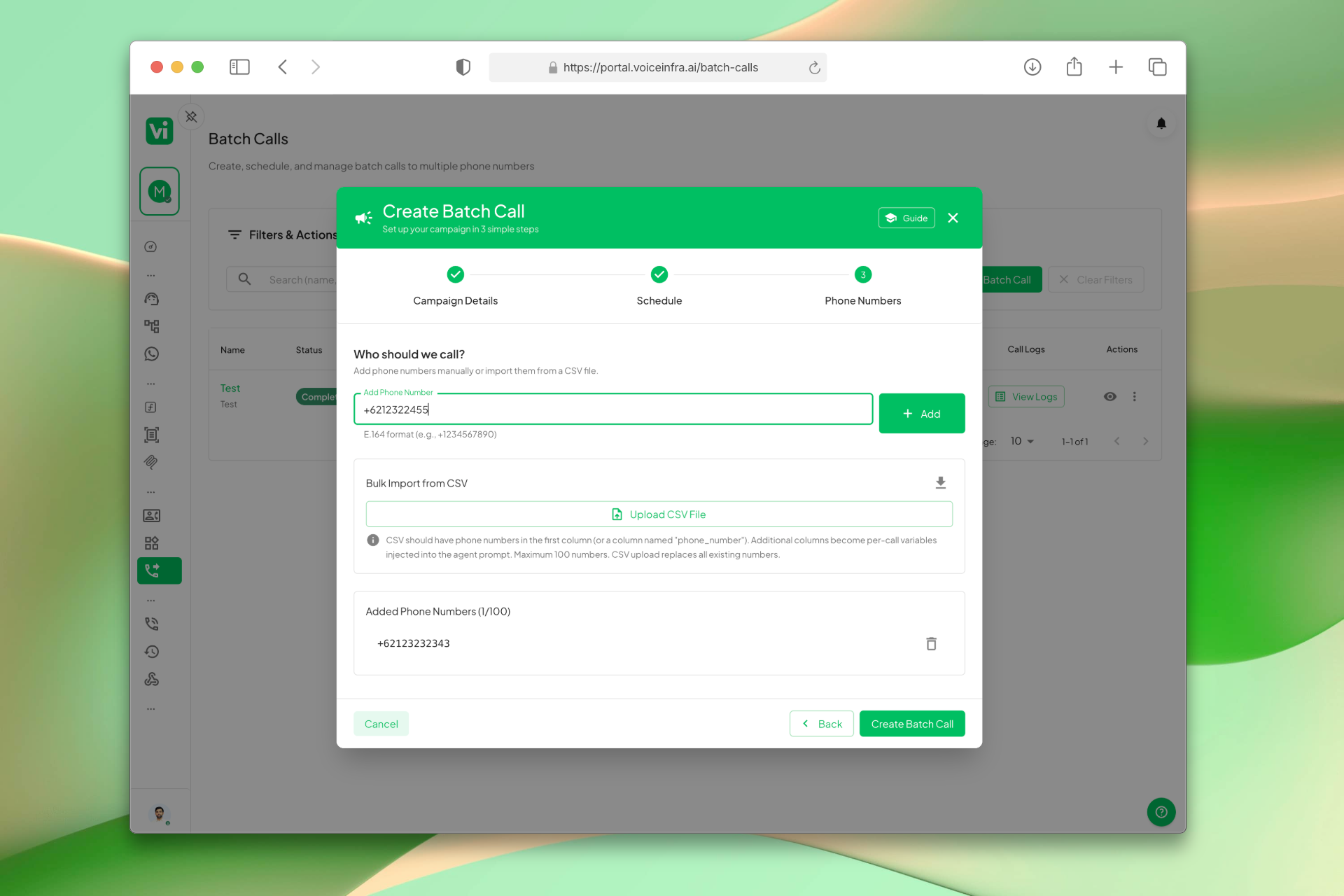
Manual Number Entry & E.164 Support
Add phone numbers one by one using the input field. Numbers must be in E.164 format with country code (e.g., +1 for US, +44 for UK). Perfect for quick tests, small lists, or adding numbers alongside CSV imports.
- Add numbers manually
- E.164 format required
- Country code validation
- Quick tests and small lists
Transform Your Business
Discover the measurable impact and advantages that drive real business growth
Launch outbound campaigns in minutes with guided wizard
Schedule calls for optimal answer rates
Import contacts via CSV with per-call variables
Personalize conversations using CSV data
Manual number entry for quick tests or small lists
E.164 format support for international numbers
Maximum 100 numbers per batch (contact support for higher limits)
Edit any step before submitting without data loss
Industry Solutions
Discover how this feature powers tailored solutions across industries
AI Sales Automation 24/7 Lead Qualification & Outreach
Build a Voice AI agent for your sales team. Handle lead qualification, outreach campaigns, and appointment setting around the clock.
Explore SolutionAI Voice Automation for BPO Companies Scale Operations & Reduce Costs
Build a Voice AI agent for your BPO operations. Handle customer service, data collection, and support tasks around the clock.
Explore SolutionAI Insurance Automation 24/7 Lead Gen, Claims & Sales
Build a Voice AI agent for your insurance business. Handle lead generation, claims processing, and sales around the clock.
Explore SolutionAI Recruitment & Staffing Automation 24/7 Screening, Matching & Outreach
Build a Voice AI agent for your recruitment firm. Handle candidate screening, matching, and outreach campaigns around the clock.
Explore SolutionSee How Our Customers Use This
Real businesses getting real results with this feature. Read their stories.
How a Spanish Telecom Operator Runs 500+ Daily Outbound AI Calls on Yeastar with 5 Languages
A CNMC-registered Spanish telecom operator deployed 10 VoiceInfra AI agents on Yeastar PBX, running 500+ outbound calls daily with 30%+ transfer rate across Spanish, Arabic, English, French, and Portuguese
Read Success StoryHow a National Medical Waste Company Runs AI Cold Calling from a Twilio Number
A national medical waste management company brought their Twilio phone number to VoiceInfra and built an AI outbound calling agent that cold calls healthcare businesses about their medical waste disposal services
Read Success StoryStill have questions about Batch Calling Campaigns? Just ask.
The people who built this feature answer every question in plain English. Want to see it running on your own setup instead? Tick the box and we'll include a live demo.
- Answered by the people who built it
- Live demo on your setup, if you want one
- A reply within one business day
Technical Specifications
Enterprise-grade infrastructure built for reliability and scale
Guided Wizard
3-step campaign creation
Flexible Scheduling
Immediate or timezone-based
CSV Import
Per-call variable injection
E.164 Format
International number support
Frequently Asked Questions
Find answers to common questions about this feature
Continue Exploring VoiceInfra
Discover more ways VoiceInfra can transform your voice AI experience
Dynamic Outbound Call API
Access your AI assistant via API to programmatically initiate outbound calls with dynamic payload customization. Leverage all configured settings while maintaining complete control over call parameters, recipient targeting, and conversation flow through our RESTful API interface.
Explore FeaturePBX Extensions & SIP Config
Configure new extensions for your PBX system with SIP registration. Provide your PBX domain, SIP username & password, and set call directions. Advanced settings let you customize proxies, transport protocols, and system names. Whitelist our IP to ensure reliable SIP traffic and start automating calls with AI.
Explore FeatureMulti-LLM Any AI Provider
Stop being tied to one AI provider. VoiceInfra lets you connect multiple LLMs, assign them to specific agents or workflows, and switch between them instantly. Whether you need faster responses, lower costs, or better reasoning, you control which model handles each call. No vendor lock-in. No rebuilds. Just better AI, on your terms.
Explore FeatureReady to transform your operations?
Contact our sales team to see how the platform works for your industry.