Website AI Widget Voice & Chat
Add voice & chat AI to your website. Capture leads, answer questions, and book appointments 24/7.
Embed a customizable AI widget on your website that handles voice calls and live chat conversations. Configure appearance, collect lead information through forms, and let your AI agent engage visitors 24/7, no coding required beyond a single script tag.
What Makes This Feature Special
Discover the powerful capabilities that drive real business results
Voice Calls and Live Chat in One Widget
Let visitors choose how they want to communicate. The widget supports both voice conversations and text chat, powered by your configured AI agent.
Lead Capture Forms Before Conversations
Require visitors to fill out a form before starting a chat or call. Collect name, email, and custom fields to qualify leads automatically.
Personalized AI Responses Using Form Data
Use captured form fields in your AI's first message. Start conversations with 'Hello {{name}}, how can I help you today?' using real visitor information.
Full Design Control to Match Your Brand
Customize colors, position, button text, and chat window appearance. Make the widget feel like a natural part of your website, not an afterthought.
Get started with this feature in a few simple steps
Everything you need to transform your voice operations from start to finish
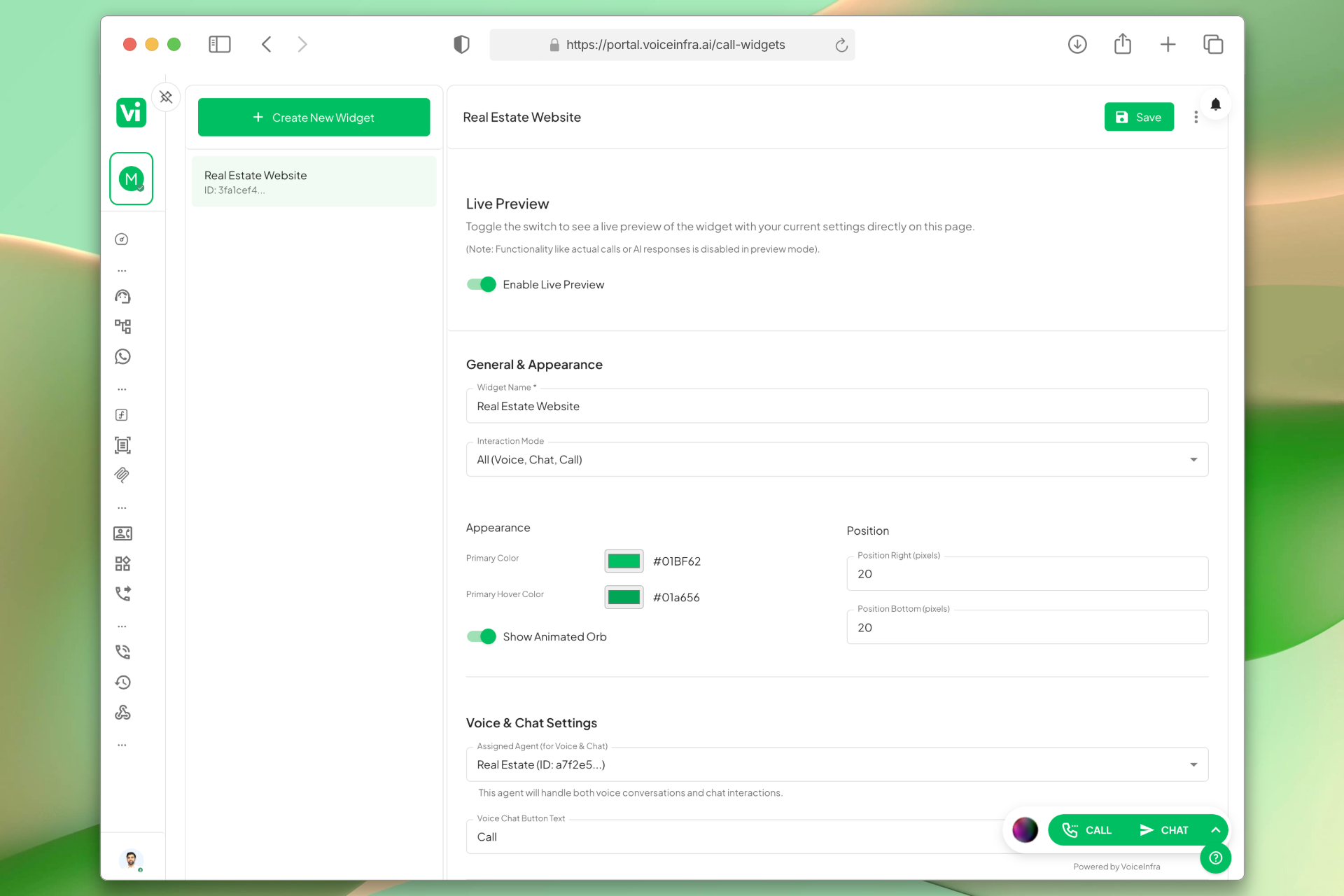
Voice Calls and Live Chat in One Widget
Give your visitors a choice. They can start a voice conversation or type a message both are handled by your AI agent with the same knowledge and capabilities.
- Toggle between voice and chat modes
- Same AI agent handles both interactions
- Configurable button text for each mode
- Outbound call support with phone number assignment
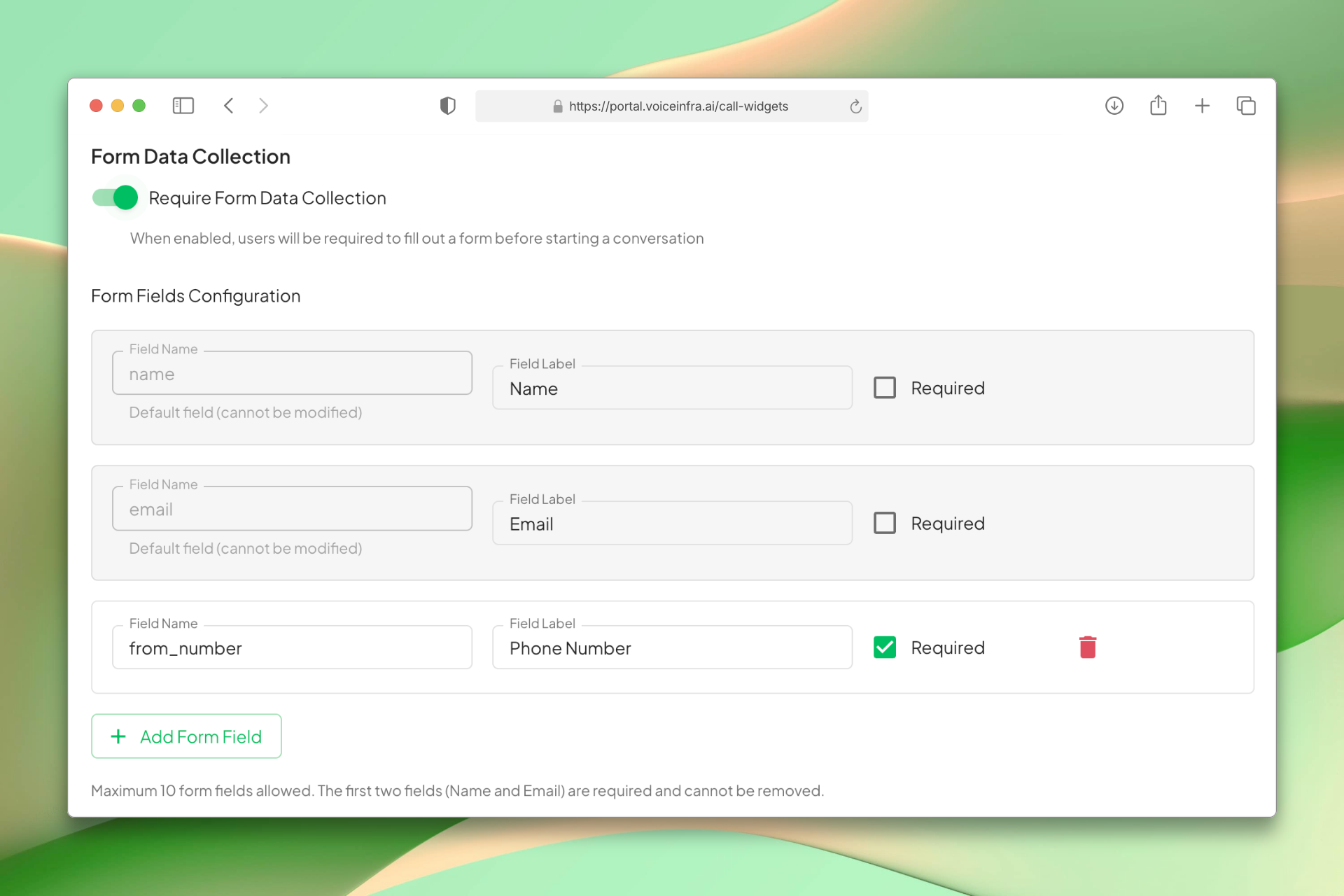
Lead Capture Forms Before Conversations
Stop anonymous chats. Require visitors to fill out a form before they can interact with your AI. Collect the information you need to qualify leads and follow up effectively.
- Mandatory form before chat or call
- Name and email fields included by default
- Add custom fields for your business
- Configure required vs optional fields
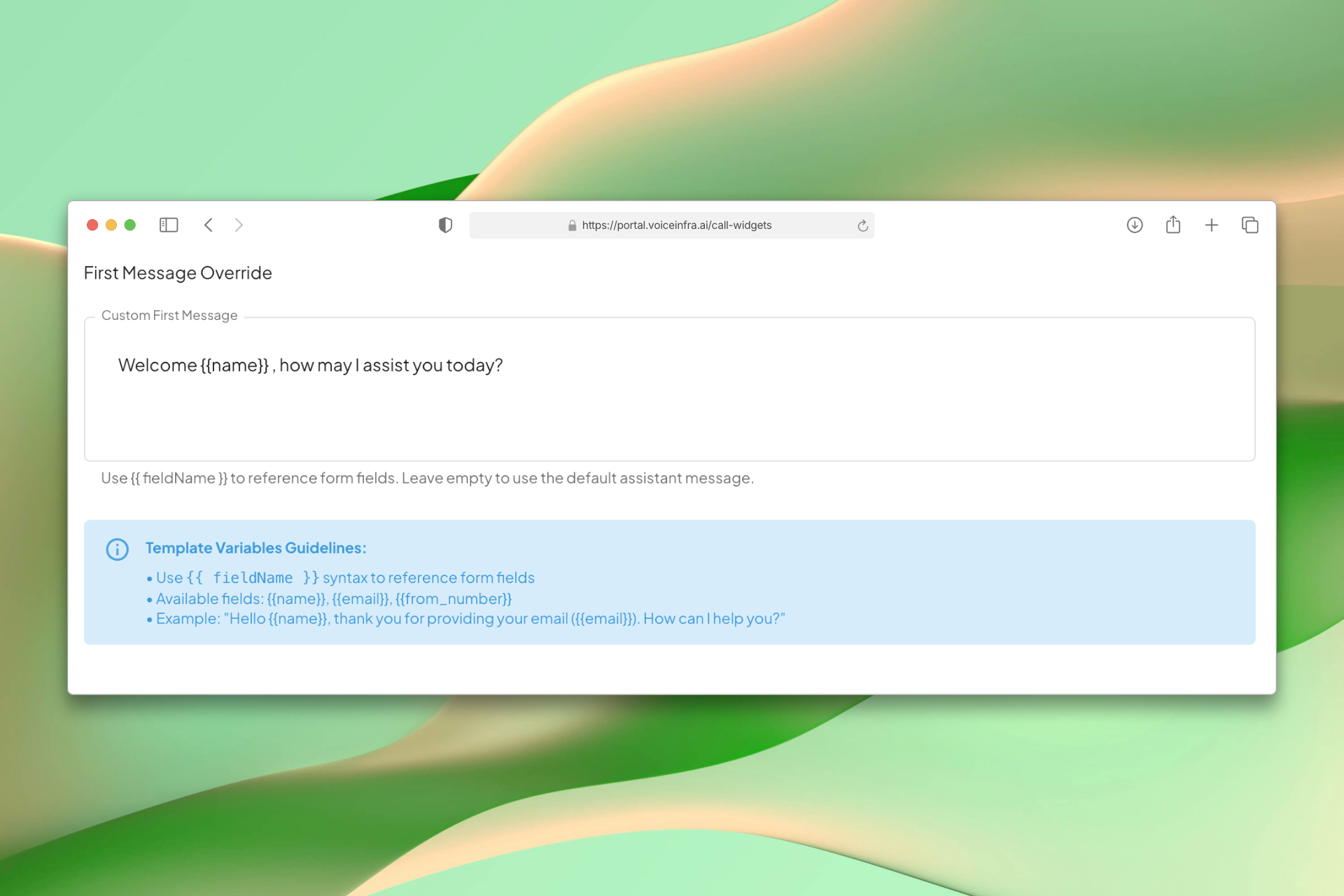
Personalized AI Responses Using Form Data
Your AI agent uses captured form data to start conversations naturally. Instead of generic greetings, visitors hear 'Hello Sarah, thanks for reaching out. How can I help you?'
- Use {{fieldName}} syntax in first messages
- Reference any form field in AI responses
- Default message available if no override set
- Natural conversation starters with real data
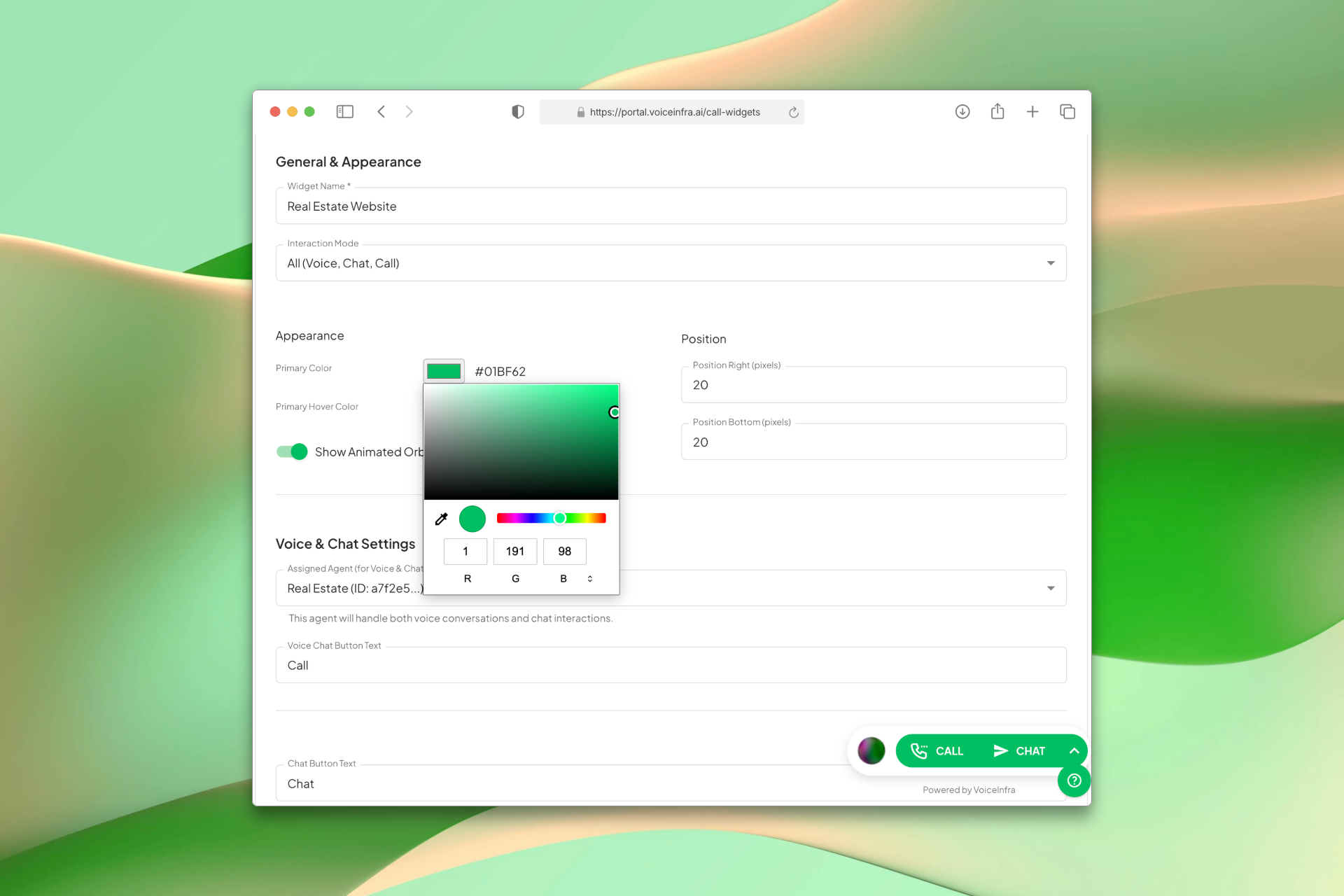
Full Design Control to Match Your Brand
The widget should look like it belongs on your website. Customize every visual element colors, position, button text, chat window title so it blends seamlessly with your design.
- Primary and hover color pickers
- Adjustable position (right and bottom offsets)
- Custom button and window text
- Optional animated orb for visual appeal
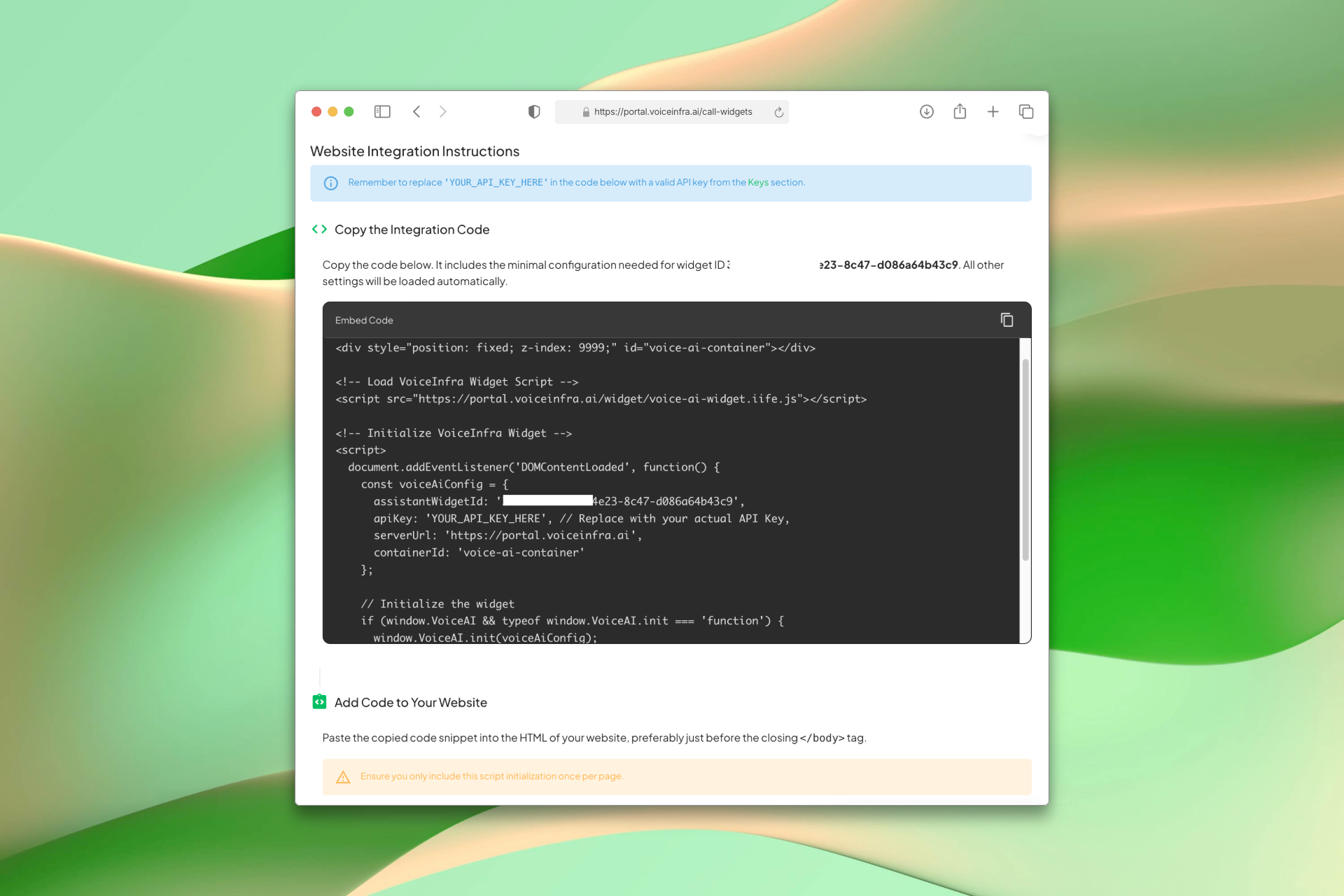
Embed With One Script Tag
Once your widget is configured, copy the generated code snippet from the integration page and paste it into your website before the closing body tag. Your widget ID, API key, and all settings are pre-filled, no manual configuration needed.
- Auto-generated code with your widget ID included
- Paste before the closing body tag, nothing else needed
- All widget settings load automatically from the dashboard
- Works on any website or CMS platform
Transform Your Business
Discover the measurable impact and advantages that drive real business growth
Offer voice and chat options so visitors communicate their way
Capture qualified leads with mandatory contact forms
Personalize AI conversations using captured visitor data
Customize every visual element to match your brand
Embed with a single script tag no complex setup
Handle customer inquiries 24/7 with your AI agent
Industry Solutions
Discover how this feature powers tailored solutions across industries
AI Marketing & Digital Agency Automation 24/7 Lead Capture & Campaigns
Build a Voice AI agent for your marketing agency. Handle lead capture, campaign management, and client support around the clock.
Explore SolutionAI Real Estate Lead Capture 24/7 Routing, Qualification & Consultations
Build a Voice AI agent for your real estate business. Handle lead capture, property inquiries, and consultation scheduling around the clock.
Explore SolutionAI Phone System for SaaS Companies 24/7 Customer Support & Technical Assistance
Build a Voice AI agent for your SaaS business. Handle customer support, technical troubleshooting, and onboarding around the clock.
Explore SolutionSee How Our Customers Use This
Real businesses getting real results with this feature. Read their stories.
How a Norwegian Business Integrated a VoiceInfra Call Widget on Their Website Using Telnyx Numbers
A Norwegian business brought their Telnyx phone numbers to VoiceInfra and integrated an AI-powered call widget on their website, enabling instant voice conversations with visitors
Read Success StoryHow an AI Automation Consultant in Cairo Replaced Missed Calls with a 24/7 Voice AI Agent
An independent AI automation consultant in Cairo connected a VoiceInfra phone number and deployed an AI voice agent that answers FAQs, qualifies leads, and books consultations
Read Success StoryStill have questions about Website AI Widget Voice & Chat? Just ask.
The people who built this feature answer every question in plain English. Want to see it running on your own setup instead? Tick the box and we'll include a live demo.
- Answered by the people who built it
- Live demo on your setup, if you want one
- A reply within one business day
Technical Specifications
Enterprise-grade infrastructure built for reliability and scale
Script Tag Integration
Copy and paste one script tag
Mobile Responsive
Works on all screen sizes
Visual Customization
Colors, position, text, and branding
Form Data Collection
Customizable fields for lead capture
Frequently Asked Questions
Find answers to common questions about this feature
Continue Exploring VoiceInfra
Discover more ways VoiceInfra can transform your voice AI experience
Telnyx Number Import
Import your Telnyx phone numbers directly into our platform. Provide your Telnyx API v2 key (starts with KEY), browse your available numbers, and import them with one click. Manage calls, messages, and AI agents without changing your existing Telnyx setup or billing.
Explore FeatureWhatsApp Business Voice
Enable voice calls on your WhatsApp Business number using SIP trunking. Customers call your WhatsApp number, and your AI agent answers with natural, conversational voice responses. Handle appointment bookings, order inquiries, support tickets, and more all through WhatsApp voice calls. No traditional phone lines needed. SIP-based architecture scales with your business.
Explore FeatureWhatsApp Chat & Messaging
Connect your WhatsApp Business number for automated text messaging. AI agents handle customer inquiries, qualify leads, and provide instant support through chat. Configure webhooks for real-time message delivery, manage multiple numbers, and use rich media to engage customers. Scale your WhatsApp chat support without adding staff.
Explore FeatureReady to transform your operations?
Contact our sales team to see how the platform works for your industry.