Dynamic Outbound Call API
Initiate outbound calls programmatically with full control. Customize payloads, target recipients, and manage flows via REST API.
Access your AI assistant via API to programmatically initiate outbound calls with dynamic payload customization. Leverage all configured settings while maintaining complete control over call parameters, recipient targeting, and conversation flow through our RESTful API interface.
What Makes This Feature Special
Discover the powerful capabilities that drive real business results
Programmatic Call Control
Initiate outbound calls programmatically using REST API with complete control over caller/callee numbers, assistant configuration, and conversation parameters. Perfect for automated workflows and system integrations.
Dynamic Payload Customization
Customize every aspect of your call dynamically - from system messages and voice settings to function integrations and compliance configurations. One API endpoint, infinite possibilities.
Real-Time Assistant Configuration
Override any assistant setting on-the-fly including LLM providers, voice synthesis, knowledge bases, and function calling. No need to create multiple assistants for different scenarios.
Enterprise Integration Ready
Built for enterprise workflows with API key authentication, comprehensive error handling, and detailed response data. Integrate with CRM systems, automation platforms, and custom applications.
Get started with this feature in a few simple steps
Everything you need to transform your voice operations from start to finish
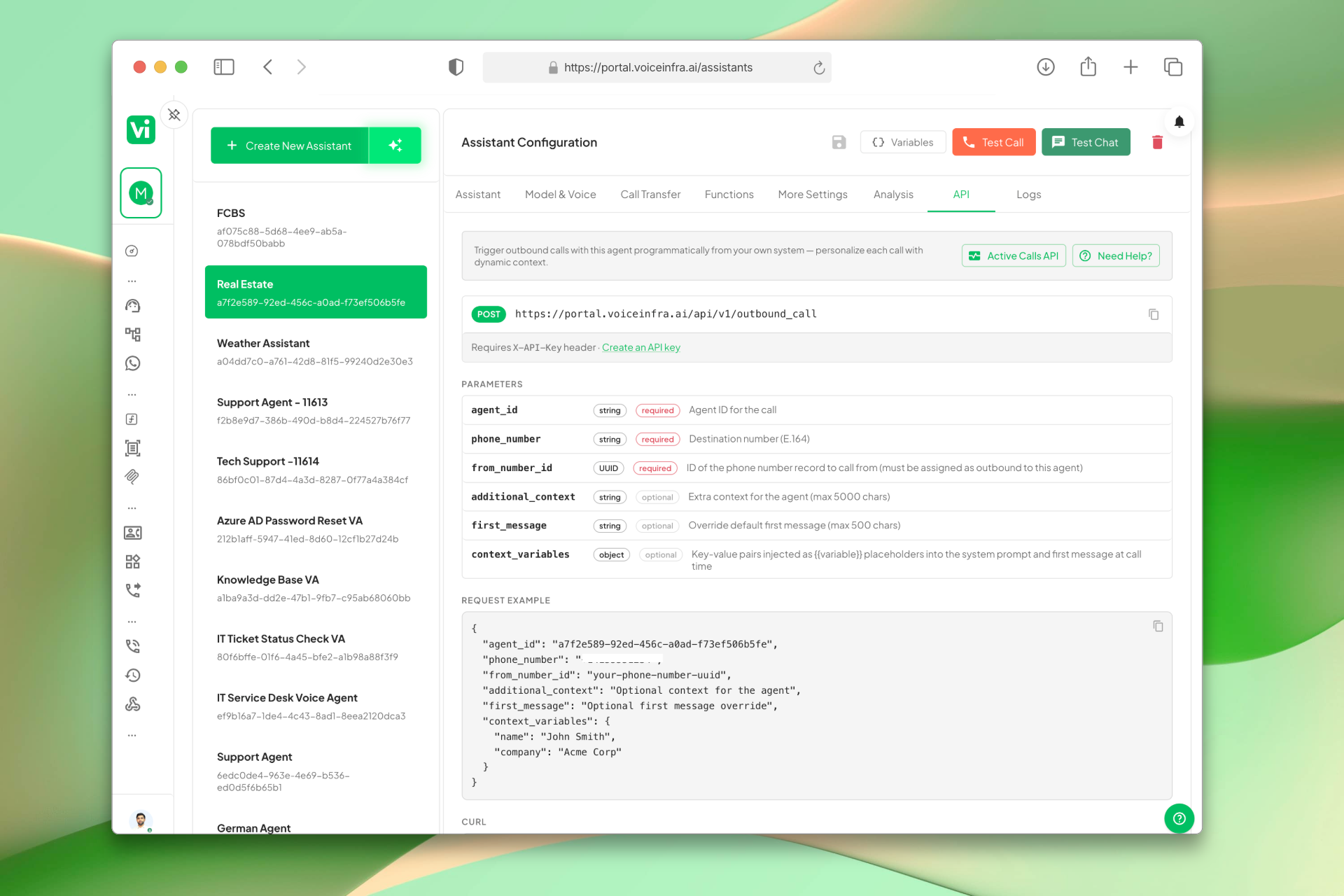
API Reference Built Into Your Assistant
Each assistant has a dedicated API tab showing the exact endpoint, required parameters, and a live request body example. Pass agent_id, destination number, optional context, a custom first message, and dynamic variables, all documented inline so you can start integrating without leaving the dashboard.
- Endpoint and parameters documented per assistant
- Required: agent_id, phone number, destination number
- Optional: first message, context, dynamic variables
- Live request body example ready to copy
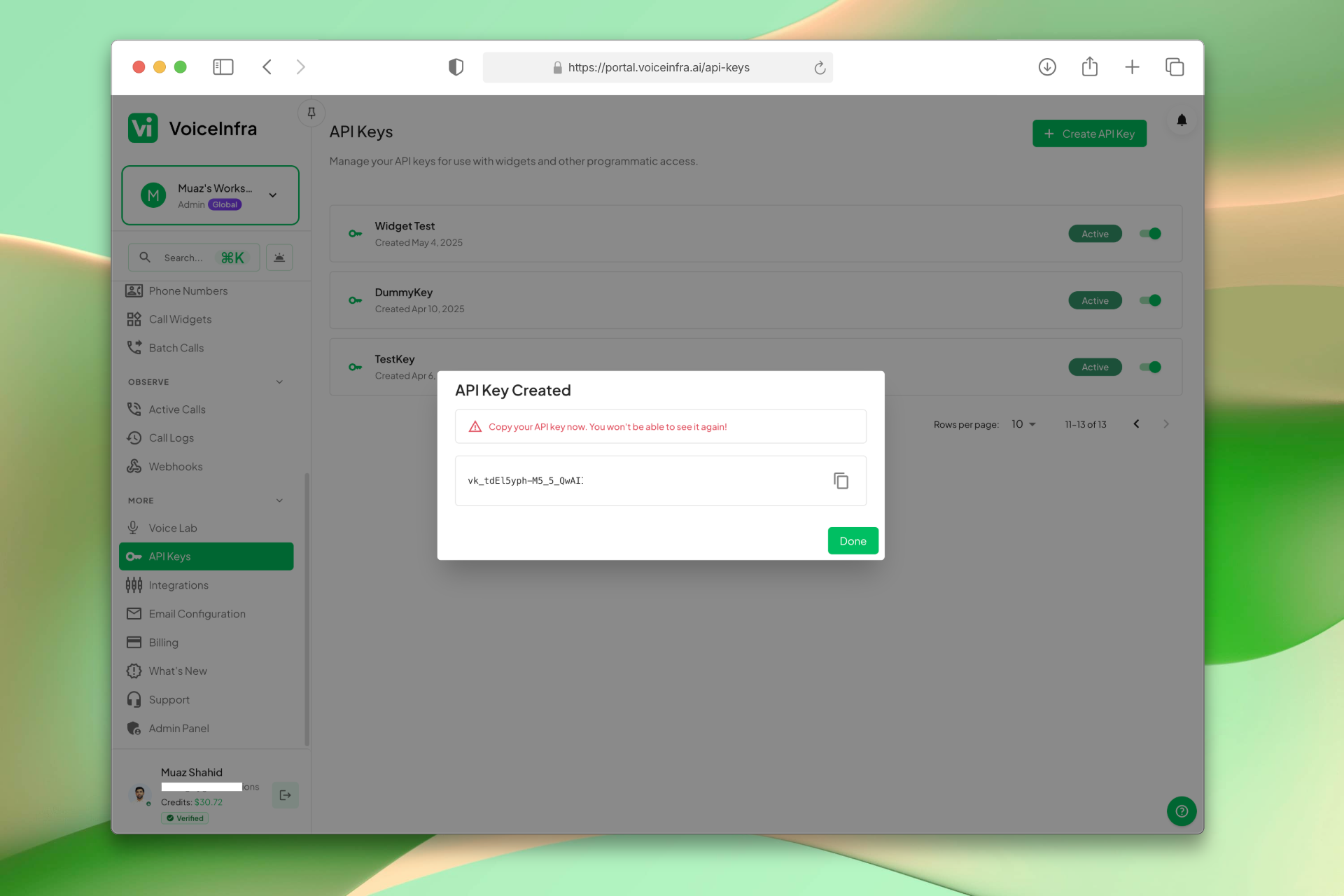
Generate & Manage API Keys
Create API keys from the API Keys dashboard to authenticate your outbound call requests. Each key is shown once on creation, copy it immediately. Manage multiple keys for different integrations and revoke access anytime.
- Create API keys in one click
- Key shown once, copy on creation
- Manage multiple keys per workspace
- Revoke access anytime
Transform Your Business
Discover the measurable impact and advantages that drive real business growth
Programmatically initiate calls from any system or application
Dynamically customize assistant behavior per call without creating multiple configurations
Integrate with existing CRM, automation, and workflow systems
Scale outbound communication through API automation
Maintain consistent assistant quality while enabling dynamic customization
Enterprise-grade authentication and error handling for production deployments
Industry Solutions
Discover how this feature powers tailored solutions across industries
AI Sales Automation 24/7 Lead Qualification & Outreach
Build a Voice AI agent for your sales team. Handle lead qualification, outreach campaigns, and appointment setting around the clock.
Explore SolutionAI Recruitment & Staffing Automation 24/7 Screening, Matching & Outreach
Build a Voice AI agent for your recruitment firm. Handle candidate screening, matching, and outreach campaigns around the clock.
Explore SolutionAI Insurance Automation 24/7 Lead Gen, Claims & Sales
Build a Voice AI agent for your insurance business. Handle lead generation, claims processing, and sales around the clock.
Explore SolutionSee How Our Customers Use This
Real businesses getting real results with this feature. Read their stories.
How a UAE Business Advisory Firm Automated Lead Follow-Up with AI Voice Agents
A UAE-based company formation and business advisory firm deployed multiple VoiceInfra AI agents to call social media leads instantly, with Zoho CRM integration triggering calls and updating lead records automatically
Read Success StoryHow a Spanish Telecom Operator Runs 500+ Daily Outbound AI Calls on Yeastar with 5 Languages
A CNMC-registered Spanish telecom operator deployed 10 VoiceInfra AI agents on Yeastar PBX, running 500+ outbound calls daily with 30%+ transfer rate across Spanish, Arabic, English, French, and Portuguese
Read Success StoryTechnical Specifications
Enterprise-grade infrastructure built for reliability and scale
REST API
Standard HTTP endpoints
Dynamic Config
Per-call customization
API Key Auth
Secure authentication
Instant Calls
Real-time call initiation
Frequently Asked Questions
Find answers to common questions about this feature
Continue Exploring VoiceInfra
Discover more ways VoiceInfra can transform your voice AI experience
MCP Server Integration
Extend your AI agents' capabilities by connecting to Model Context Protocol (MCP) servers. Define server names, URLs, timeouts, and authentication headers. Allow agents to access external databases, APIs, and custom tools securely during conversations.
Explore FeatureWhatsApp Business Voice
Enable voice calls on your WhatsApp Business number using SIP trunking. Customers call your WhatsApp number, and your AI agent answers with natural, conversational voice responses. Handle appointment bookings, order inquiries, support tickets, and more all through WhatsApp voice calls. No traditional phone lines needed. SIP-based architecture scales with your business.
Explore FeatureIntegrations & Provider API Keys
Manage your workspace integrations in one place. Connect Cal.com, Calendly, Google Workspace, and Microsoft 365 with one-click OAuth. Add your own API keys for 17+ AI providers including OpenAI, Anthropic, ElevenLabs, and Deepgram. Override platform defaults, control costs, and route usage to your own accounts.
Explore FeatureReady to transform your operations?
Schedule a demo to see how our solutions work for your industry.