Automated Post-Call Emails
Connect your email server and let AI send automated call summaries. SMTP, TLS/SSL security, and test emails included.
Stop manually sending follow-up emails after calls. Our Email Configuration feature automatically sends professional post-call summaries via email. Connect any SMTP server (Gmail, Outlook, SendGrid, AWS SES), configure sender details, and enable automated emails for every call. Complete with call recordings, transcripts, AI analysis, and next steps – all in a beautifully formatted email. Setup in 5 minutes. Impress customers forever.
What Makes This Feature Special
Discover the powerful capabilities that drive real business results
SMTP Server Integration
Connect any email provider: Gmail, Outlook, SendGrid, AWS SES, or custom SMTP. Multiple configurations for different purposes.
Flexible Security Options
STARTTLS (Port 587) recommended, SSL/TLS (Port 465) supported. Password encryption at rest (AES-256). Secure transmission.
Custom Sender Identity
From Name (company/brand), From Email (domain email), Reply-To support. Consistent professional branding across all emails.
Test Email Feature
Send test email before enabling. Instant success/failure feedback. Debug connection issues immediately. Verify formatting before customers see it.
Get started with this feature in a few simple steps
Everything you need to transform your voice operations from start to finish
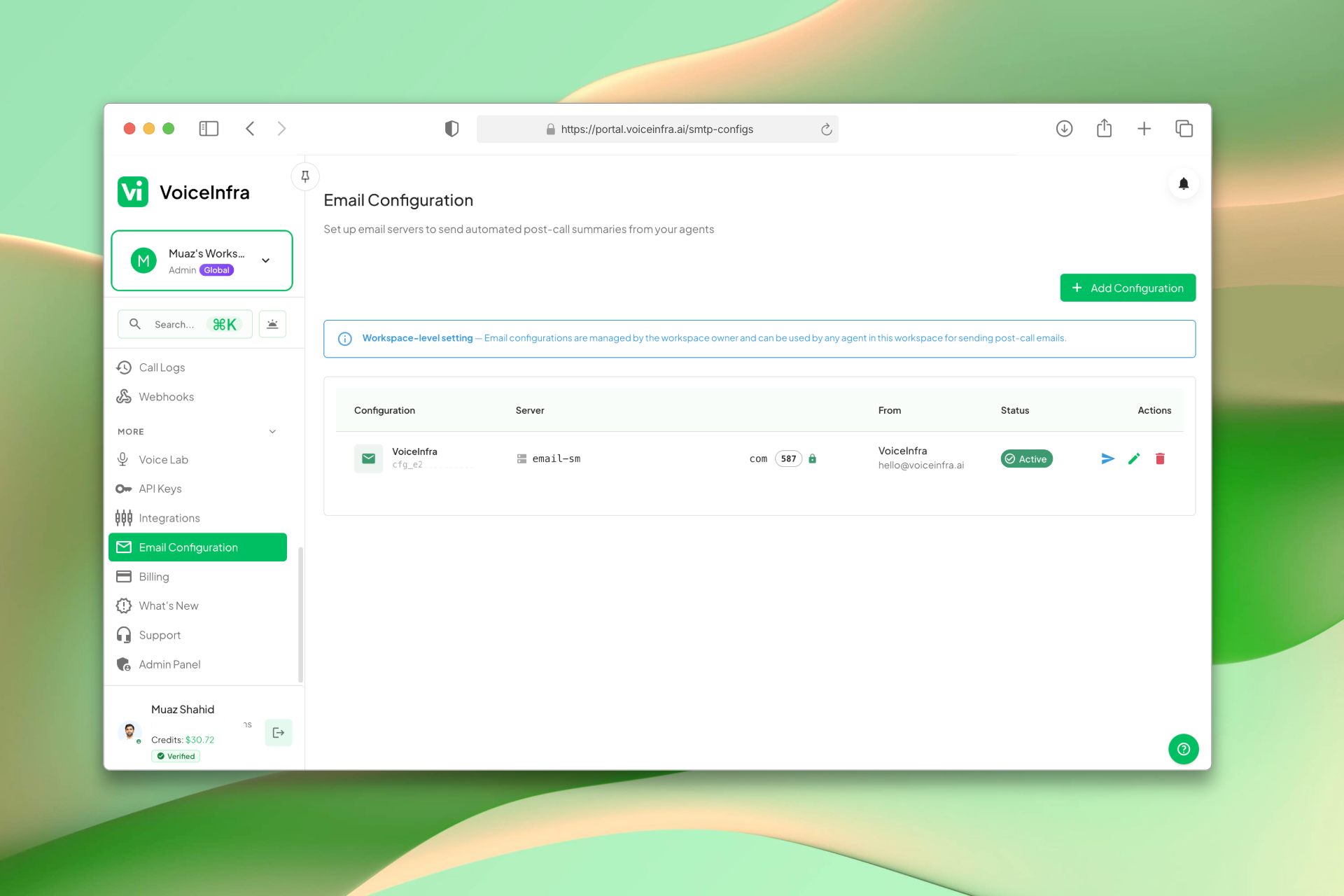
Manage Email Configurations
The Email Configuration dashboard lists all your SMTP setups in one place. See the server, sender identity, and active status for each config at a glance. Test any configuration directly from the list, toggle it on or off, or edit without disrupting active sending.
- All configs listed with server, from address, and status
- Test email directly from the list
- Toggle active/inactive without deleting
- Add multiple configs for different purposes
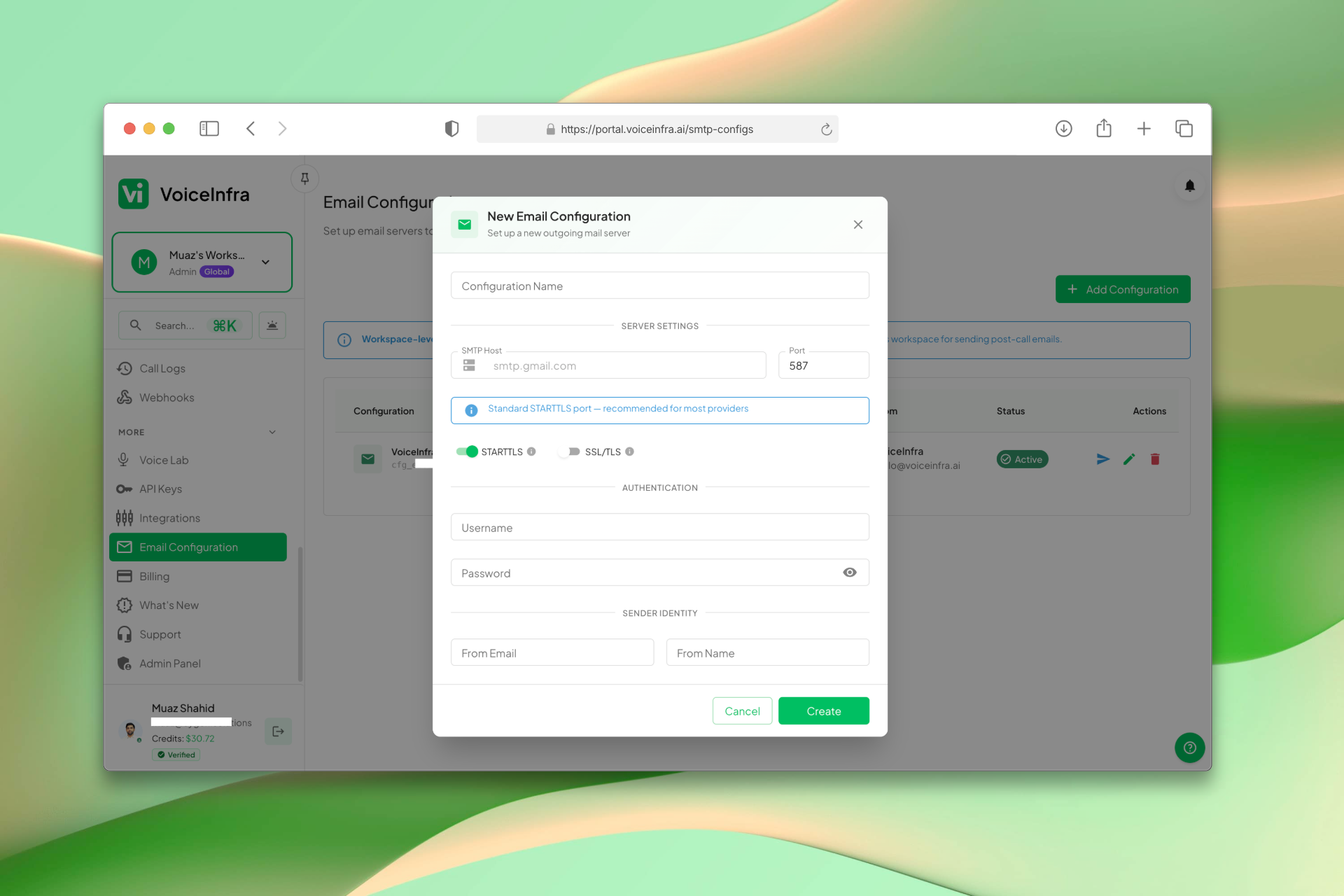
Add an SMTP Configuration
Enter your SMTP server host and port, choose STARTTLS or SSL/TLS security, add your username and password, and set the sender identity: from email and from name. Works with Gmail, Outlook, SendGrid, AWS SES, or any custom SMTP server.
- SMTP host, port, and security type
- STARTTLS (port 587) or SSL/TLS (port 465)
- Username, password, from email, and from name
- Compatible with Gmail, SendGrid, SES, and custom SMTP
Transform Your Business
Discover the measurable impact and advantages that drive real business growth
Professional customer experience – instant follow-up with call details
Team alignment – everyone gets same call summary
Compliance & records – every call documented and emailed
Zero manual work – AI handles call, writes summary, sends email
Connect any SMTP server in 5 minutes
Multiple configurations for different purposes
TLS/SSL encryption for security
Password encryption at rest (AES-256)
Test configuration before going live
Active/inactive toggle – pause without deleting
Workspace-level management – owner/admin only
Masked password display for security
Automatic retry on failed emails
Error logging for all failures
Industry Solutions
Discover how this feature powers tailored solutions across industries
AI Sales Automation 24/7 Lead Qualification & Outreach
Build a Voice AI agent for your sales team. Handle lead qualification, outreach campaigns, and appointment setting around the clock.
Explore SolutionAI Phone System for SaaS Companies 24/7 Customer Support & Technical Assistance
Build a Voice AI agent for your SaaS business. Handle customer support, technical troubleshooting, and onboarding around the clock.
Explore SolutionAI Mortgage & Commercial Lending 24/7 Automation
Build a Voice AI agent for your mortgage or lending business. Handle loan inquiries, application processing, and customer support around the clock.
Explore SolutionSee How Our Customers Use This
Real businesses getting real results with this feature. Read their stories.
How a UAE Business Advisory Firm Automated Lead Follow-Up with AI Voice Agents
A UAE-based company formation and business advisory firm deployed multiple VoiceInfra AI agents to call social media leads instantly, with Zoho CRM integration triggering calls and updating lead records automatically
Read Success StoryHow a Telecom MSP Replaced Their Customer Service Team with VoiceInfra AI Agents
A US-India telecom MSP replaced their human customer service with VoiceInfra AI agents that handle new leads, troubleshoot issues, report incidents, and transfer callers to the right extension
Read Success StoryStill have questions about Automated Post-Call Emails? Just ask.
The people who built this feature answer every question in plain English. Want to see it running on your own setup instead? Tick the box and we'll include a live demo.
- Answered by the people who built it
- Live demo on your setup, if you want one
- A reply within one business day
Technical Specifications
Enterprise-grade infrastructure built for reliability and scale
Any SMTP Server
Gmail, SendGrid, SES, etc.
TLS/SSL Encryption
STARTTLS or SSL/TLS
Custom Sender
From name and email
Test Feature
Verify before going live
Frequently Asked Questions
Find answers to common questions about this feature
Continue Exploring VoiceInfra
Discover more ways VoiceInfra can transform your voice AI experience
Call Analytics & Intelligence
Stop guessing about your voice operations. VoiceInfra's Enterprise Call Analytics transforms raw call data into actionable business intelligence, helping you reduce costs by 40%, improve customer satisfaction, and scale operations with confidence. Built for enterprises that prioritize operational excellence and competitive advantage.
Explore FeatureTelnyx Number Import
Import your Telnyx phone numbers directly into our platform. Provide your Telnyx API v2 key (starts with KEY), browse your available numbers, and import them with one click. Manage calls, messages, and AI agents without changing your existing Telnyx setup or billing.
Explore FeatureCustom Functions & API Endpoints
Extend your AI agents' capabilities by configuring custom REST functions. Define function names, request types (GET, POST, etc.), endpoints, and authentication headers. Allow agents to fetch data, trigger actions, and interact with your systems dynamically during conversations.
Explore FeatureReady to transform your operations?
Contact our sales team to see how the platform works for your industry.