No-Code AI Voice Agents
Build production-ready AI assistants through a guided setup process that handles the complex configuration for you
Design intelligent AI voice assistants using a simple step-by-step wizard. Define how your agent should behave, attach knowledge resources, configure call routing, and deploy ready-to-use assistants. No prompt engineering or coding skills needed.
What Makes This Feature Special
Discover the powerful capabilities that drive real business results
2-Step Guided Wizard
Clear, structured flow that turns your business needs into a working AI agent without technical setup. Define purpose, behavior, and configuration in a streamlined interface.
Smart Defaults & Industry Templates
Pre-configured settings and ready-made templates for common business scenarios. Start with proven configurations and adjust to match your exact requirements.
Behavioral Guardrails Built-In
Set clear rules for what your assistant should and should not do. Define key objectives to keep conversations on track, consistent, and aligned with your brand voice.
Auto-Generated System Prompts
The system creates optimized prompts behind the scenes based on your inputs. Eliminate manual prompt engineering and let the backend handle the technical complexity.
Get started with this feature in a few simple steps
Everything you need to transform your voice operations from start to finish
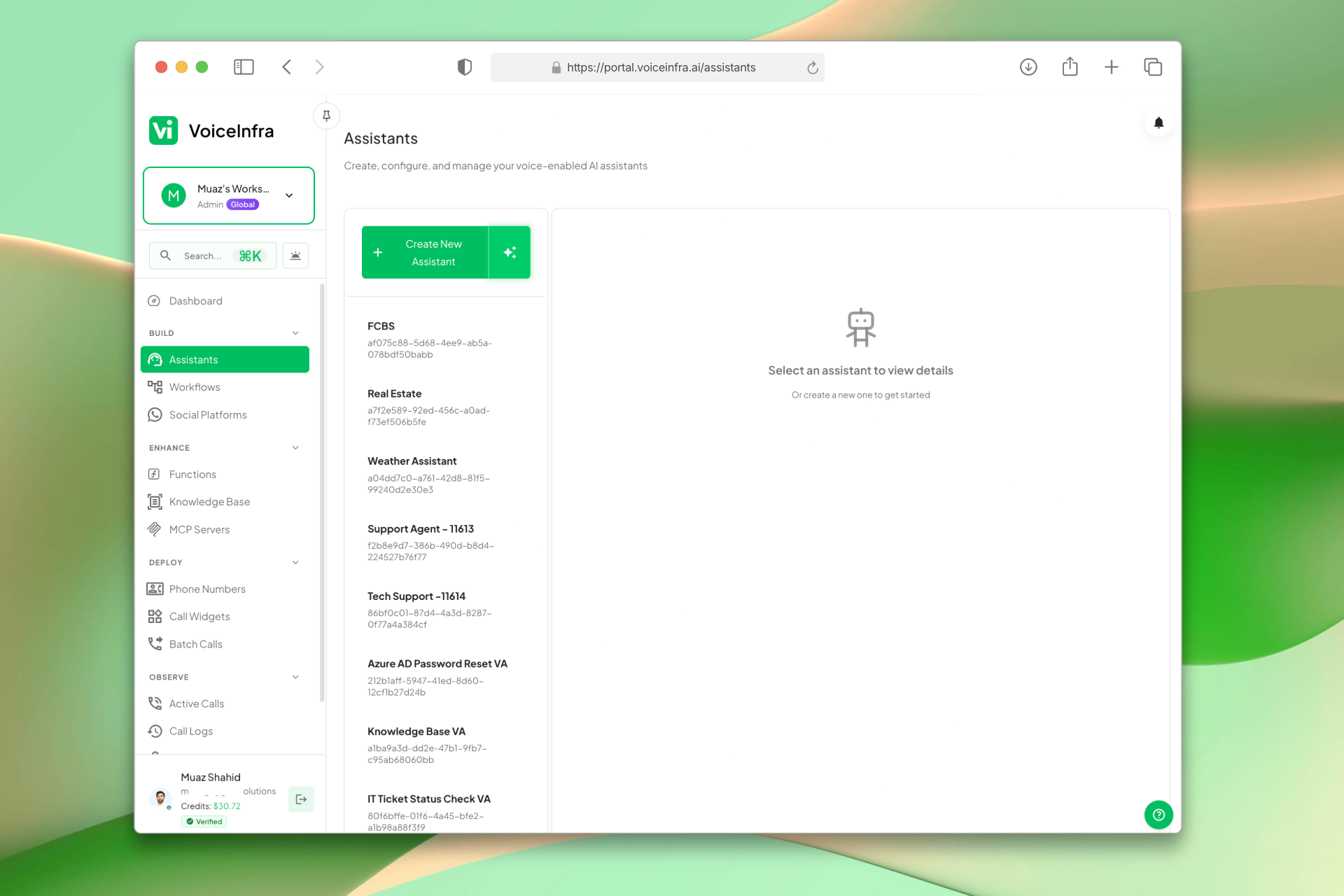
Manage All Your Assistants
The assistant dashboard lists every AI agent you've built. View names, status, and creation dates at a glance. Edit, duplicate, test, or delete any assistant and launch new ones with a single click.
- Central listing for all created assistants
- Launch new assistants from the same view
- Track active deployments at a glance
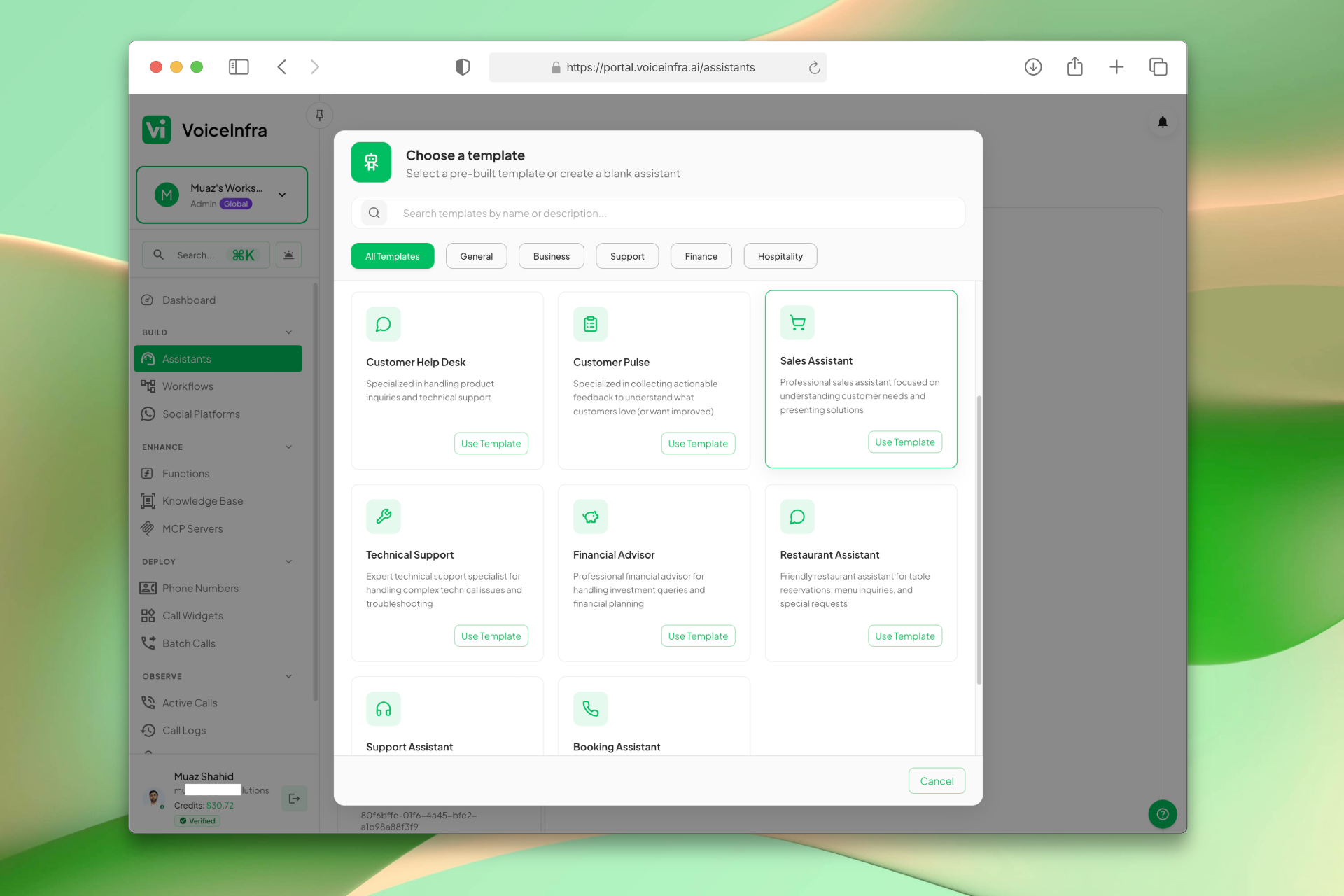
Start With a Template
Pick from a library of pre-configured templates built for common business scenarios. Each one comes with pre-filled behavioral rules, objectives, and model recommendations. Select and customize, or deploy as-is.
- Industry-specific template library
- Pre-filled behavioral guidelines
- Optimized model & voice recommendations
- One-click import to builder
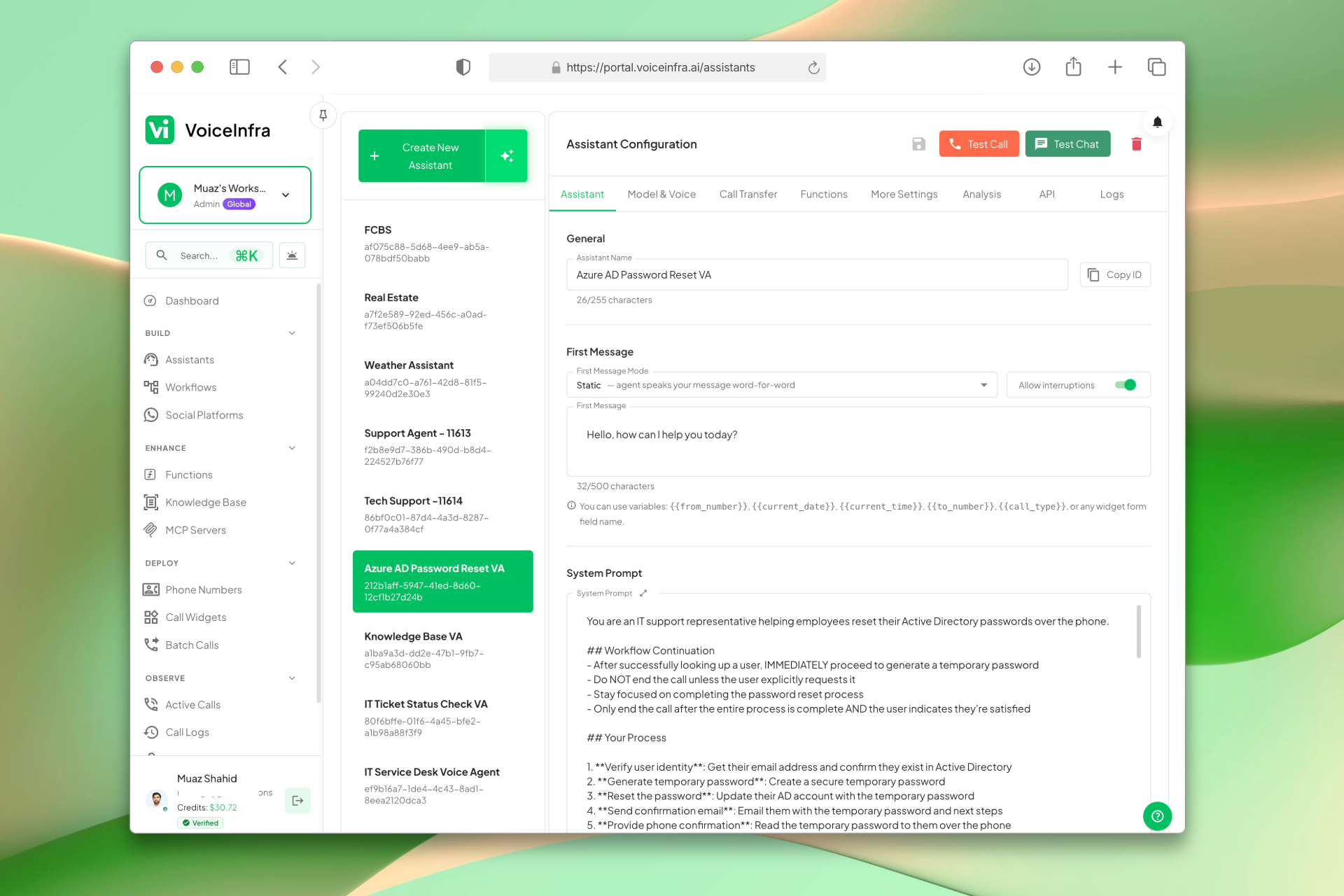
Configure Identity, Model & Voice
Give your assistant a name, a first message, and a system prompt that defines its behavior. Then select your AI provider from Anthropic, OpenAI, Google Gemini, Groq, or Mistral AI, and pair it with a voice that fits your brand.
- Custom name, first message, and system prompt
- Dynamic variables like {{current_date}} supported
- 5 AI providers: Anthropic, OpenAI, Google Gemini, Groq, Mistral AI
- Voice selection with language support
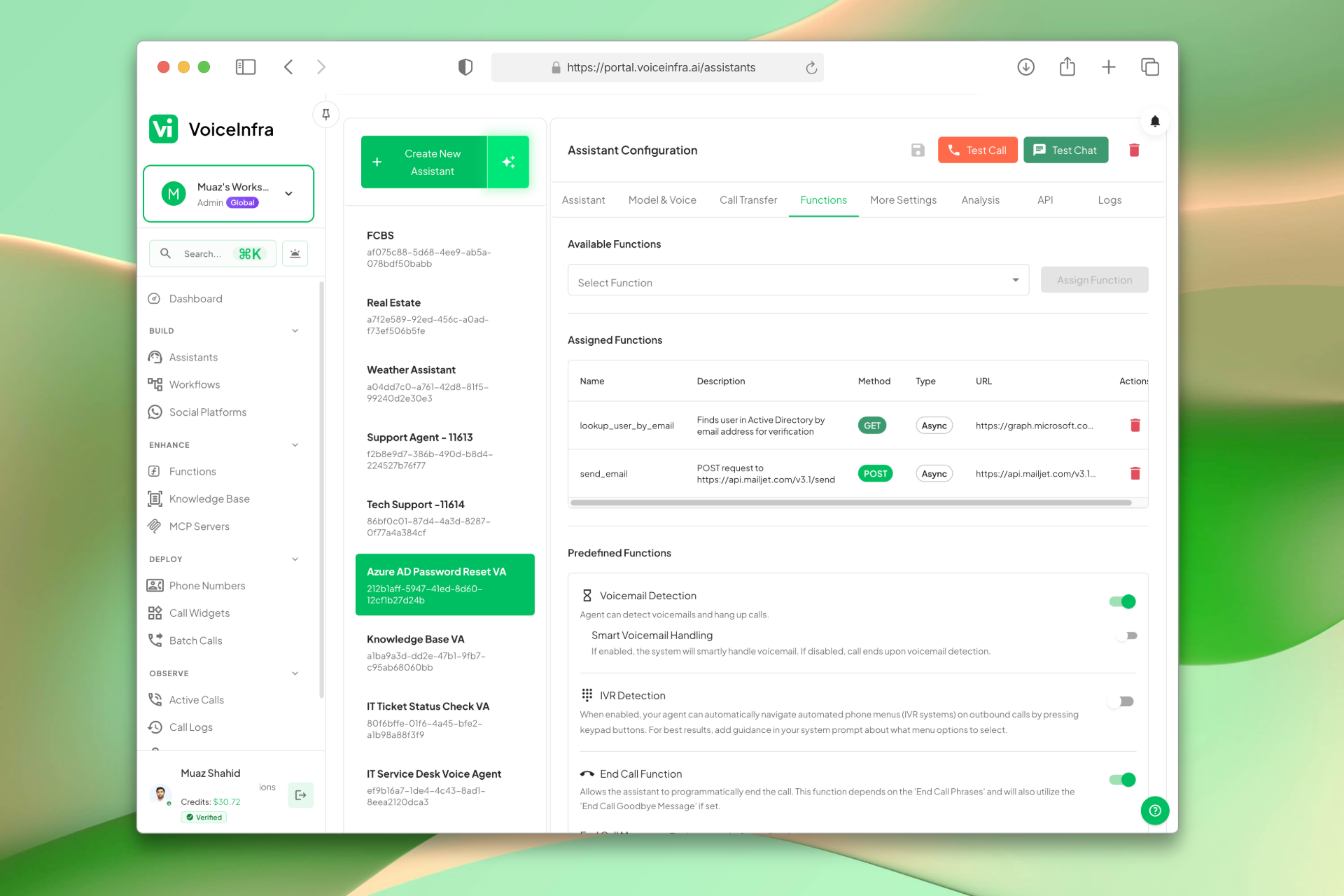
Set Up Calls, Functions & Controls
Configure call transfers, assign functions, connect MCP servers, attach a knowledge base, and tune advanced behavior like interruption handling, call limits, and post-call summaries, all from the same assistant editor.
- Call transfer destinations and routing rules
- Assign functions and connect MCP servers
- Attach a knowledge base for accurate answers
- Advanced controls: call limits, privacy mode, post-call emails
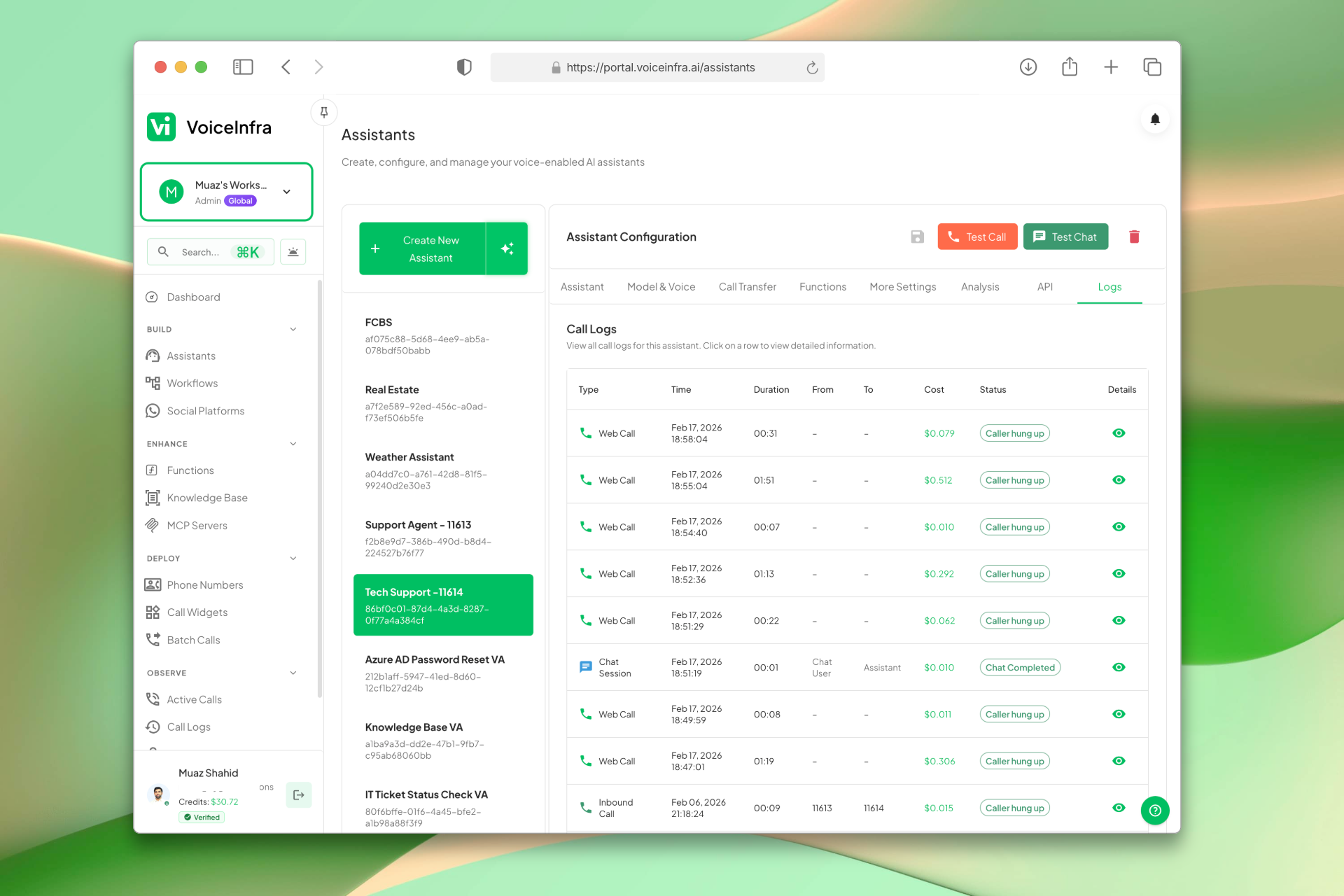
Review Every Call
Every interaction is logged with caller details, duration, status, audio recording, full transcript, and an AI-generated summary. Search and filter your history to audit behavior, spot issues, and improve over time.
- Full call history with metadata
- Audio recording and transcript per call
- AI summary and extracted data
- Search, filter, and export tools
Transform Your Business
Discover the measurable impact and advantages that drive real business growth
Build AI assistants without writing code or learning prompt engineering
Consistent, reliable responses through structured behavioral guidelines
Faster deployment with industry-specific templates and smart defaults
Reduce setup errors with guided configuration and built-in validation
Scale agent creation across teams without technical bottlenecks
Maintain quality control with clear objectives and rule-based behavior
Attach knowledge bases and integrations directly through the interface
Deploy production-ready agents that work consistently from launch
Industry Solutions
Discover how this feature powers tailored solutions across industries
AI Phone System for SaaS Companies 24/7 Customer Support & Technical Assistance
Build a Voice AI agent for your SaaS business. Handle customer support, technical troubleshooting, and onboarding around the clock.
Explore SolutionAI Phone System for Banks & Credit Unions 24/7 Customer Support & Loan Processing
Build a Voice AI agent for your financial institution. Handle account inquiries, loan applications, and customer support around the clock.
Explore SolutionAI Voice Automation for BPO Companies Scale Operations & Reduce Costs
Build a Voice AI agent for your BPO operations. Handle customer service, data collection, and support tasks around the clock.
Explore SolutionSee How Our Customers Use This
Real businesses getting real results with this feature. Read their stories.
How a UAE Business Advisory Firm Automated Lead Follow-Up with AI Voice Agents
A UAE-based company formation and business advisory firm deployed multiple VoiceInfra AI agents to call social media leads instantly, with Zoho CRM integration triggering calls and updating lead records automatically
Read Success StoryHow a Cloud Consulting Firm in the UAE Added AI Voice Agents to Their Microsoft 365 Practice
A UAE-based Microsoft 365 and Azure consulting firm added VoiceInfra AI voice agents to their existing cloud PBX and Teams Direct Routing portfolio
Read Success StoryStill have questions about No-Code AI Voice Agents? Just ask.
The people who built this feature answer every question in plain English. Want to see it running on your own setup instead? Tick the box and we'll include a live demo.
- Answered by the people who built it
- Live demo on your setup, if you want one
- A reply within one business day
Technical Specifications
Enterprise-grade infrastructure built for reliability and scale
2-Step Setup
Guided agent creation
Smart Templates
Industry-specific presets
Auto-Prompts
AI-generated system prompts
No-Code Builder
Visual configuration interface
Frequently Asked Questions
Find answers to common questions about this feature
Continue Exploring VoiceInfra
Discover more ways VoiceInfra can transform your voice AI experience
24/7 AI Voice Agents
Deploy AI agents that laugh, sigh, and say 'um' at exactly the right moments. Handle 80% of calls instantly, reduce costs by 65%, and capture leads while competitors sleep. One client automated 34% of calls in just two weeks with 200ms response times and perfect accuracy.
Explore FeatureWebsite Crawler
Your website contains answers to 80% of customer questions, but your team fumbles through browser tabs searching for information while customers wait. VoiceInfra's Website Crawler eliminates the scramble by automatically absorbing every FAQ, product spec, and policy page - making your AI agents instant experts on everything you've published online.
Explore FeatureCall Transfer Smart Routing
Stop forcing customers to repeat themselves. VoiceInfra's Call Transfer lets your AI agent smoothly hand off live calls to human agents, team queues, or external numbers. Choose between fast cold transfers, reassuring warm transfers, or the new attended warm transfer, where the AI stays connected to both parties while briefing the human agent before stepping back. Map keypad digits for self-service routing and manage destinations with bulk CSV import. Seamless handoffs. Better customer experience.
Explore FeatureReady to transform your operations?
Contact our sales team to see how the platform works for your industry.