MCP Server Integration
Connect voice agents to external tools, databases, and APIs using Model Context Protocol for seamless data access.
Extend your AI agents' capabilities by connecting to Model Context Protocol (MCP) servers. Define server names, URLs, timeouts, and authentication headers. Allow agents to access external databases, APIs, and custom tools securely during conversations.
What Makes This Feature Special
Discover the powerful capabilities that drive real business results
Model Context Protocol Support
Connect agents to external tools and data sources using the standard MCP protocol. Enable real-time information retrieval and action triggering.
Flexible Server Configuration
Define server name, URL, and timeout settings. Customize how agents interact with your infrastructure for optimal performance and reliability.
Secure Header Authentication
Add custom HTTP headers for authentication. Keep your MCP connections secure and authorized. Headers are encrypted and stored safely.
Real-time Tool Access
Agents can call external tools instantly. Fetch data, trigger actions, and provide accurate responses based on live information from your systems.
Get started with this feature in a few simple steps
Everything you need to transform your voice operations from start to finish
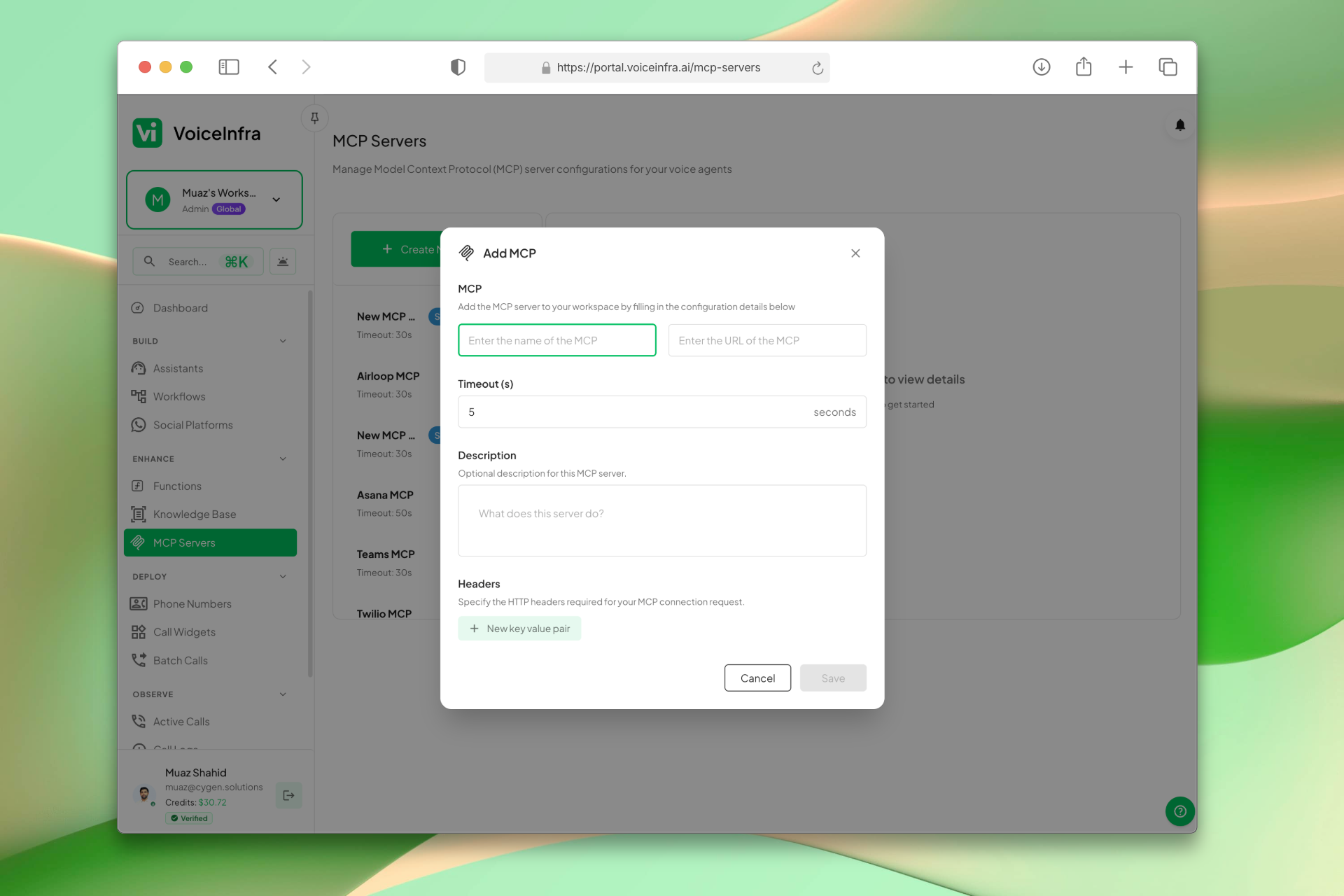
Add & Configure an MCP Server
Click Add MCP and fill in the server name, URL, timeout, and an optional description. Add custom HTTP headers for authentication; each header is stored encrypted and sent only to your specified endpoint. Save and the server is immediately available to assign to any AI agent.
- Server name, URL, and timeout in one form
- Adjustable timeout (default 5s, max 600s)
- Custom HTTP headers for authentication
- Available for agent assignment immediately after saving
Transform Your Business
Discover the measurable impact and advantages that drive real business growth
Extend agent capabilities with external tools
Secure connection via custom headers
Configurable timeouts for reliability
Easy management from dashboard
Standard MCP protocol support
Real-time data retrieval
Action triggering
Unlimited server configurations
Industry Solutions
Discover how this feature powers tailored solutions across industries
AI Tech Startup, Software & Cloud Automation 24/7 Support & Sales
Build a Voice AI agent for your tech company. Handle support tickets, sales inquiries, and customer onboarding around the clock.
Explore SolutionAI Phone System for Engineering & IT Consulting 24/7 Project Support & Lead Qualification
Build a Voice AI agent for your engineering or IT consulting firm. Handle project inquiries, technical support, and lead qualification around the clock.
Explore SolutionAI Phone System for SaaS Companies 24/7 Customer Support & Technical Assistance
Build a Voice AI agent for your SaaS business. Handle customer support, technical troubleshooting, and onboarding around the clock.
Explore SolutionSee How Our Customers Use This
Real businesses getting real results with this feature. Read their stories.
How a UAE Business Advisory Firm Automated Lead Follow-Up with AI Voice Agents
A UAE-based company formation and business advisory firm deployed multiple VoiceInfra AI agents to call social media leads instantly, with Zoho CRM integration triggering calls and updating lead records automatically
Read Success StoryHow an AI-Native Dubai Real Estate Brokerage Runs 5 Voice AI Agents on Yeastar and Zoho CRM
An AI-native real estate brokerage in Dubai built 5 autonomous AI voice agents for lead generation, follow-up, marketing lead qualification, property portal inquiry matching, and recruitment
Read Success StoryStill have questions about MCP Server Integration? Just ask.
The people who built this feature answer every question in plain English. Want to see it running on your own setup instead? Tick the box and we'll include a live demo.
- Answered by the people who built it
- Live demo on your setup, if you want one
- A reply within one business day
Technical Specifications
Enterprise-grade infrastructure built for reliability and scale
MCP Protocol
Standard tool integration
Custom URL
Connect to any endpoint
Timeout Config
Adjustable wait time
Secure Auth
Encrypted headers
Frequently Asked Questions
Find answers to common questions about this feature
Continue Exploring VoiceInfra
Discover more ways VoiceInfra can transform your voice AI experience
Custom AI Voice Cloning
Centralize your voice cloning workflow in one dashboard. Create custom voice profiles, link them to provider accounts, configure language settings, and assign them directly to your AI assistants. No technical setup required.
Explore FeatureSIP Integration & Numbers
Manage your telephony infrastructure and AI routing in one place. Import existing numbers from Twilio or Telnyx, provision new SIP numbers directly, or configure custom SIP trunks for any provider. Set up inbound/outbound routing, secure authentication, transport protocols, and assign AI agents to handle calls automatically. No vendor lock-in, no rip-and-replace.
Explore FeatureWhatsApp Business Voice
Enable voice calls on your WhatsApp Business number using SIP trunking. Customers call your WhatsApp number, and your AI agent answers with natural, conversational voice responses. Handle appointment bookings, order inquiries, support tickets, and more all through WhatsApp voice calls. No traditional phone lines needed. SIP-based architecture scales with your business.
Explore FeatureReady to transform your operations?
Contact our sales team to see how the platform works for your industry.