Multilingual 30+ Languages
Communicate globally with 30+ languages and top transcription providers. Accurate, real-time understanding in any accent.
Break language barriers with AI that understands 30+ languages instantly. VoiceInfra connects you to leading transcription engines (ElevenLabs, OpenAI, Cartesia, Deepgram, Groq, Speechmatics, Hamsa) so you get the best accuracy for every accent and dialect. Your agents respond naturally, no matter where your customers call from.
What Makes This Feature Special
Discover the powerful capabilities that drive real business results
30+ Languages, One Platform
Reach customers in English, Spanish, French, German, Hindi, Arabic, and 25+ more. Your AI agents detect the language automatically and switch seamlessly without human intervention.
Top Transcription Providers
Connect Deepgram, OpenAI, Cartesia, ElevenLabs, Groq, Speechmatics, and Hamsa. Pick the provider that offers the best accuracy for your specific region or industry jargon.
Real-Time Accent Recognition
Struggle with thick accents or regional dialects? Our transcription models are trained to understand diverse speech patterns, ensuring your agent never misses a beat.
Zero Language Barriers
Expand your business globally without hiring multilingual staff. One AI agent handles calls from New York, London, Mumbai, and Dubai with equal proficiency.
Switch Language Mid-Sentence
Auto Language Switching is a system tool you switch on per agent. The agent opens in its transcription language and switches the moment the caller speaks another language or asks to switch, mid-conversation, without dropping the thread or restarting the call, and without a menu.
A Voice Chosen Per Language
Decide which languages the agent is allowed to switch into. The list comes from your transcription provider's supported set, and each language gets its own voice picked from your text-to-speech provider, or you can leave a language on the agent's default voice.
Get started with this feature in a few simple steps
Everything you need to transform your voice operations from start to finish
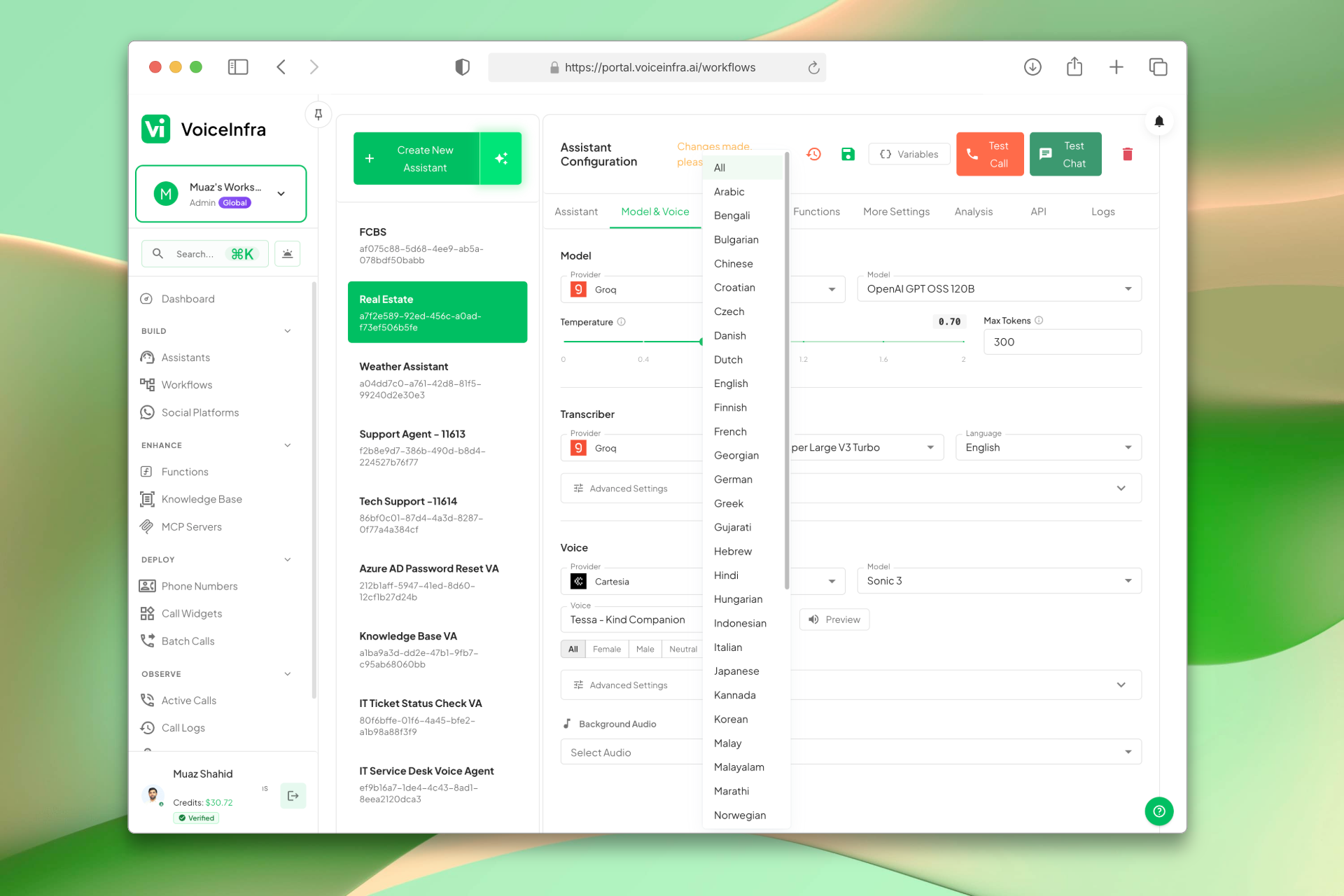
Select the Language for Your Agent
Set the language your AI agent speaks directly in the assistant configuration. Choose from 30+ supported languages so your agent responds naturally to callers from any region.
- 30+ languages including English, Spanish, French, German, Hindi, Arabic
- Set per assistant, different agents for different regions
- Agent responds in the configured language automatically
- No extra setup or code required
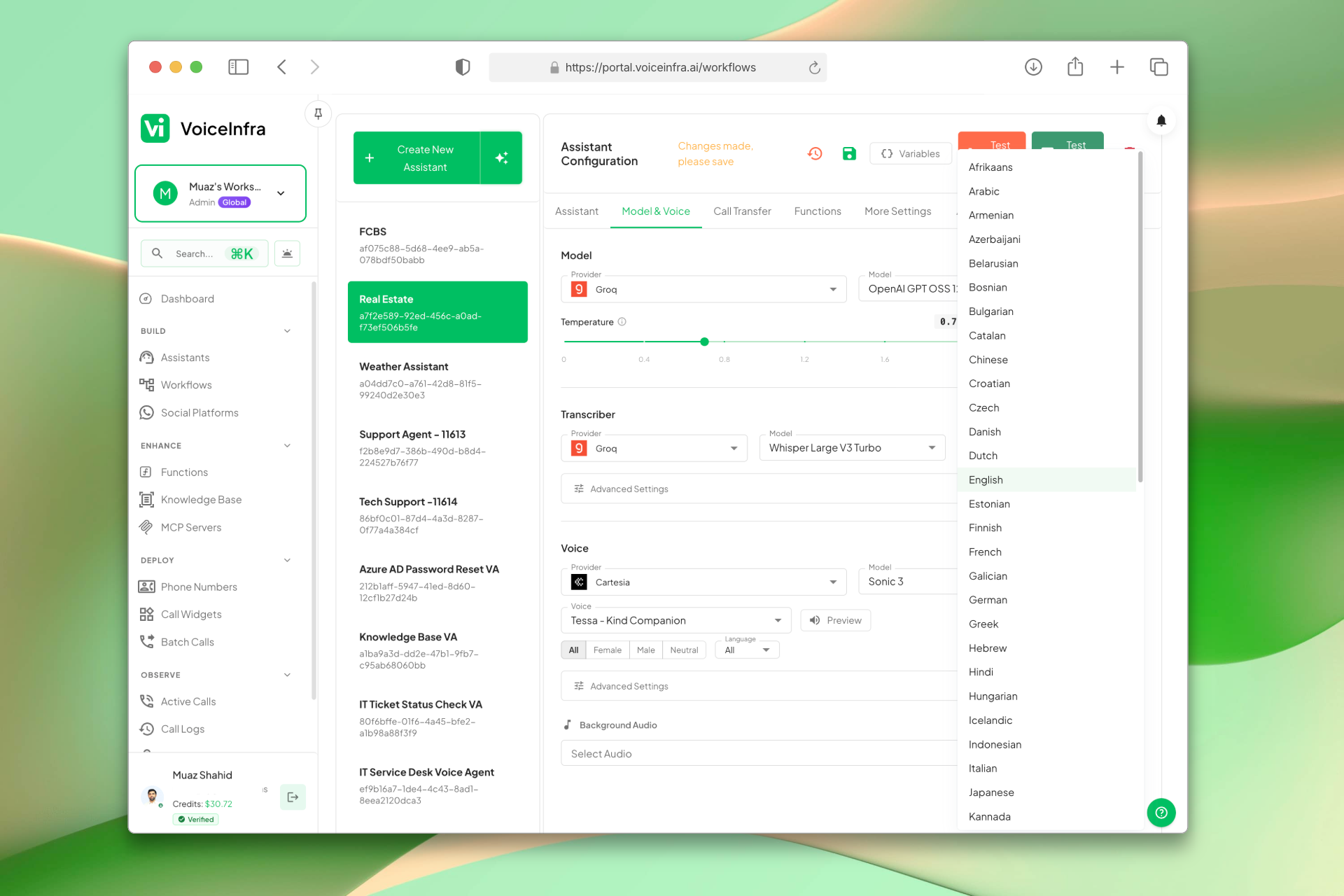
Choose Your Transcription Provider
Pick the transcription engine that gives you the best accuracy for your region and use case. Connect Deepgram, OpenAI, Groq, Speechmatics, Hamsa, or others, each with different strengths for languages, accents, and industry terms.
- Deepgram, OpenAI, Groq, Speechmatics, Hamsa and more
- Pick the best provider per agent or language
- High accuracy across accents and dialects
- API key setup in minutes
Transform Your Business
Discover the measurable impact and advantages that drive real business growth
Expand to international markets instantly without new hires
Reduce miscommunication with high-accuracy transcription
Choose the best provider for specific languages or accents
Natural, native-sounding conversations build trust
Automatic language detection saves setup time
Switch language mid-sentence without restarting the call
Choose which languages the agent may switch into
Assign a distinct voice to each language
Consistent quality across all regions
Lower costs compared to multilingual human teams
24/7 support in any language
Industry Solutions
Discover how this feature powers tailored solutions across industries
AI Phone System for Multilingual Call Centers 24/7 Global Customer Support
Build a Voice AI agent for your multilingual call center. Handle support in 30+ languages around the clock.
Explore SolutionAI-Powered Contact Center Automation Build Custom Voice AI Agents
Build a Voice AI agent for your contact center. Reduce costs by 40-60% while delivering superior customer experience.
Explore SolutionAI Voice Automation for BPO Companies Scale Operations & Reduce Costs
Build a Voice AI agent for your BPO operations. Handle customer service, data collection, and support tasks around the clock.
Explore SolutionSee How Our Customers Use This
Real businesses getting real results with this feature. Read their stories.
How a Spanish Telecom Operator Runs 500+ Daily Outbound AI Calls on Yeastar with 5 Languages
A CNMC-registered Spanish telecom operator deployed 10 VoiceInfra AI agents on Yeastar PBX, running 500+ outbound calls daily with 30%+ transfer rate across Spanish, Arabic, English, French, and Portuguese
Read Success StoryHow a Turkish Industrial Trading Company Deployed VoiceInfra AI Agents on Sentral PBX Across Turkey, USA, and Germany
A Bursa-based industrial spare parts trading company deployed a VoiceInfra AI agent on Sentral PBX to handle inbound inquiries, product requests, and technical documentation calls across Turkey, USA, and Germany
Read Success StoryStill have questions about Multilingual 30+ Languages? Just ask.
The people who built this feature answer every question in plain English. Want to see it running on your own setup instead? Tick the box and we'll include a live demo.
- Answered by the people who built it
- Live demo on your setup, if you want one
- A reply within one business day
Technical Specifications
Enterprise-grade infrastructure built for reliability and scale
30+ Languages
Global coverage
7 Providers
Deepgram, OpenAI, Hamsa, Groq & more
Real-Time
Instant transcription
Accent Support
Regional dialects
Frequently Asked Questions
Find answers to common questions about this feature
Continue Exploring VoiceInfra
Discover more ways VoiceInfra can transform your voice AI experience
No-Code AI Voice Agents
Design intelligent AI voice assistants using a simple step-by-step wizard. Define how your agent should behave, attach knowledge resources, configure call routing, and deploy ready-to-use assistants. No prompt engineering or coding skills needed.
Explore FeatureVisual Workflow AI Agents
VoiceInfra's Workflow-Based Agents transform simple voice bots into intelligent conversation orchestrators. Design complex conversation paths with visual workflow builder, create smart node systems, enable dynamic routing based on customer responses. Stop writing complex conversation logic by hand. Visual simplicity. Unlimited complexity. Zero coding.
Explore FeatureCall Analytics & Intelligence
Stop guessing about your voice operations. VoiceInfra's Enterprise Call Analytics transforms raw call data into actionable business intelligence, helping you reduce costs by 40%, improve customer satisfaction, and scale operations with confidence. Built for enterprises that prioritize operational excellence and competitive advantage.
Explore FeatureReady to transform your operations?
Contact our sales team to see how the platform works for your industry.