PBX Extensions & SIP Config
Register your PBX extensions securely. Enter SIP credentials, configure call directions, and connect your phone system to AI agents.
Configure new extensions for your PBX system with SIP registration. Provide your PBX domain, SIP username & password, and set call directions. Advanced settings let you customize proxies, transport protocols, and system names. Whitelist our IP to ensure reliable SIP traffic and start automating calls with AI.
What Makes This Feature Special
Discover the powerful capabilities that drive real business results
Extension Details Setup
Create human-readable display names, assign unique extension numbers, and select call directions (inbound/outbound). Keep your phone system organized.
Secure SIP Registration
Connect using your PBX domain, SIP username, and password. Credentials are encrypted and used only for SIP registration with your PBX.
Firewall Whitelisting
Whitelist IP 51.81.221.91 in your PBX firewall. This ensures SIP traffic flows correctly between your PBX and our servers for reliable connectivity.
Advanced SIP Settings
Configure SIP proxies, registration proxies, and transport protocols (TCP/UDP/TLS). Use these for complex PBX environments that require specific routing.
Get started with this feature in a few simple steps
Everything you need to transform your voice operations from start to finish
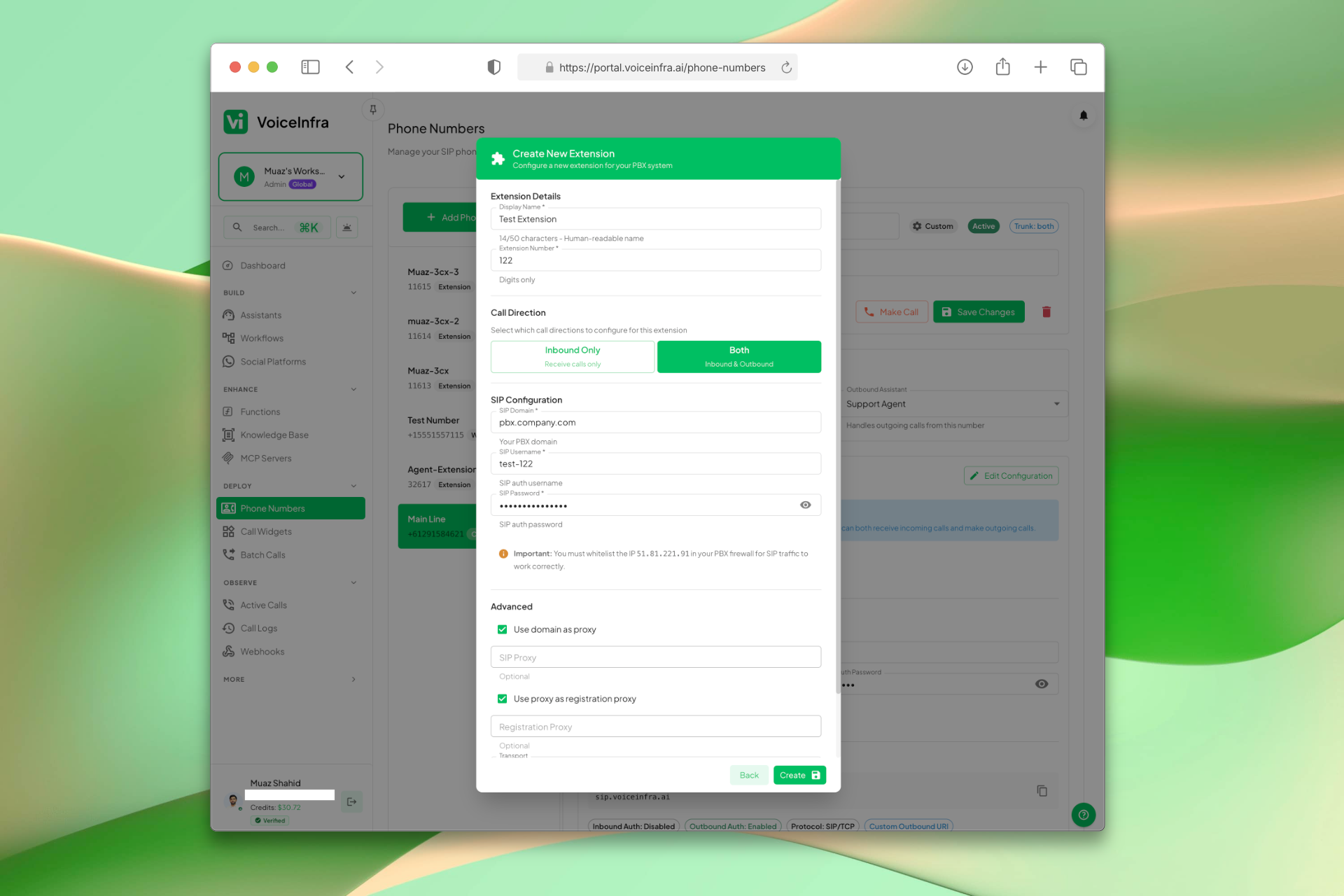
Create & Configure a PBX Extension
Fill in the extension details, SIP credentials, and call direction in one form. Set a display name and extension number, enter your PBX domain, SIP username and password, and choose inbound or outbound. Advanced options let you configure proxies and transport protocols for complex network setups. Whitelist IP 51.81.221.91 in your PBX firewall to ensure SIP traffic flows correctly.
- Display name, extension number, and call direction
- PBX domain, SIP username and password
- Whitelist IP 51.81.221.91 for SIP traffic
- Advanced proxy and transport settings (TCP/UDP/TLS)
Transform Your Business
Discover the measurable impact and advantages that drive real business growth
Register unlimited PBX extensions
Secure SIP credential storage
Flexible call direction configuration
Advanced proxy & transport settings
Firewall whitelisting for security
Human-readable extension names
Digits-only extension numbers
Ready for AI agent assignment after registration
Industry Solutions
Discover how this feature powers tailored solutions across industries
AI-Powered Contact Center Automation Build Custom Voice AI Agents
Build a Voice AI agent for your contact center. Reduce costs by 40-60% while delivering superior customer experience.
Explore SolutionAI Hotels, B & Bs & Call Centers 24/7 Bookings & Guest Support
Build a Voice AI agent for your hotel or B&B. Handle bookings, guest inquiries, and call center support around the clock.
Explore SolutionAI Phone System for Plumbers 24/7 Emergency Call Handling & Scheduling
Build a Voice AI agent for your plumbing business. Handle emergency calls, service scheduling, and customer inquiries around the clock.
Explore SolutionSee How Our Customers Use This
Real businesses getting real results with this feature. Read their stories.
How an Australian Telecom MSP Added AI Voice Agents to Their Hosted PBX Portfolio
A telecom and managed IT provider in Australia uses VoiceInfra AI agents on Yeastar for their own reception and resells AI voice services to their customers across real estate, healthcare, accounting, education, and logistics
Read Success StoryHow a 30-Year Telecom MSP in Sydney Resells AI Voice Agents on Enreach
A Sydney-based telecom and IT solutions provider with 30+ years of experience resells VoiceInfra AI voice agents on Enreach to their business customers across legal, asset management, and professional services
Read Success StoryHow a London Plumbing & Heating Company Deployed a VoiceInfra AI Agent on Yeastar P-Series for Out-of-Hours Call Handling
A London-based plumbing and heating company deployed a VoiceInfra AI agent on their Yeastar P-series PBX to handle emergency and out-of-hours calls, ensuring no customer goes unanswered after business hours
Read Success StoryStill have questions about PBX Extensions & SIP Config? Just ask.
The people who built this feature answer every question in plain English. Want to see it running on your own setup instead? Tick the box and we'll include a live demo.
- Answered by the people who built it
- Live demo on your setup, if you want one
- A reply within one business day
Technical Specifications
Enterprise-grade infrastructure built for reliability and scale
Secure SIP Auth
Encrypted username & password
Firewall Whitelist
IP 51.81.221.91 required
Advanced Proxies
Custom SIP & registration proxies
Transport Options
TCP, UDP, TLS support
Frequently Asked Questions
Find answers to common questions about this feature
Continue Exploring VoiceInfra
Discover more ways VoiceInfra can transform your voice AI experience
Twilio Number Import
Import your Twilio phone numbers directly into our platform. Provide your Twilio credentials (Account SID & Auth Token), browse your available numbers, and import them with one click. Manage calls, messages, and AI agents without changing your existing Twilio setup or billing.
Explore FeatureNo-Code AI Voice Agents
Design intelligent AI voice assistants using a simple step-by-step wizard. Define how your agent should behave, attach knowledge resources, configure call routing, and deploy ready-to-use assistants. No prompt engineering or coding skills needed.
Explore FeatureIntegrations & Provider API Keys
Manage your workspace integrations in one place. Connect Cal.com, Calendly, Google Workspace, and Microsoft 365 with one-click OAuth. Add your own API keys for 17+ AI providers including OpenAI, Anthropic, ElevenLabs, and Deepgram. Override platform defaults, control costs, and route usage to your own accounts.
Explore FeatureReady to transform your operations?
Contact our sales team to see how the platform works for your industry.