Integrations & Provider API Keys
Connect third-party apps with OAuth and add your own AI keys. Route costs to your accounts and unlock powerful functions.
Manage your workspace integrations in one place. Connect Cal.com, Calendly, Google Workspace, and Microsoft 365 with one-click OAuth. Add your own API keys for 17+ AI providers including OpenAI, Anthropic, ElevenLabs, and Deepgram. Override platform defaults, control costs, and route usage to your own accounts.
What Makes This Feature Special
Discover the powerful capabilities that drive real business results
One-Click OAuth Apps
Connect Cal.com, Calendly, Google Workspace, and Microsoft 365 instantly. Secure OAuth authentication gives your AI agents access to scheduling, email, and calendar functions.
17+ AI Provider Keys
Add your own keys for OpenAI, Anthropic, ElevenLabs, Deepgram, Cartesia, Groq, and more. Override platform defaults and route costs directly to your accounts.
Function Availability
Each connected app unlocks multiple functions for your AI agents. Cal.com offers 6 functions, Calendly 5, Google 3, and Microsoft 365 10. Build smarter workflows instantly.
Cost Control & Billing
Use your own API keys to control exactly where costs go. Route LLM, STT, and TTS usage to your billing accounts. Transparent pricing, no surprise charges.
Get started with this feature in a few simple steps
Everything you need to transform your voice operations from start to finish
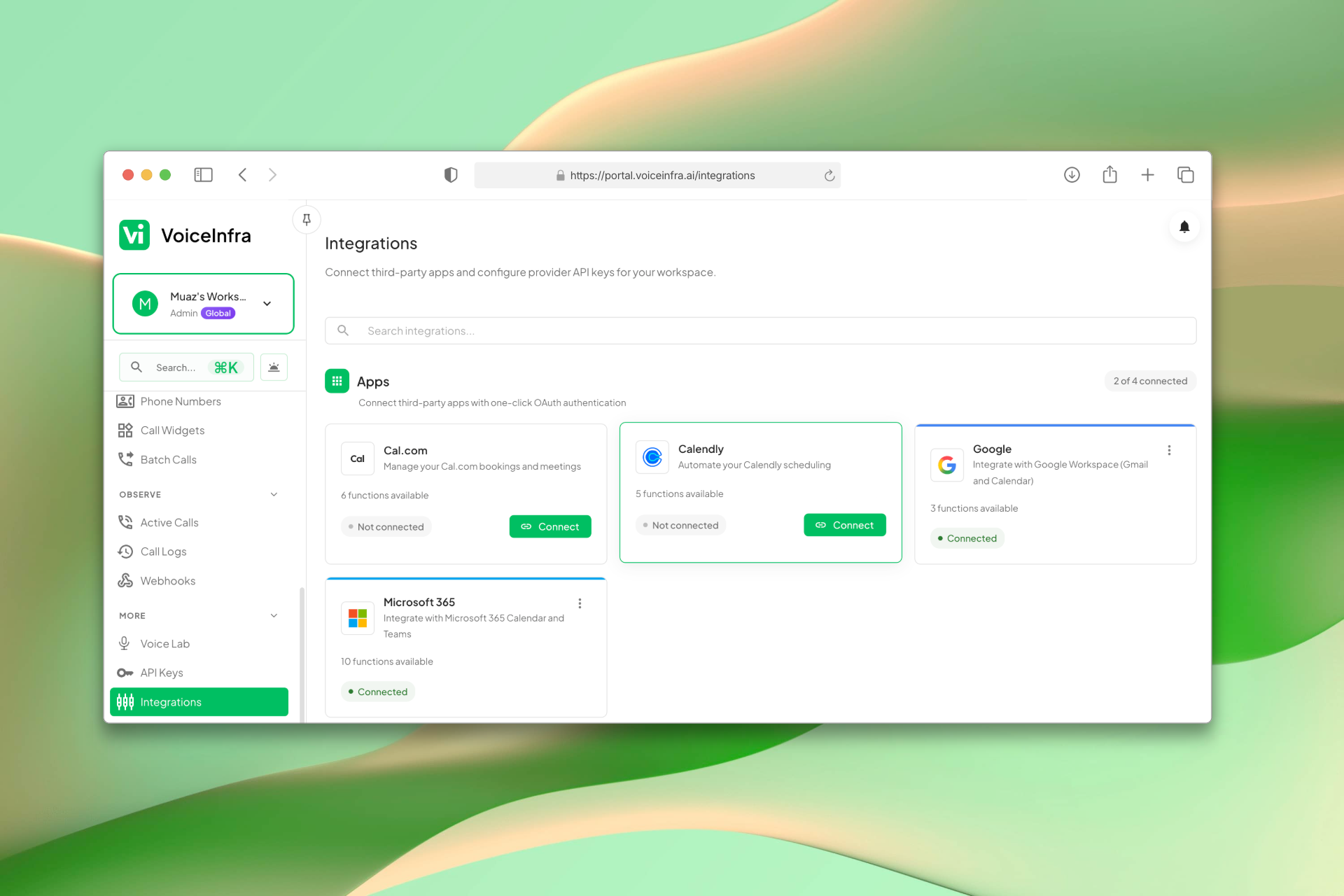
Connect Apps with One-Click OAuth
The Integrations page shows all available apps: Cal.com, Calendly, Google Workspace, and Microsoft 365. Click Connect, authorize via OAuth, and the app is linked instantly. Each connected app unlocks scheduling, calendar, and productivity functions your AI agents can use during calls.
- Cal.com, Calendly, Google, and Microsoft 365
- One-click OAuth, no manual credential setup
- See connection status at a glance
- Connected apps unlock functions for AI agents
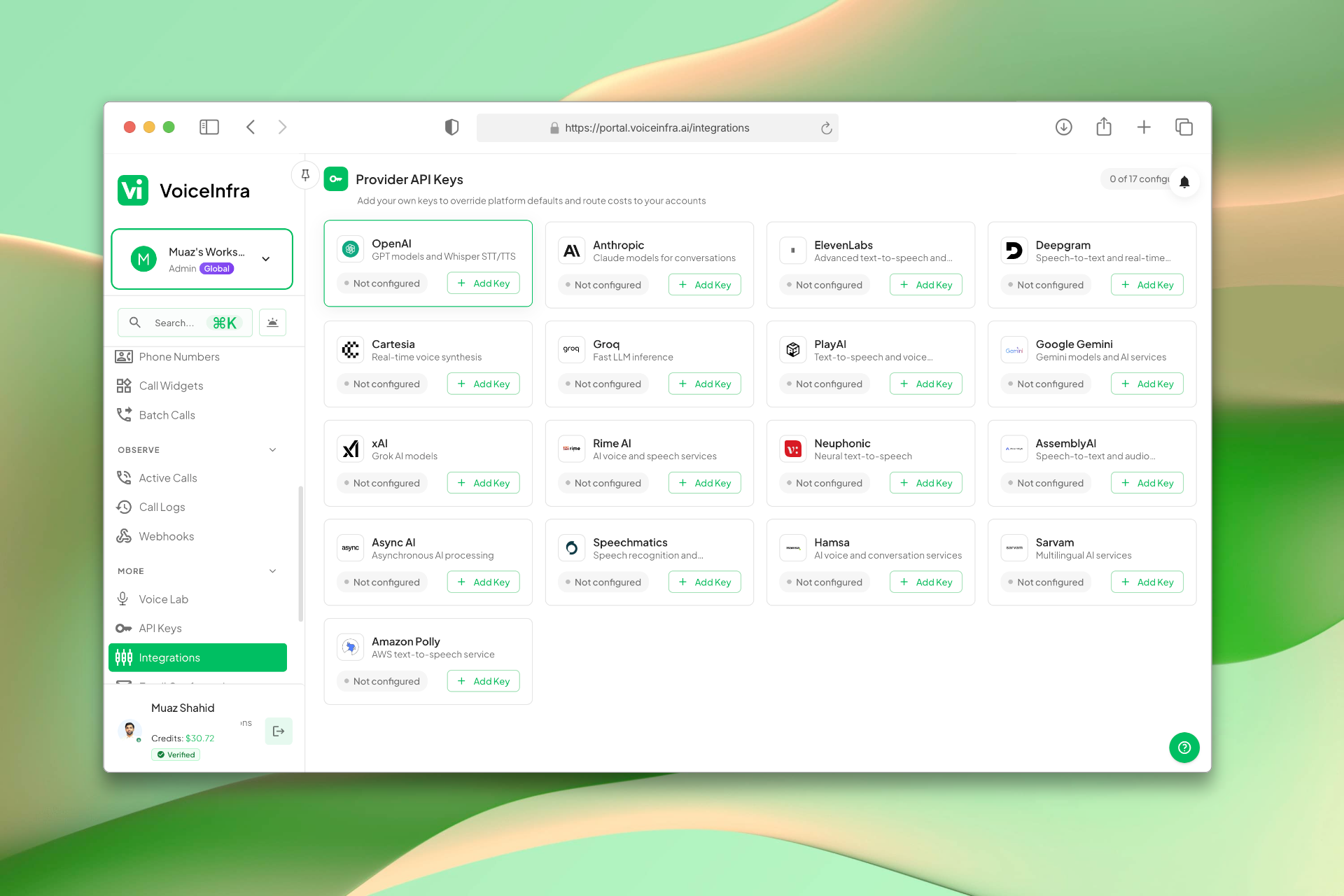
Add Your Own AI Provider API Keys
The Provider API Keys section lists every supported provider: OpenAI, Anthropic, ElevenLabs, Deepgram, Groq, Cartesia, PlayAI, Google Gemini, xAI, Rime AI, Neuphonic, AssemblyAI, Speechmatics, Hamsa, Sarvam, and Amazon Polly. Add your own key to override platform defaults and route costs directly to your accounts.
- 17+ providers: LLM, STT, and TTS
- Add your key to override platform defaults
- Costs route directly to your accounts
- Enable or remove keys anytime
Transform Your Business
Discover the measurable impact and advantages that drive real business growth
Connect scheduling and productivity apps instantly
Use your own AI provider accounts
Control costs by routing to your keys
Access 24+ functions across connected apps
Secure OAuth authentication
Flexible provider support (LLMs, STT, TTS)
Easy key management from one dashboard
No vendor lock-in switch providers anytime
Industry Solutions
Discover how this feature powers tailored solutions across industries
AI Tech Startup, Software & Cloud Automation 24/7 Support & Sales
Build a Voice AI agent for your tech company. Handle support tickets, sales inquiries, and customer onboarding around the clock.
Explore SolutionAI Phone System for SaaS Companies 24/7 Customer Support & Technical Assistance
Build a Voice AI agent for your SaaS business. Handle customer support, technical troubleshooting, and onboarding around the clock.
Explore SolutionAI Phone System for Engineering & IT Consulting 24/7 Project Support & Lead Qualification
Build a Voice AI agent for your engineering or IT consulting firm. Handle project inquiries, technical support, and lead qualification around the clock.
Explore SolutionSee How Our Customers Use This
Real businesses getting real results with this feature. Read their stories.
How a Cloud Consulting Firm in the UAE Added AI Voice Agents to Their Microsoft 365 Practice
A UAE-based Microsoft 365 and Azure consulting firm added VoiceInfra AI voice agents to their existing cloud PBX and Teams Direct Routing portfolio
Read Success StoryHow a UAE Business Advisory Firm Automated Lead Follow-Up with AI Voice Agents
A UAE-based company formation and business advisory firm deployed multiple VoiceInfra AI agents to call social media leads instantly, with Zoho CRM integration triggering calls and updating lead records automatically
Read Success StoryStill have questions about Integrations & Provider API Keys? Just ask.
The people who built this feature answer every question in plain English. Want to see it running on your own setup instead? Tick the box and we'll include a live demo.
- Answered by the people who built it
- Live demo on your setup, if you want one
- A reply within one business day
Technical Specifications
Enterprise-grade infrastructure built for reliability and scale
OAuth 2.0
Secure app authentication
Encrypted Keys
AES-256 encrypted storage
17+ Providers
LLMs, STT, TTS support
Cost Routing
Direct billing to your accounts
Frequently Asked Questions
Find answers to common questions about this feature
Continue Exploring VoiceInfra
Discover more ways VoiceInfra can transform your voice AI experience
Batch Calling Campaigns
Create outbound calling campaigns in 3 simple steps. Define your campaign name and caller ID, choose when to start (immediately or scheduled), and add phone numbers manually or via CSV import. CSV uploads support per-call variables like name and company for personalized AI conversations. Maximum 100 numbers per batch.
Explore FeatureSmart Voicemail Detection
Stop wasting time and money on voicemail loops. VoiceInfra's Voicemail Detection identifies answering machines the moment they answer. You control the outcome: hang up immediately to save time, or enable Smart Voicemail Handling to leave a tailored message for the recipient.
Explore Feature24/7 AI Voice Agents
Deploy AI agents that laugh, sigh, and say 'um' at exactly the right moments. Handle 80% of calls instantly, reduce costs by 65%, and capture leads while competitors sleep. One client automated 34% of calls in just two weeks with 200ms response times and perfect accuracy.
Explore FeatureReady to transform your operations?
Contact our sales team to see how the platform works for your industry.