WhatsApp Chat & Messaging
Automate WhatsApp conversations. AI answers questions, captures leads, and manages chats 24/7.
Connect your WhatsApp Business number for automated text messaging. AI agents handle customer inquiries, qualify leads, and provide instant support through chat. Configure webhooks for real-time message delivery, manage multiple numbers, and use rich media to engage customers. Scale your WhatsApp chat support without adding staff.
What Makes This Feature Special
Discover the powerful capabilities that drive real business results
AI-Powered Chat Automation
AI answers customer messages instantly. Handles FAQs, order status, and booking requests automatically. No wait times, no missed messages.
Lead Capture & Qualification
Collect customer info (name, email, phone) before starting the chat. AI qualifies leads and routes hot prospects to your sales team.
Rich Media Messaging
Send images, PDFs, documents, and location pins. AI can generate and send receipts, menus, product catalogs, or invoices automatically.
Real-Time Webhook Sync
Instant message delivery via webhooks. No polling, no delays. Messages appear in your dashboard the moment they arrive from Meta servers.
Get started with this feature in a few simple steps
Everything you need to transform your voice operations from start to finish
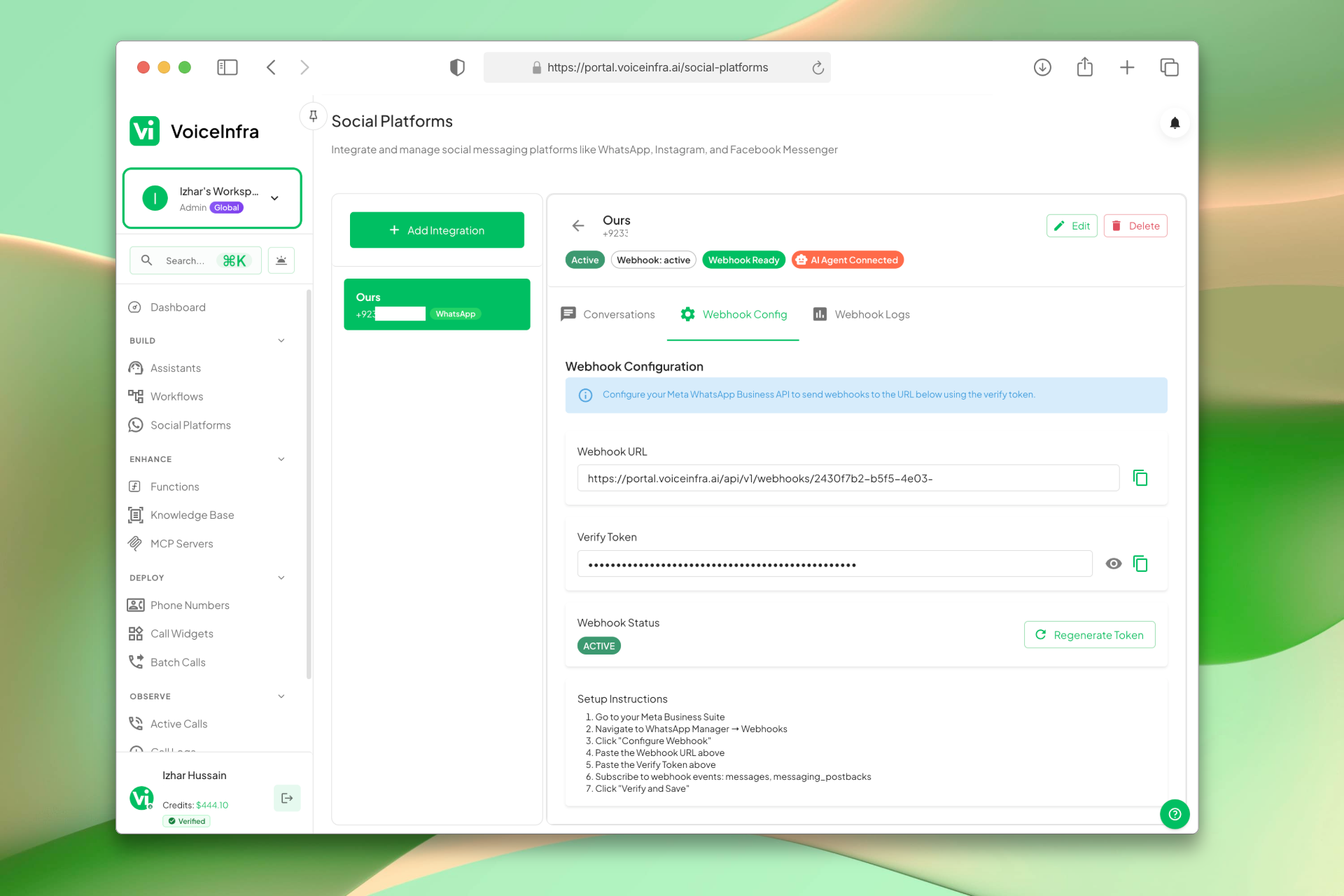
Connect Your WhatsApp Number & Configure Webhooks
Add your WhatsApp Business integration and set up the webhook so messages reach your dashboard in real time. Copy the webhook URL and verify token, follow the setup steps, and your number is active and ready for AI chat automation.
- Add WhatsApp Business integration in one click
- Webhook URL and verify token provided
- Step-by-step setup instructions included
- Webhook status shows Active once connected
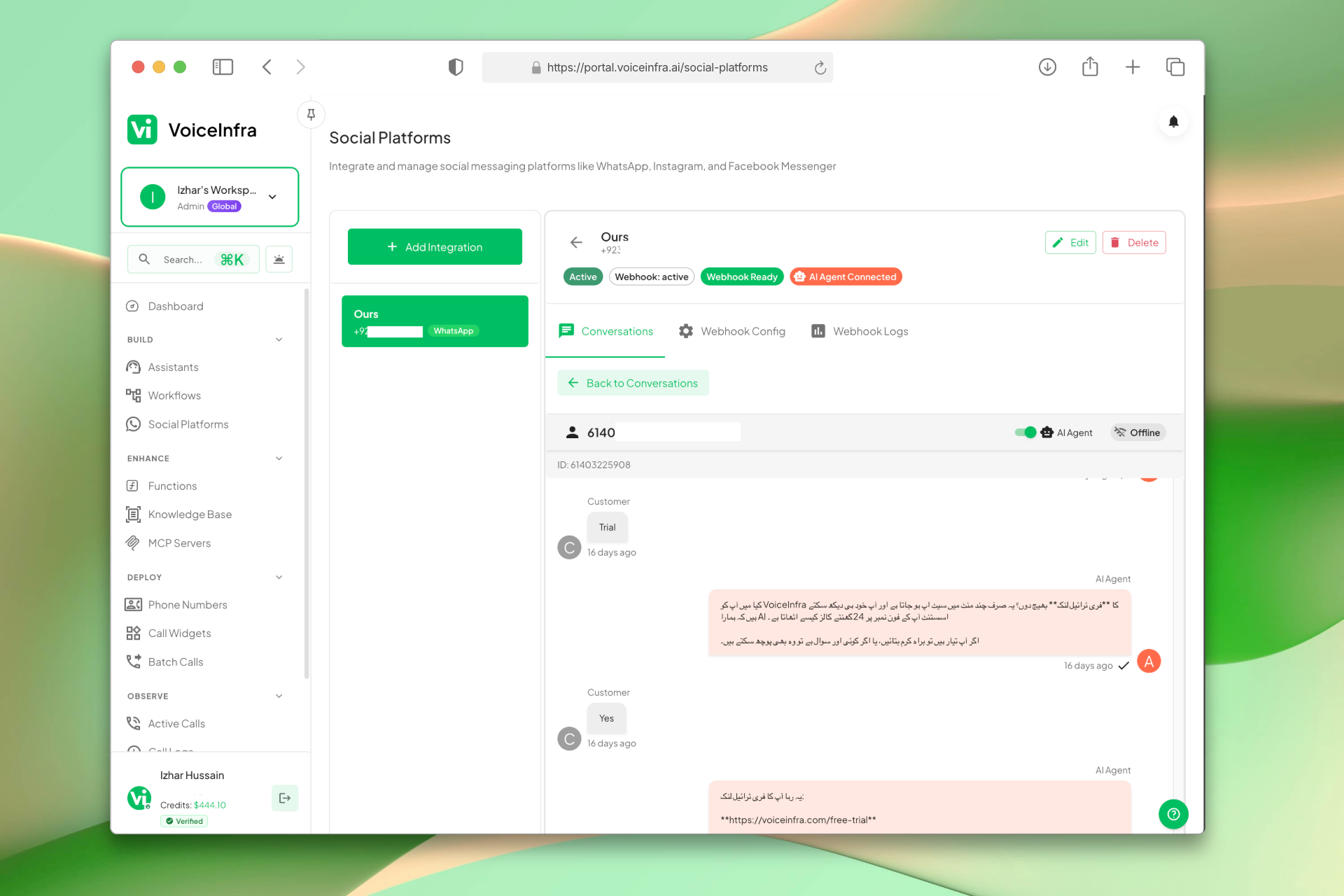
Manage Conversations & AI Responses
Every incoming WhatsApp message appears in the Conversations tab. Open any chat to see the full message history, AI responses, and customer details. Monitor how your AI agent handles conversations and step in when needed.
- All conversations in one inbox
- Full message history per contact
- AI responses visible alongside customer messages
- Switch between active chats instantly
Transform Your Business
Discover the measurable impact and advantages that drive real business growth
24/7 automated chat support on WhatsApp
Instant responses to customer inquiries
Capture and qualify leads automatically
Manage multiple WhatsApp Business numbers
Rich media support (images, PDFs, docs, locations)
Webhook-based real-time message sync
AI qualification and smart routing
Secure and encrypted messaging
Message templates for proactive notifications
Human handoff for complex conversations
Industry Solutions
Discover how this feature powers tailored solutions across industries
AI Marketing & Digital Agency Automation 24/7 Lead Capture & Campaigns
Build a Voice AI agent for your marketing agency. Handle lead capture, campaign management, and client support around the clock.
Explore SolutionAI E-Commerce, Fashion & Subscriptions 24/7 Orders & Support
Build a Voice AI agent for your e-commerce business. Handle orders, customer support, and subscription management around the clock.
Explore SolutionAI Sales Automation 24/7 Lead Qualification & Outreach
Build a Voice AI agent for your sales team. Handle lead qualification, outreach campaigns, and appointment setting around the clock.
Explore SolutionSee How Our Customers Use This
Real businesses getting real results with this feature. Read their stories.
How a Norwegian Business Integrated a VoiceInfra Call Widget on Their Website Using Telnyx Numbers
A Norwegian business brought their Telnyx phone numbers to VoiceInfra and integrated an AI-powered call widget on their website, enabling instant voice conversations with visitors
Read Success StoryHow a UAE Business Advisory Firm Automated Lead Follow-Up with AI Voice Agents
A UAE-based company formation and business advisory firm deployed multiple VoiceInfra AI agents to call social media leads instantly, with Zoho CRM integration triggering calls and updating lead records automatically
Read Success StoryStill have questions about WhatsApp Chat & Messaging? Just ask.
The people who built this feature answer every question in plain English. Want to see it running on your own setup instead? Tick the box and we'll include a live demo.
- Answered by the people who built it
- Live demo on your setup, if you want one
- A reply within one business day
Technical Specifications
Enterprise-grade infrastructure built for reliability and scale
AI Chat Agent
Natural language understanding & responses
Webhook Sync
Real-time message delivery via Meta API
Rich Media
Images, PDFs, docs, locations, contacts
Secure Messaging
End-to-end encryption + secure webhooks
Frequently Asked Questions
Find answers to common questions about this feature
Continue Exploring VoiceInfra
Discover more ways VoiceInfra can transform your voice AI experience
Batch Calling Campaigns
Create outbound calling campaigns in 3 simple steps. Define your campaign name and caller ID, choose when to start (immediately or scheduled), and add phone numbers manually or via CSV import. CSV uploads support per-call variables like name and company for personalized AI conversations. Maximum 100 numbers per batch.
Explore FeatureCall Analytics & Intelligence
Stop guessing about your voice operations. VoiceInfra's Enterprise Call Analytics transforms raw call data into actionable business intelligence, helping you reduce costs by 40%, improve customer satisfaction, and scale operations with confidence. Built for enterprises that prioritize operational excellence and competitive advantage.
Explore FeatureSIP Integration & Numbers
Manage your telephony infrastructure and AI routing in one place. Import existing numbers from Twilio or Telnyx, provision new SIP numbers directly, or configure custom SIP trunks for any provider. Set up inbound/outbound routing, secure authentication, transport protocols, and assign AI agents to handle calls automatically. No vendor lock-in, no rip-and-replace.
Explore FeatureReady to transform your operations?
Contact our sales team to see how the platform works for your industry.