Visual Workflow AI Agents
Transform simple voice bots into intelligent conversation orchestrators. No coding required.
VoiceInfra's Workflow-Based Agents transform simple voice bots into intelligent conversation orchestrators. Design complex conversation paths with visual workflow builder, create smart node systems, enable dynamic routing based on customer responses. Stop writing complex conversation logic by hand. Visual simplicity. Unlimited complexity. Zero coding.
What Makes This Feature Special
Discover the powerful capabilities that drive real business results
Visual Workflow Builder Complete Control
Drag-and-drop interface to design complex conversation paths. 6 node types: Start, Conversation, Tool, Transfer, Knowledge Base, End. Auto-layout, zoom, minimap.
Smart Node System Multiple Node Types
Start (entry point), Conversation (dialogue blocks), Tool (execute APIs), Transfer (to humans), Knowledge Base (search docs), End (terminate calls).
Dynamic Routing AI Navigates Based on Responses
AI automatically navigates between workflow steps. AI Transitions (natural language), Equation Transitions (variable-based), Combined Conditions.
Seamless Tool Integrations Execute Actions
Connect tools, functions, external systems at any workflow step. Custom REST APIs, pre-built functions, MCP servers, OAuth integrations.
Test Chat With a Live Canvas
Run the entire workflow as a text conversation before a single call is placed. As the flow moves, the canvas lights up node by node. See which step ran, which tool fired, which variables were captured, and where the conversation ended. Same visualization as a live voice call, without dialing.
Get started with this feature in a few simple steps
Everything you need to transform your voice operations from start to finish
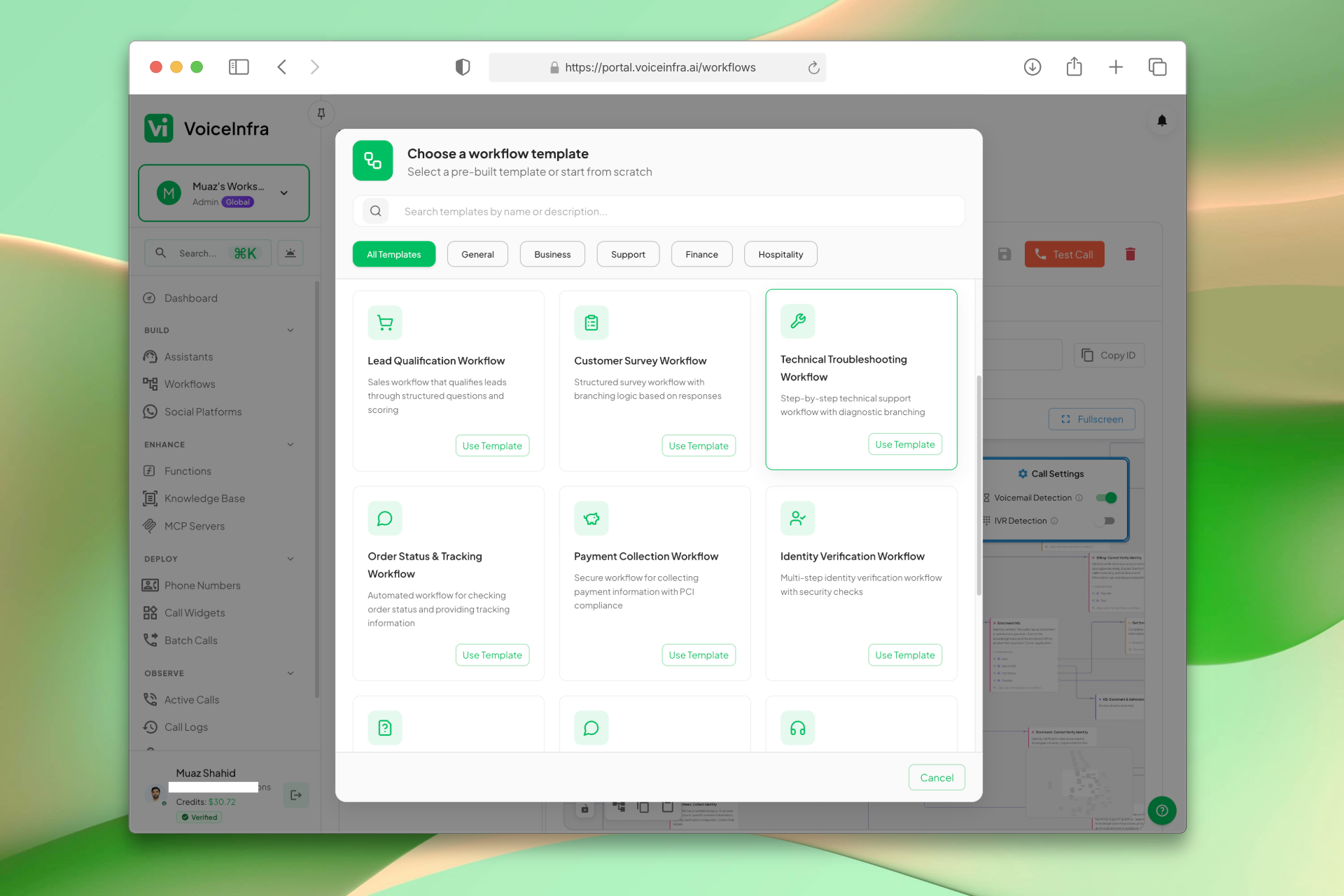
Create a Workflow or Pick a Template
Start from scratch or choose from pre-built templates for customer support, lead qualification, appointment booking, and more. Name your workflow, define its purpose, and you're in the canvas within seconds.
- Blank workflow or pre-built templates
- Templates for support, sales, booking and more
- Custom naming and purpose definition
- Ready to build in seconds
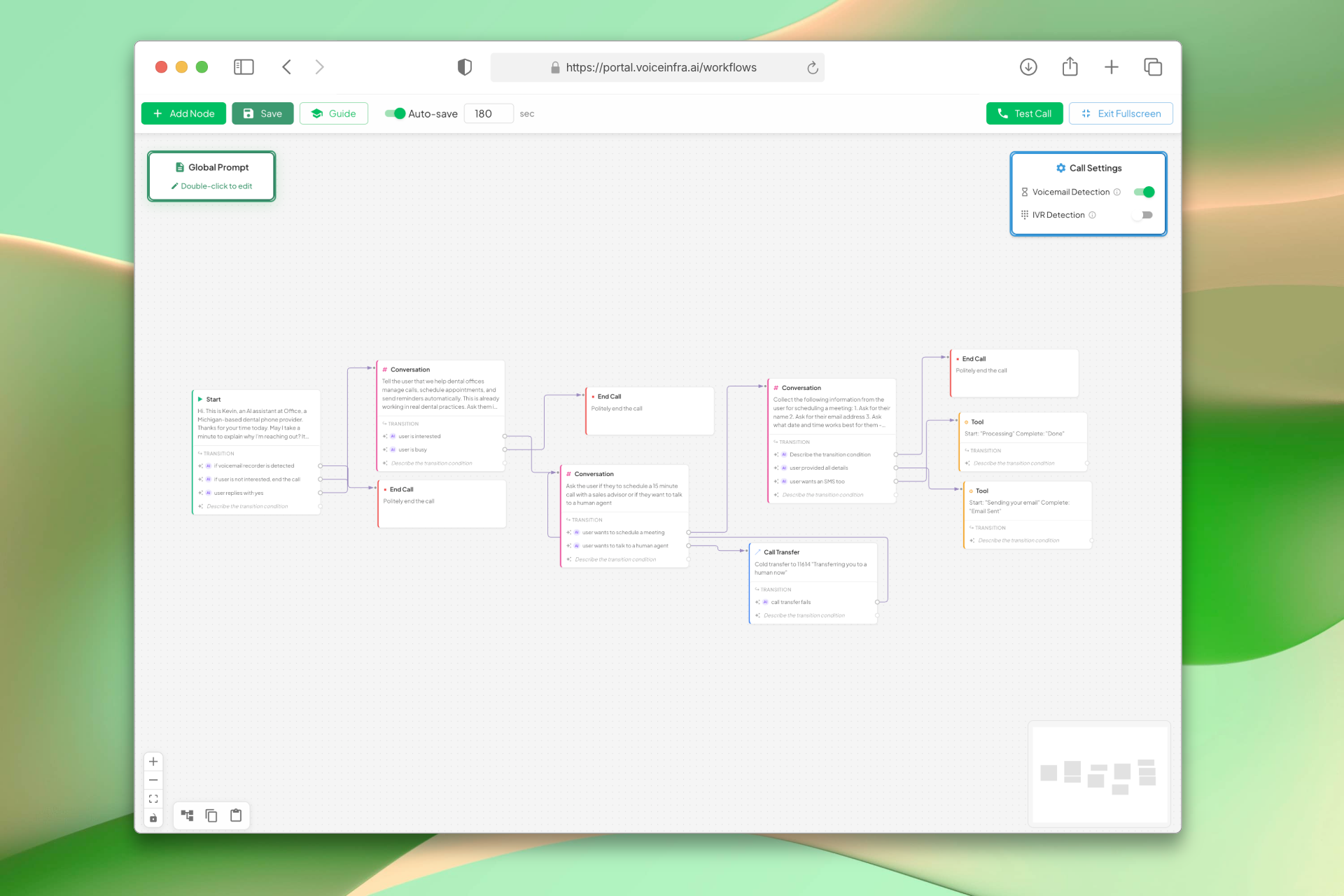
Design Conversation Flows Visually
Drag and drop nodes onto a visual canvas to build your conversation path. Connect them with edges, configure each step, and see the entire flow at a glance. Six node types cover every conversation scenario.
- 6 node types: Start, Conversation, Tool, Transfer, Knowledge Base, End
- AI and equation-based transition conditions
- Auto-layout, zoom, pan, and minimap
- Fullscreen editing for complex flows
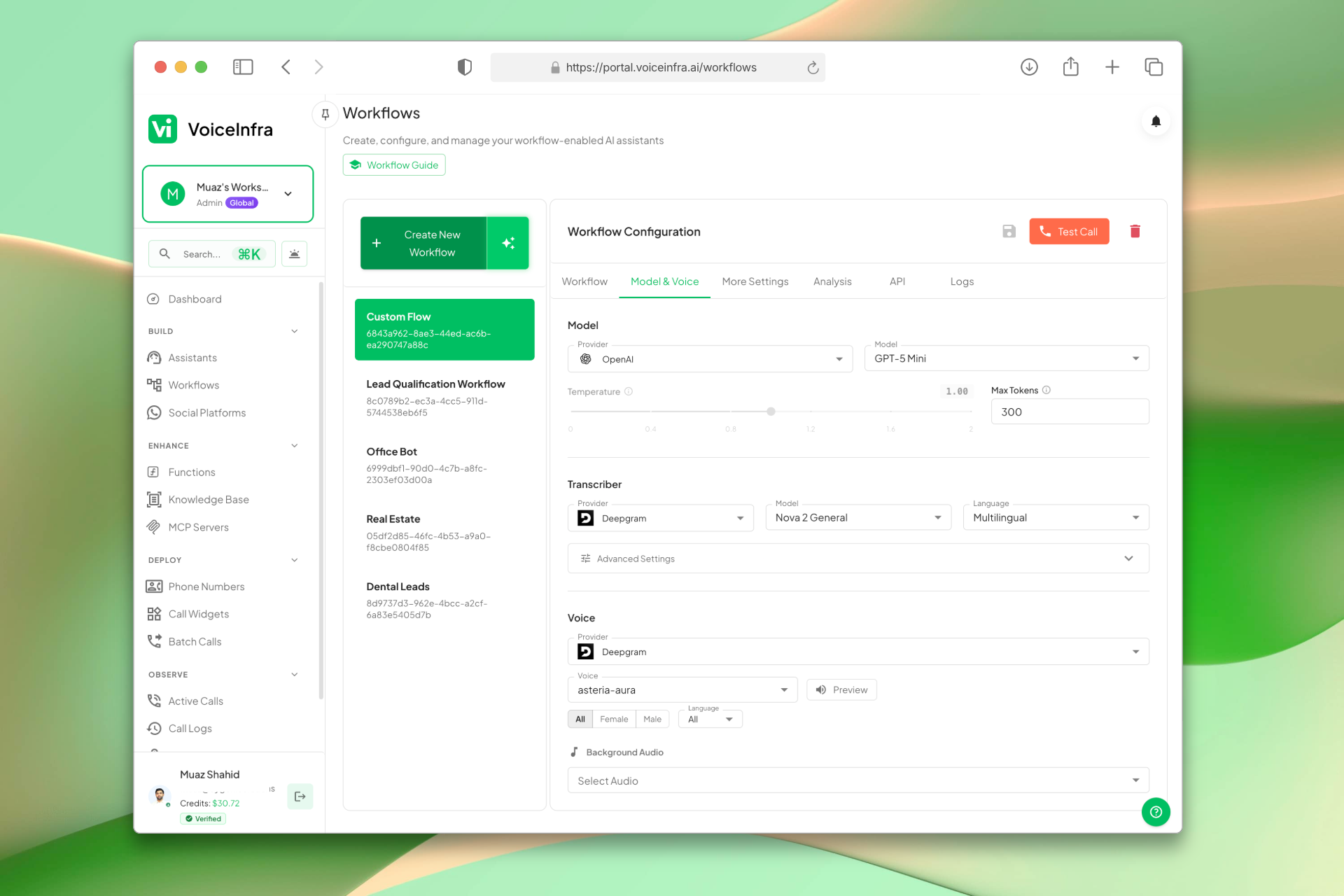
Configure Model, Voice & Advanced Settings
Choose your AI provider and voice, then tune advanced behavior, including interruption handling, call limits, timezone, privacy mode, and post-call summaries. Everything is configured in one place before you deploy.
- 5 AI providers: Anthropic, OpenAI, Google Gemini, Groq, Mistral AI
- Voice selection with language support
- Call limits, privacy mode, and timezone settings
- Post-call email summaries
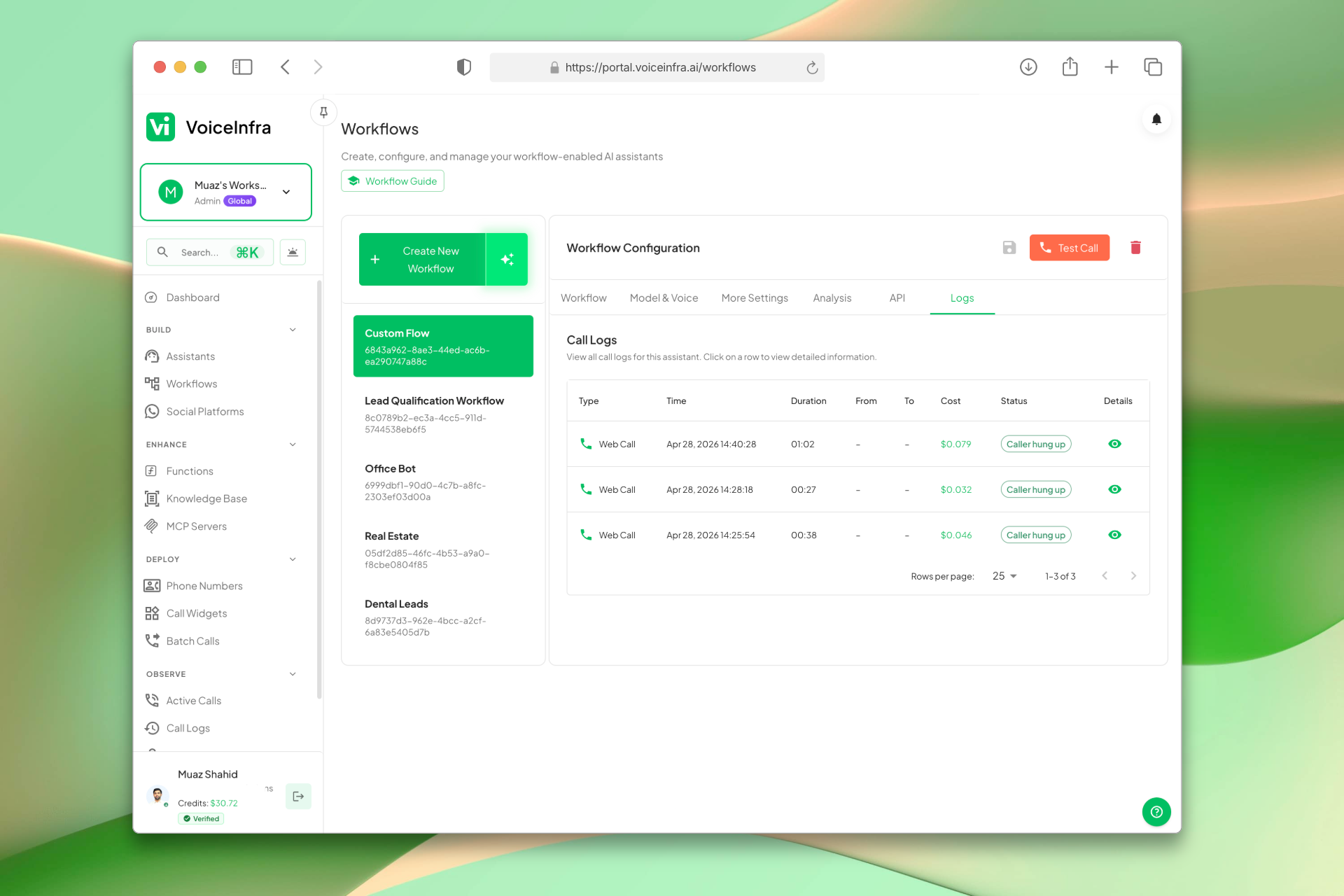
Review Every Conversation
Every call is logged with a full recording, transcript, and AI-generated summary. Search by caller, date, or outcome to monitor workflow performance and identify steps to improve.
- Complete call history with metadata
- Audio recordings and full transcripts
- AI-generated conversation summaries
- Search and filter by caller, date, or outcome
Transform Your Business
Discover the measurable impact and advantages that drive real business growth
Design complex flows without coding
Reduce development time from weeks to hours
Handle sophisticated business processes
Execute real-time actions during calls
Scale workflows without technical overhead
Integrate with existing business systems
Visual drag-and-drop builder
Smart node system (6 types)
Dynamic routing based on responses
Seamless tool integrations
Auto-layout system
Workflow validation
Testing & debugging
Chat-test the whole flow before you deploy
Watch the canvas light up node by node
Copy/paste workflows
Custom templates
Industry Solutions
Discover how this feature powers tailored solutions across industries
AI-Powered Contact Center Automation Build Custom Voice AI Agents
Build a Voice AI agent for your contact center. Reduce costs by 40-60% while delivering superior customer experience.
Explore SolutionAI BPO Automation 24/7 Support, Tech & Back Office
Build a Voice AI agent for your BPO operations. Handle customer support, technical troubleshooting, back-office tasks, and sales campaigns around the clock.
Explore SolutionAI Phone System for Healthcare Call Centers 24/7 Patient Triage & Support
Build a Voice AI agent for your healthcare call center. Handle patient triage, support inquiries, and appointment routing around the clock.
Explore SolutionSee How Our Customers Use This
Real businesses getting real results with this feature. Read their stories.
How a Telecom MSP Replaced Their Customer Service Team with VoiceInfra AI Agents
A US-India telecom MSP replaced their human customer service with VoiceInfra AI agents that handle new leads, troubleshoot issues, report incidents, and transfer callers to the right extension
Read Success StoryHow an AI-Native Dubai Real Estate Brokerage Runs 5 Voice AI Agents on Yeastar and Zoho CRM
An AI-native real estate brokerage in Dubai built 5 autonomous AI voice agents for lead generation, follow-up, marketing lead qualification, property portal inquiry matching, and recruitment
Read Success StoryStill have questions about Visual Workflow AI Agents? Just ask.
The people who built this feature answer every question in plain English. Want to see it running on your own setup instead? Tick the box and we'll include a live demo.
- Answered by the people who built it
- Live demo on your setup, if you want one
- A reply within one business day
Technical Specifications
Enterprise-grade infrastructure built for reliability and scale
6 Node Types
Start to End
12+ Templates
Pre-built workflows
AI Builder
Auto-generate
Conditional Routing
AI & equation transitions
Frequently Asked Questions
Find answers to common questions about this feature
Continue Exploring VoiceInfra
Discover more ways VoiceInfra can transform your voice AI experience
Knowledge Base
Stop feeding your AI outdated information. Our Knowledge Base lets you upload company documents, crawl entire websites, or paste custom text then instantly connect it to any AI agent. No retraining, no hardcoding, no hallucinations. Just accurate, real-time answers that scale with your business. Upload product manuals, FAQ documents, pricing sheets, or website content. The AI automatically references this information during conversations pulling exact details in under 100ms.
Explore FeatureSmart Voicemail Detection
Stop wasting time and money on voicemail loops. VoiceInfra's Voicemail Detection identifies answering machines the moment they answer. You control the outcome: hang up immediately to save time, or enable Smart Voicemail Handling to leave a tailored message for the recipient.
Explore FeatureAutomated Post-Call Emails
Stop manually sending follow-up emails after calls. Our Email Configuration feature automatically sends professional post-call summaries via email. Connect any SMTP server (Gmail, Outlook, SendGrid, AWS SES), configure sender details, and enable automated emails for every call. Complete with call recordings, transcripts, AI analysis, and next steps – all in a beautifully formatted email. Setup in 5 minutes. Impress customers forever.
Explore FeatureReady to transform your operations?
Contact our sales team to see how the platform works for your industry.