Custom Functions & API Endpoints
Connect voice agents to external APIs. Define functions, URLs, and headers for real-time data and actions.
Extend your AI agents' capabilities by configuring custom REST functions. Define function names, request types (GET, POST, etc.), endpoints, and authentication headers. Allow agents to fetch data, trigger actions, and interact with your systems dynamically during conversations.
What Makes This Feature Special
Discover the powerful capabilities that drive real business results
REST API Integration
Connect your voice agents to any external API endpoint. Define exactly how the LLM should understand and use each function for seamless data retrieval.
Flexible Request Types
Support for GET, POST, and asynchronous operations. Choose the method that fits your use case from simple data lookups to complex background processing.
Dynamic URL Parameters
Use path parameter placeholders (e.g., /users/{id}) to pass dynamic data. Agents can fetch specific records based on caller input or context.
Secure Header Management
Add custom headers to requests, including authentication tokens and API keys. Keep your endpoints secure while allowing agents to access protected data.
Pre-Call, During-Call & Post-Call Phases
Every function carries an execution phase. During-Call functions run as agent tools mid-conversation. Pre-Call functions run before the call starts and their response is injected straight into the agent's system context. Post-Call functions run once the call has ended, with the transcript and summary available to them.
Phase-Aware Placeholders
Pre-Call functions receive call placeholders such as {{from_number}}, {{to_number}}, {{call_type}} and {{call_id}}. Post-Call functions receive {{summary}}, {{transcript}} and {{call_duration}}. Your endpoint gets real call data without the agent having to pass it explicitly.
Get started with this feature in a few simple steps
Everything you need to transform your voice operations from start to finish
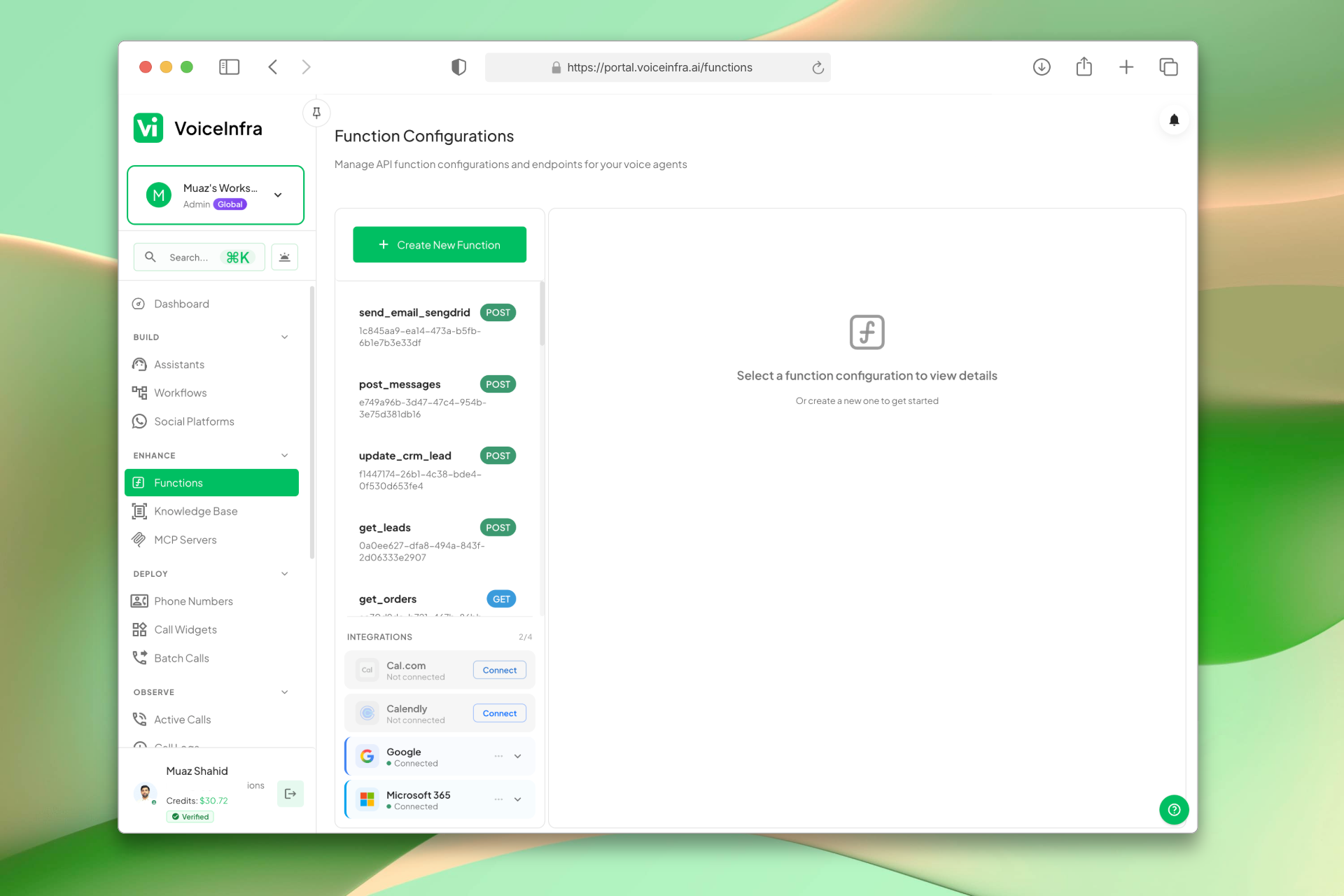
Manage All Your Functions & Integrations
The Function Configurations dashboard lists every custom API function you've built alongside your connected integrations, including Cal.com, Calendly, Google, and Microsoft 365. Select any function to view or edit its details, or create a new one with a single click.
- All custom functions listed with method and description
- Connected integrations (Cal.com, Calendly, Google, Microsoft 365)
- Select any function to view or edit details
- Create new functions from the same view
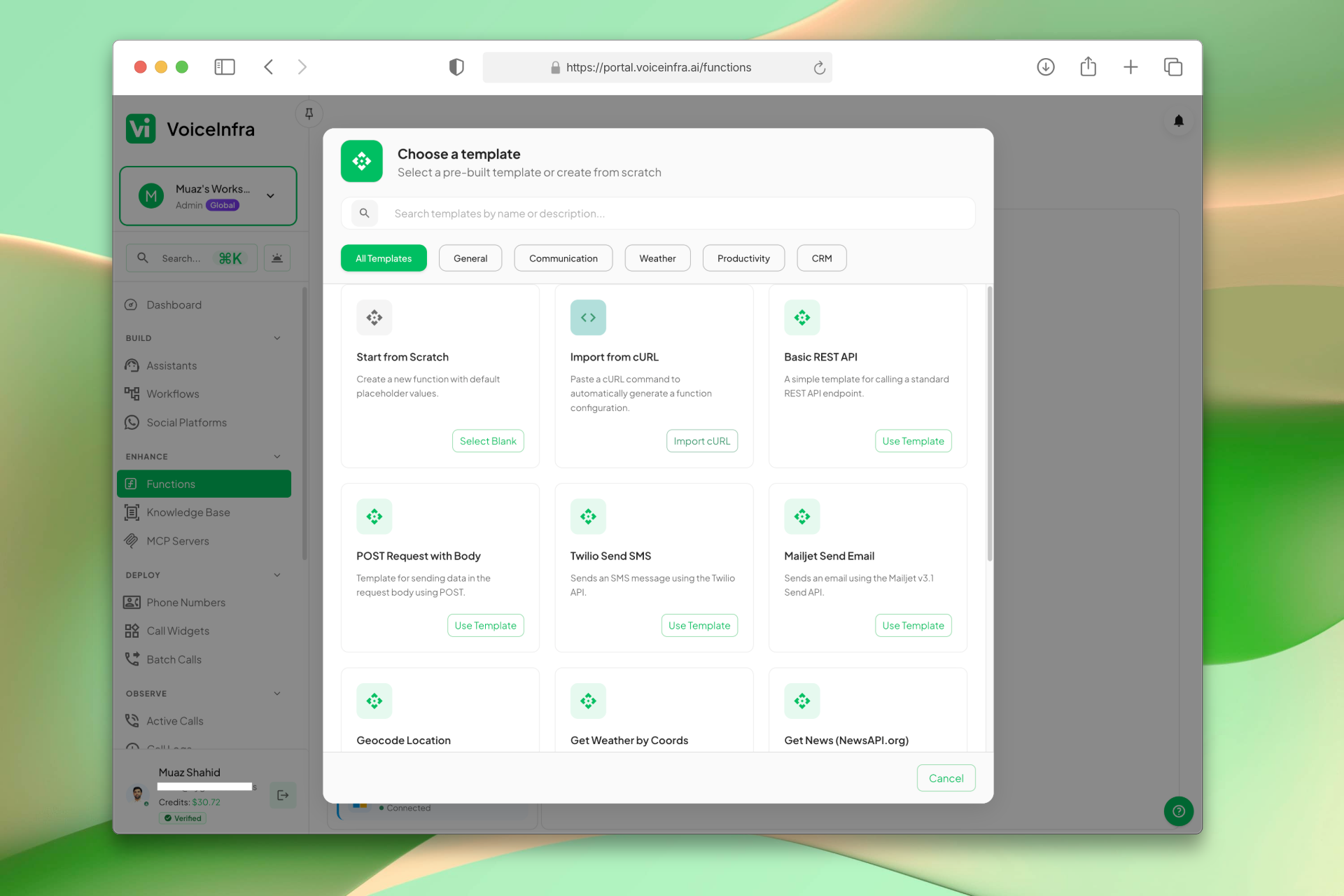
Start From a Template or Build From Scratch
When creating a new function, pick from ready-made templates: Basic REST API, POST Request with Body, Twilio Send SMS, Mailjet Send Email, Geocode Location, and more, or start from scratch. Import from a cURL command for fastest setup.
- Templates for REST API, SMS, email, weather, and more
- Filter by General, Communication, Productivity, CRM
- Import directly from a cURL command
- Start from scratch for fully custom functions
Transform Your Business
Discover the measurable impact and advantages that drive real business growth
Enable real-time data retrieval during calls
Trigger actions in external systems automatically
Secure authentication via custom headers
Flexible request types (GET, POST, Async)
Dynamic URL parameters for specific queries
LLM-optimized descriptions for better intent matching
Manage multiple function configurations easily
Extend agent capabilities without code changes
Run logic before the call starts and after it ends
Pre-Call responses become agent context automatically
Post-Call functions receive the transcript and summary
Assign an execution phase to every function from one place
Industry Solutions
Discover how this feature powers tailored solutions across industries
AI Tech Startup, Software & Cloud Automation 24/7 Support & Sales
Build a Voice AI agent for your tech company. Handle support tickets, sales inquiries, and customer onboarding around the clock.
Explore SolutionAI Phone System for SaaS Companies 24/7 Customer Support & Technical Assistance
Build a Voice AI agent for your SaaS business. Handle customer support, technical troubleshooting, and onboarding around the clock.
Explore SolutionAI Phone System for Engineering & IT Consulting 24/7 Project Support & Lead Qualification
Build a Voice AI agent for your engineering or IT consulting firm. Handle project inquiries, technical support, and lead qualification around the clock.
Explore SolutionSee How Our Customers Use This
Real businesses getting real results with this feature. Read their stories.
How a UAE Business Advisory Firm Automated Lead Follow-Up with AI Voice Agents
A UAE-based company formation and business advisory firm deployed multiple VoiceInfra AI agents to call social media leads instantly, with Zoho CRM integration triggering calls and updating lead records automatically
Read Success StoryHow an AI-Native Dubai Real Estate Brokerage Runs 5 Voice AI Agents on Yeastar and Zoho CRM
An AI-native real estate brokerage in Dubai built 5 autonomous AI voice agents for lead generation, follow-up, marketing lead qualification, property portal inquiry matching, and recruitment
Read Success StoryStill have questions about Custom Functions & API Endpoints? Just ask.
The people who built this feature answer every question in plain English. Want to see it running on your own setup instead? Tick the box and we'll include a live demo.
- Answered by the people who built it
- Live demo on your setup, if you want one
- A reply within one business day
Technical Specifications
Enterprise-grade infrastructure built for reliability and scale
REST API
Connect to any endpoint
Request Types
GET, POST, Async
Dynamic Params
Path parameter placeholders
Secure Headers
Auth tokens & API keys
Frequently Asked Questions
Find answers to common questions about this feature
Continue Exploring VoiceInfra
Discover more ways VoiceInfra can transform your voice AI experience
Multilingual 30+ Languages
Break language barriers with AI that understands 30+ languages instantly. VoiceInfra connects you to leading transcription engines (ElevenLabs, OpenAI, Cartesia, Deepgram, Groq, Speechmatics, Hamsa) so you get the best accuracy for every accent and dialect. Your agents respond naturally, no matter where your customers call from.
Explore FeatureVersion Control & Rollback
Editing a live AI agent is nerve-wracking when the change goes straight to production. VoiceInfra separates draft from live: you edit freely, see exactly what will change, and choose when it becomes what callers actually hear. Every publish is kept as a version you can inspect, preview in read-only mode, and roll back to. Diffs include not just the agent's own settings but its attachments: the functions, MCP servers and knowledge documents it depends on. Nothing changes silently. Auto-saved work becomes a version too, meaning even an accidental edit is recoverable.
Explore FeatureDynamic Outbound Call API
Access your AI assistant via API to programmatically initiate outbound calls with dynamic payload customization. Leverage all configured settings while maintaining complete control over call parameters, recipient targeting, and conversation flow through our RESTful API interface.
Explore FeatureReady to transform your operations?
Contact our sales team to see how the platform works for your industry.