Telnyx Number Import
Import Telnyx numbers and manage calls, messages, and AI agents in one dashboard. No setup changes required.
Import your Telnyx phone numbers directly into our platform. Provide your Telnyx API v2 key (starts with KEY), browse your available numbers, and import them with one click. Manage calls, messages, and AI agents without changing your existing Telnyx setup or billing.
What Makes This Feature Special
Discover the powerful capabilities that drive real business results
Secure API v2 Connection
Connect using your Telnyx API v2 key. Keys starting with KEY are verified instantly. Credentials are encrypted and stored securely. No access to your Telnyx billing or account settings.
Browse Available Numbers
After connecting, view all your Telnyx phone numbers in a clean list. See number format, country code (+1, +44, etc.), and friendly name before importing.
Select & Import Numbers
Choose exactly which numbers to import. Select one, multiple, or all your Telnyx numbers. Import them instantly into your dashboard.
Keep Your Existing Setup
Your numbers stay with Telnyx. We only import them for management. No number porting, no billing changes, no service disruption.
Get started with this feature in a few simple steps
Everything you need to transform your voice operations from start to finish
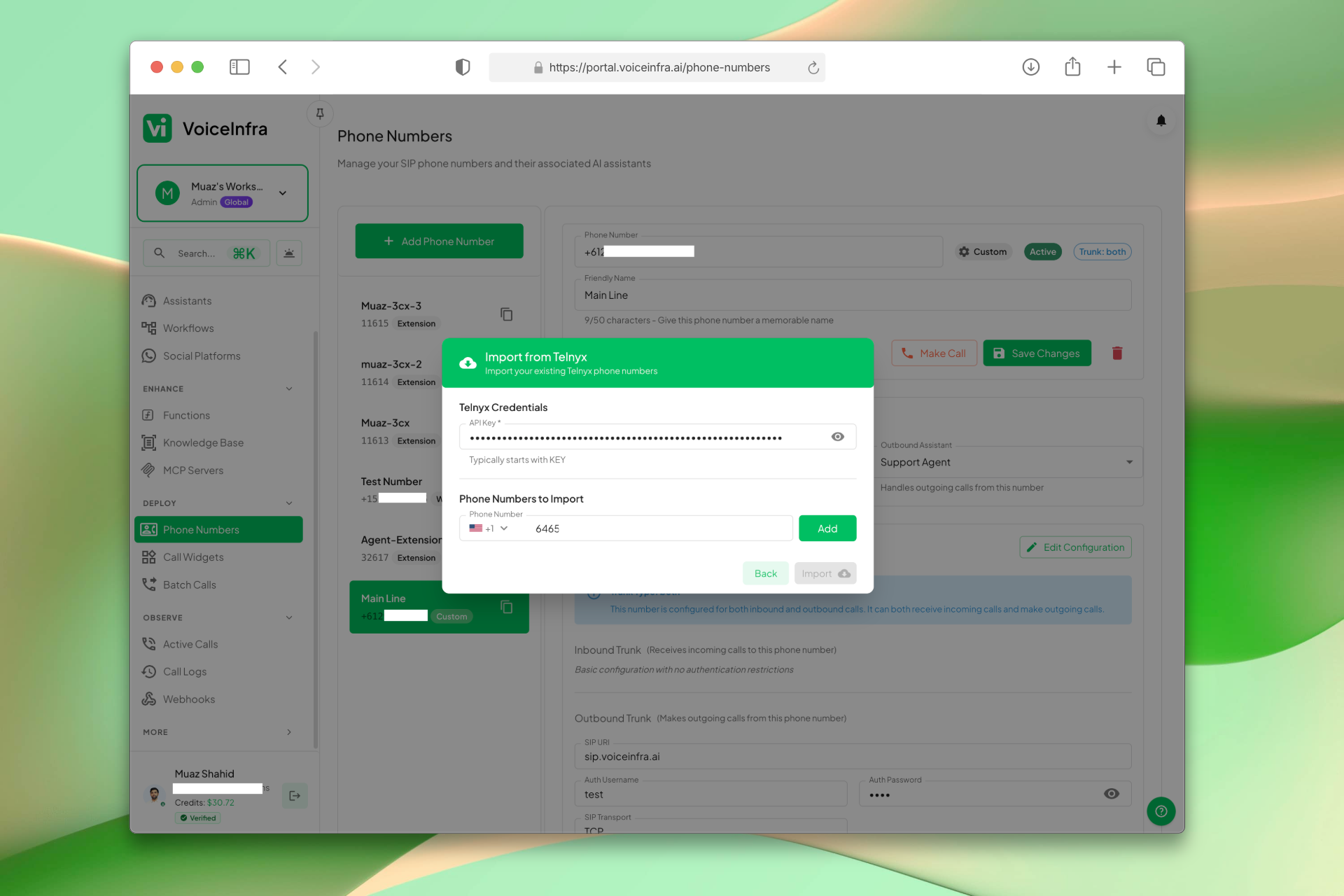
Connect & Import Telnyx Numbers
Open the Import from Telnyx modal, enter your API v2 key, and your available numbers appear immediately. Select the ones you want and click Import, all in one screen. Numbers are instantly available in your dashboard for AI agent assignment.
- API v2 key entry (starts with KEY)
- Numbers listed instantly after connecting
- Select individual or all numbers
- One-click import, no porting required
Transform Your Business
Discover the measurable impact and advantages that drive real business growth
Import existing Telnyx numbers without porting
Secure API v2 connection using your key
Browse and select specific numbers to import
Manage imported numbers in one centralized dashboard
Keep your Telnyx billing and account unchanged
No service disruption during import
Ready for AI agent assignment after import
Support for international numbers (+1, +44, +91, etc.)
Industry Solutions
Discover how this feature powers tailored solutions across industries
AI-Powered Contact Center Automation Build Custom Voice AI Agents
Build a Voice AI agent for your contact center. Reduce costs by 40-60% while delivering superior customer experience.
Explore SolutionAI Phone System for Tech Call Centers 24/7 Support & Routing
Build a Voice AI agent for your tech call center. Handle support tickets, technical routing, and customer inquiries around the clock.
Explore SolutionAI BPO Automation 24/7 Support, Tech & Back Office
Build a Voice AI agent for your BPO operations. Handle customer support, technical troubleshooting, back-office tasks, and sales campaigns around the clock.
Explore SolutionSee How Our Customers Use This
Real businesses getting real results with this feature. Read their stories.
How a Norwegian Business Integrated a VoiceInfra Call Widget on Their Website Using Telnyx Numbers
A Norwegian business brought their Telnyx phone numbers to VoiceInfra and integrated an AI-powered call widget on their website, enabling instant voice conversations with visitors
Read Success StoryHow a Telecom MSP Replaced Their Customer Service Team with VoiceInfra AI Agents
A US-India telecom MSP replaced their human customer service with VoiceInfra AI agents that handle new leads, troubleshoot issues, report incidents, and transfer callers to the right extension
Read Success StoryStill have questions about Telnyx Number Import? Just ask.
The people who built this feature answer every question in plain English. Want to see it running on your own setup instead? Tick the box and we'll include a live demo.
- Answered by the people who built it
- Live demo on your setup, if you want one
- A reply within one business day
Technical Specifications
Enterprise-grade infrastructure built for reliability and scale
Secure API v2
Encrypted API key authentication
Number Sync
Real-time list from Telnyx API
Bulk Import
Select multiple numbers at once
No Porting
Numbers stay with Telnyx
Frequently Asked Questions
Find answers to common questions about this feature
Continue Exploring VoiceInfra
Discover more ways VoiceInfra can transform your voice AI experience
WhatsApp Chat & Messaging
Connect your WhatsApp Business number for automated text messaging. AI agents handle customer inquiries, qualify leads, and provide instant support through chat. Configure webhooks for real-time message delivery, manage multiple numbers, and use rich media to engage customers. Scale your WhatsApp chat support without adding staff.
Explore FeatureMCP Server Integration
Extend your AI agents' capabilities by connecting to Model Context Protocol (MCP) servers. Define server names, URLs, timeouts, and authentication headers. Allow agents to access external databases, APIs, and custom tools securely during conversations.
Explore FeatureKnowledge Base
Stop feeding your AI outdated information. Our Knowledge Base lets you upload company documents, crawl entire websites, or paste custom text then instantly connect it to any AI agent. No retraining, no hardcoding, no hallucinations. Just accurate, real-time answers that scale with your business. Upload product manuals, FAQ documents, pricing sheets, or website content. The AI automatically references this information during conversations pulling exact details in under 100ms.
Explore FeatureReady to transform your operations?
Contact our sales team to see how the platform works for your industry.