Over the past year, we've watched countless teams struggle with the same problem: building conversational AI agents that work reliably in production.
The pattern is familiar. Your agent handles a few happy paths perfectly. Then complexity creeps in, knowledge base lookups, database queries, tool executions, and conditional routing based on sentiment or caller intent. Suddenly, things break. And the first thing everyone blames is the LLM or the platform.
Here's the uncomfortable truth: It's not the model. It's your orchestration layer.
The Prompt Engineering Trap
We've all been there. You spend hours crafting the perfect system prompt. It works beautifully for three or four scenarios. Then someone asks a question that requires:
Searching across multiple documents
Checking a CRM for customer history
Executing an API call to verify account status
Deciding whether to transfer based on sentiment AND conversation duration
Compiling all of this into a coherent response
Your prompt engineering hits a wall. Not because the LLM can't handle it, but because you're asking a single prompt to do what should be an orchestrated workflow.
When this happens, teams go down a rabbit hole: "Maybe we need a different model." "Maybe the temperature is wrong." "Maybe we need a few better-shot examples."
Rarely do they ask the right question: "Should a single prompt even be responsible for all of this?"
The Real Problem: Monolithic Conversation Design
After building voice AI products for UC/CX platforms and working with partners deploying agents at scale, we identified the core issue: most teams build monolithic conversation flows. Everything lives in one giant prompt context. Variables, state, routing logic, tool calls, it's all tangled together.
This works until it doesn't. And when it breaks, debugging is a nightmare. You're staring at conversation logs, trying to figure out:
Did the LLM misunderstand the intent?
Did it lose track of a variable extracted 10 turns ago?
Did the knowledge base search return irrelevant results?
Did the tool call fail silently?
With a monolithic design, you can't tell. Everything is in a state. Everything is context. Everything is connected.
The Solution: Modular Orchestration
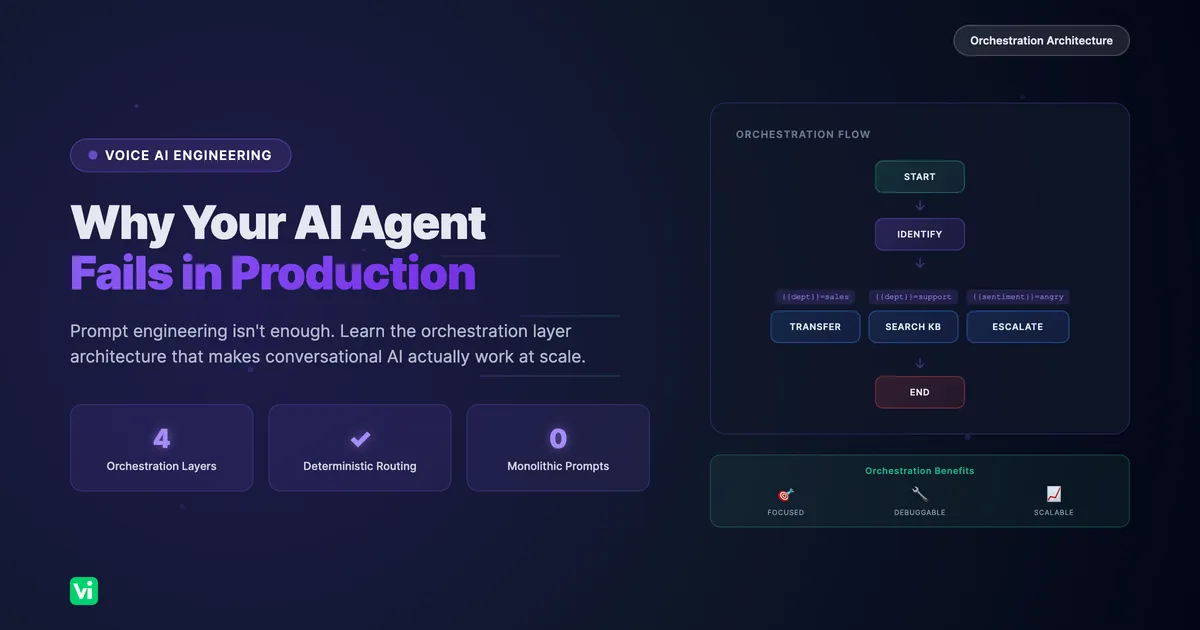
The proper way to build production-ready conversational agents is to divide complexity into discrete, manageable chunks and have an orchestration layer coordinate between them.
This is exactly what we rebuilt at VoiceInfra when we redesigned our workflows from the ground up. After extensive discussions with our team and partners building real-world voice AI deployments, we identified the key building blocks every orchestration layer needs.
1. Node-Based Architecture
Each conversation stage becomes a discrete node with a single responsibility:
| Node Type | Purpose | Example |
|---|---|---|
| Start | Entry point, initial greeting | "Thanks for calling Acme Support" |
| Conversation | Focused dialogue stages | "Collect caller name and account number" |
| Tool | Execute functions | CRM lookup, payment processing |
| Knowledge Base | Search documents | FAQ lookup, policy references |
| Transfer | Conditional call routing | Warm transfer to billing team |
| End | Clear termination states | "Your ticket has been created" |
The key insight: each node has its own prompt context. When you enter a "Collect Account Number" node, the LLM only knows about that task. It's not juggling 15 other responsibilities.
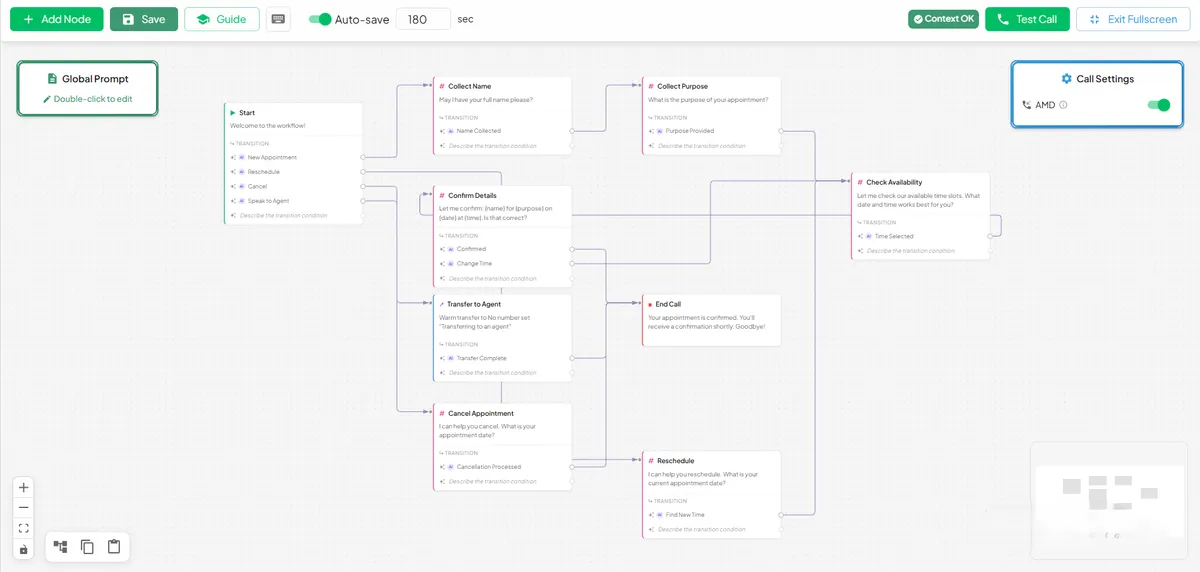
The workflow builder guide walks users through each node type: Start, Conversation, End Call, Transfer, Tool, and Knowledge Base. Each serves a specific purpose in the conversation flow.
2. Variable Extraction & State Management
Each node extracts only the variables it needs. These flow through the workflow as structured state, not buried in conversation history.
Node: "Greet & Identify"
  Extracts: {{customer_name}}, {{department}}, {{account_number}}
Node: "Check Account Status"
  Uses: {{account_number}}
  Extracts: {{account_status}}, {{last_payment_date}}
Node: "Routing Decision"
  Condition: {{account_status}} == 'delinquent'
  Transition: → Billing Node
This means:
Prompts stay focused and short
Variables are reusable across nodes
Equation-based transitions enable deterministic routing
You can debug exactly what was extracted and when
3. Conditional Transitions
We support two types of edges between nodes:
AI Transitions use natural language conditions:
"Customer wants to escalate to a manager"
"Caller is asking about pricing"
"Issue has been resolved"
Equation Transitions use extracted variables:
{{department}} == 'sales'
{{sentiment}} == 'negative' AND {{call_duration}} > 300
{{payment_status}} == 'failed'
This hybrid approach gives you flexibility without sacrificing control. Simple routing uses equations. Complex intent classification uses AI.
4. Context Isolation
This is where most implementations fail. Knowledge base searches happen in isolated nodes. Tool executions have their own message contexts. Your main conversation prompt never gets polluted with search results or API responses it doesn't need.
Consider a support flow:
[Identify Issue] → [Search KB] → [Provide Solution] → [Confirm Resolved]The "Search KB" node:
Takes the caller's last message as a query
Searches documents in isolation
Returns results to the orchestration layer
The next node receives structured results, not raw search context
Your main conversation LLM never sees the search mechanics. It just gets: "Here are the relevant articles."
What This Looks Like in Practice
Here's a real customer support workflow we built:
Start (Incoming Call)
  │
  ▼
[Greet & Identify]
  Extracts: {{customer_name}}, {{department}}, {{issue_description}}
  │
  ├─ {{department}} == 'sales' ──→ [Qualify Lead] → [Transfer to Sales]
  │                                     │
  ├─ {{department}} == 'support' ──→ [Check Account] → [Search KB] → [Resolve]
  │                                       │
  ├─ {{department}} == 'billing' ──→ [Verify Identity] → [Payment Flow]
  │
  └─ {{sentiment}} == 'angry' ──→ [Escalate] → [Transfer to Manager]
Each box is a node. Each arrow is a conditional transition. The orchestration layer handles routing, state, and context; your prompts handle conversation.
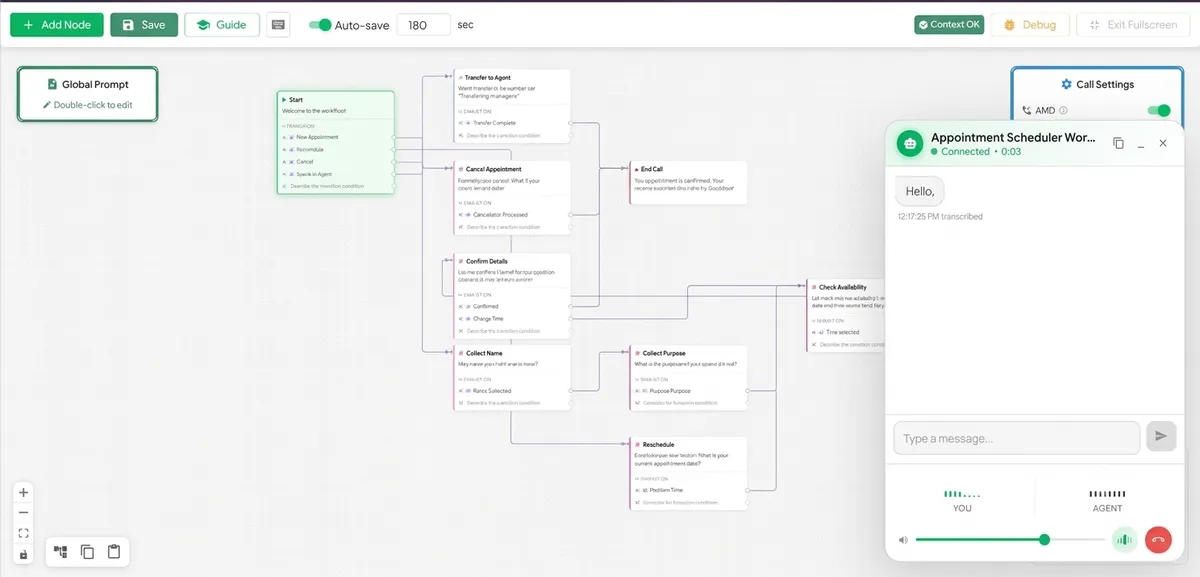
A complete workflow in action. The call session UI shows a real-time conversation while the active node is highlighted on the canvas. Notice how the workflow routes callers through different paths based on their needs.
Why This Works
Debugging becomes tractable. When something breaks, you know exactly which node failed. Was it the knowledge base search? The tool execution? The routing condition? You can inspect node-level logs instead of wading through full conversation transcripts.
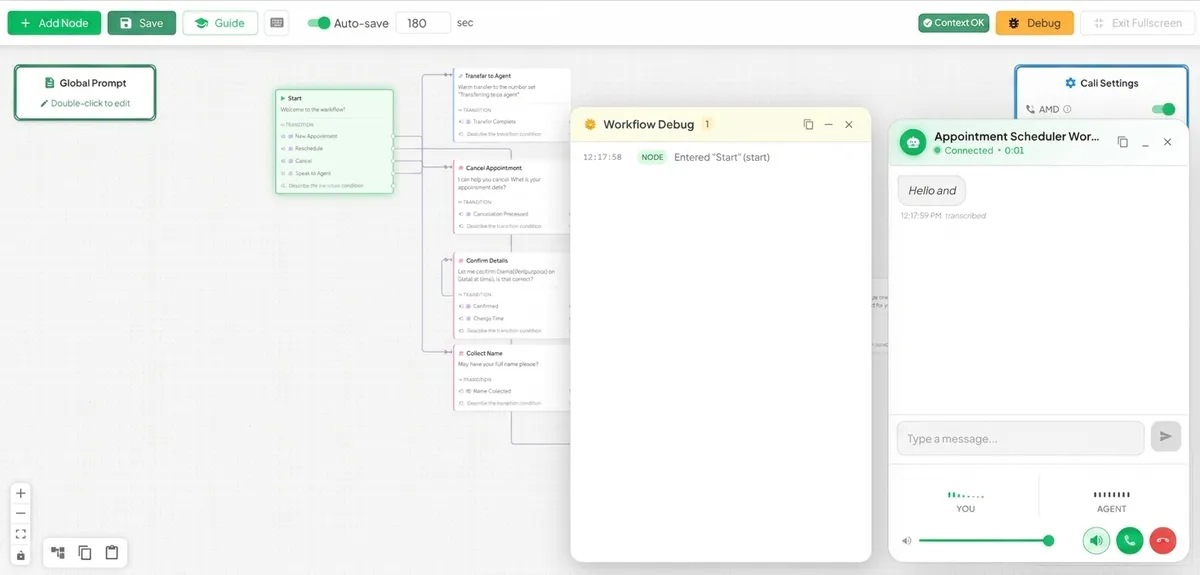
The debug panel shows real-time workflow execution, node transitions, variable extractions, tool calls, and knowledge base searches. Each event is timestamped and categorized, making it easy to trace exactly what happened during a call. Copy logs with one click for post-call analysis.
Prompts stay focused. Each node prompt does one thing well instead of juggling multiple responsibilities. Your "Greet Caller" prompt doesn't need to know about payment processing.
Complexity scales gracefully. Adding a new workflow path means adding nodes, not rewriting a monolithic prompt. Want to add a "VIP Customer" fast path? Add a condition, create two nodes, done.
Testing is isolated. You can test individual nodes without running full conversations. Test your knowledge base search node with sample queries. Test your routing conditions with edge cases.
State is explicit. Variables are extracted, named, and tracked. You're not relying on the LLM to "remember" something from 20 turns ago.
The Trade-Off
Yes, this requires more upfront design. You need to:
Map out your conversation flow
Identify state variables at each stage
Define transition conditions
Design node-level prompts
But that's the point, if you can't design the flow on paper, prompting won't fix it. The discipline of workflow design forces you to think through edge cases before they become production fires.
What We Learned Rebuilding VoiceInfra Workflows
When we redesigned our workflow system, we made some key decisions based on partner feedback:
Visual builder first. If you can't see your workflow, you can't reason about it. Our drag-and-drop builder shows nodes, edges, variables, and conditions in one view.
Templates for common patterns. Appointment scheduling, support triage, lead qualification, and payment collection are solved problems. Don't start from scratch.
Variables as first-class citizens. Extract once, use everywhere. Variables appear in conditions, in prompts, and in transfer logic.
Tool and KB nodes as isolated contexts. Keep your main conversation clean. Tool nodes handle API complexity. KB nodes handle search. Your conversation nodes handle dialogue.
Conditional transfers are built in. Route calls based on sentiment, keywords, call duration, or any extracted variable. Warm transfers announce the caller. Cold transfers just connect.
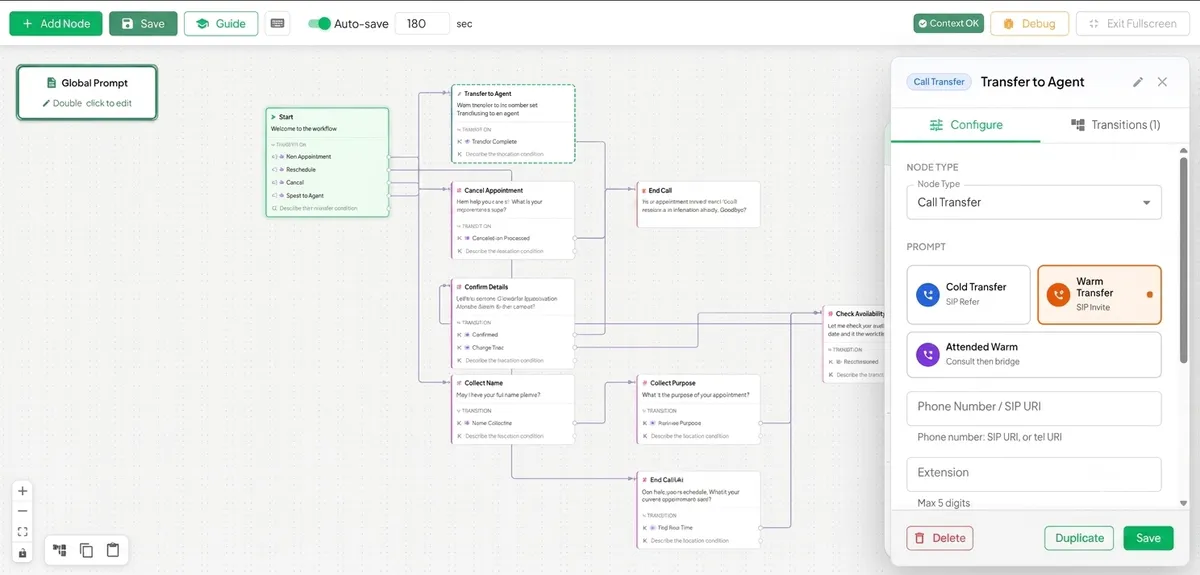
A Call Transfer node is being configured. The side panel shows transfer type (cold/warm), destination number, and custom messages. Transfer conditions can be based on variables like{{sentiment}} == 'negative'or{{call_duration}} > 300.
Analysis and recording per workflow. Not every workflow needs the same analysis. Configure structured analysis prompts per workflow, not globally.
The Bottom Line
Prompt engineering matters. But it's not a substitute for proper orchestration design. If your conversational agent needs to search documents, execute tools, check databases, and make routing decisions, you need a workflow layer, not just a better prompt.
The teams winning with voice AI right now aren't the ones with the best prompts. They're the ones who figured out how to orchestrate complexity.
The VoiceInfra team builds conversational AI infrastructure for UC/CX platforms. We've helped dozens of companies deploy production voice agents handling thousands of calls monthly. Try VoiceInfra to build workflow-powered voice agents.