Your IVR system works. It routes calls, handles basic inquiries, and integrates with your existing infrastructure. But here's the reality: 80% of calls are expected to be answered within 20 seconds (industry standard), yet traditional IVR menu navigation often takes longer than that just to reach the right department.
The good news? You don't need to rip out your entire phone system. You can enhance your existing IVR with Voice AI to create a conversational experience while keeping the infrastructure you've already invested in. According to recent data, 73% of consumers expect companies to deliver personalized interactions, and conversational AI enables exactly that, without replacing your existing infrastructure.
This guide shows you exactly how to upgrade your IVR to AI in a practical, step-by-step way.
What We Mean by "Conversational IVR"
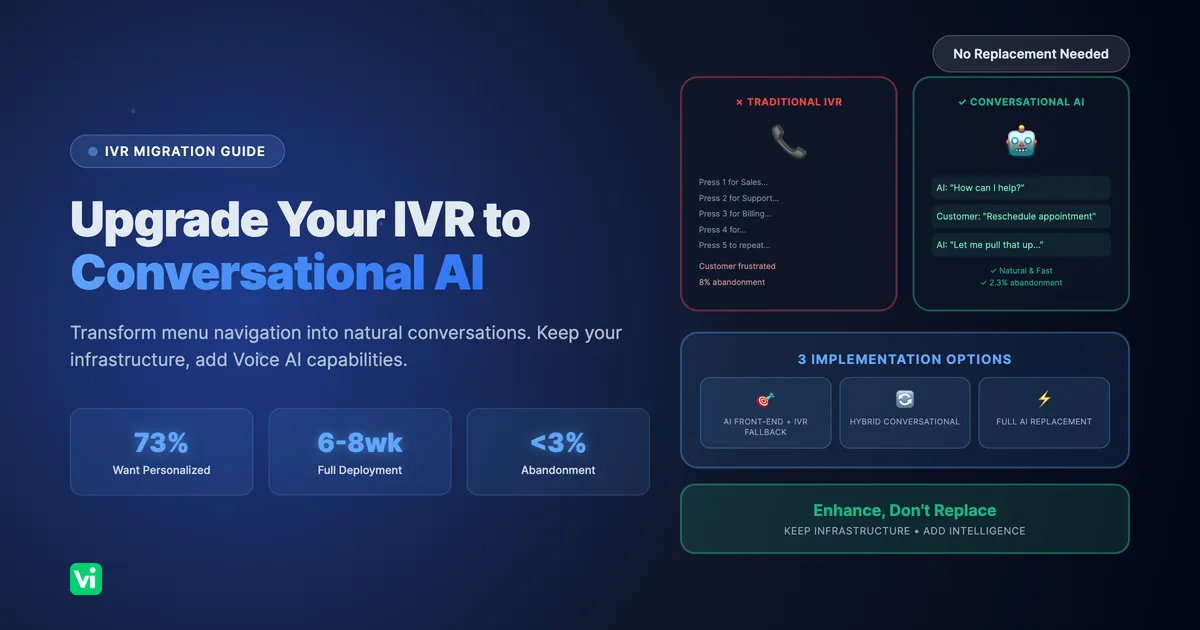
Instead of this:
IVR: "Press 1 for Sales, Press 2 for Support, Press 3 for Billing"
Customer: *presses 2*
IVR: "Press 1 for Technical Support, Press 2 for Account Issues..."
Customer: *already frustrated*
You get this:
AI: "Hi! How can I help you today?"
Customer: "I need to reschedule my appointment"
AI: "I can help with that. Let me pull up your appointment..."
Same backend systems. Same phone numbers. Natural conversation instead of menu navigation.
Three Ways to Add Voice AI to Your IVR
Here's a visual comparison of your three implementation options:
You have options depending on your current setup and goals:
Option 1: AI Front-End with IVR Fallback
How it works:
Voice AI answers the call first
Handles common requests conversationally (appointments, FAQs, simple tasks)
Falls back to your existing IVR for complex scenarios or when needed
Your IVR becomes the safety net, not the first experience
Best for:
Businesses with working IVR infrastructure
Want to test AI without major changes
Need to maintain existing call routing logic
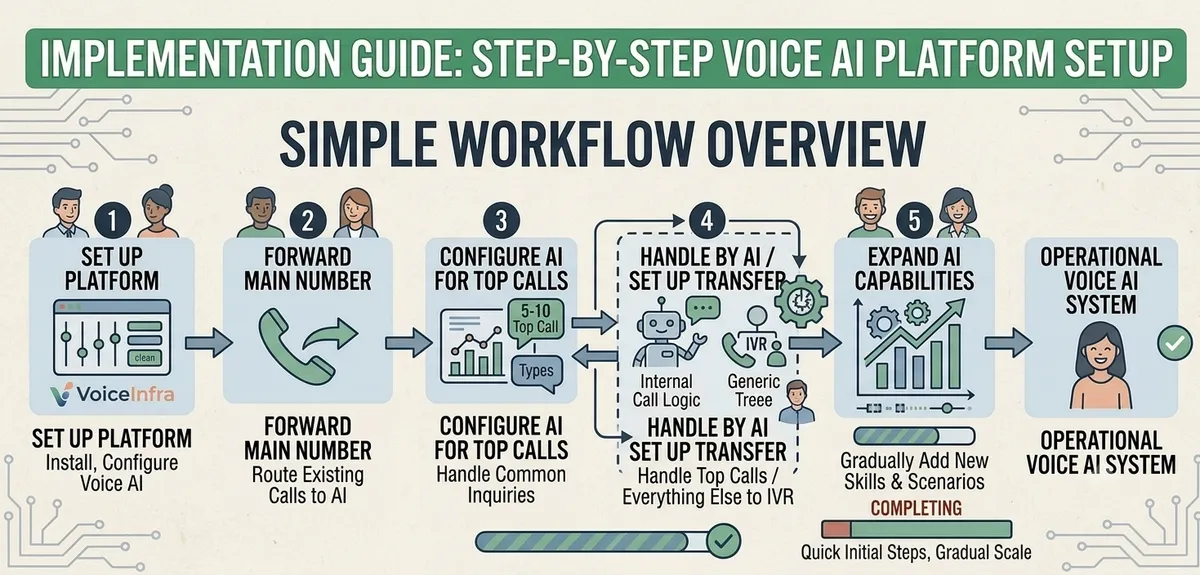
Implementation:
Set up Voice AI platform (VoiceInfra, etc.)
Forward your main number to AI.
Configure AI to handle the top 5-10 call types
Set up transfer to IVR for everything else
Gradually expand AI capabilities
Example flow:
Call comes in → AI answers
AI: "Hi! How can I help?"
Customer: "I need to pay my bill"
AI: Handles payment conversationally
---
Customer: "I need to speak to legal department"
AI: "Let me transfer you" → Routes to IVR → IVR handles specialized routing
Option 2: Hybrid Conversational IVR
How it works:
Keep your IVR structure
Add natural language understanding at each menu level
Customers can speak naturally OR use traditional menu options
Best of both worlds
Best for:
Complex organizations with department-specific routing
Compliance requirements for specific call flows
Gradual transition approach
Implementation:
Identify your current IVR menu structure
Add a Voice AI layer to the main menu
Allow natural language: "I want to schedule an appointment" instead of "Press 1."
Keep number options for those who prefer them
Expand to sub-menus over time
Example flow:
AI: "You can say what you need, or press 1 for Sales, 2 for Support, 3 for Billing"
Customer: "I need help with my account"
AI: *understands intent* "I'll help with your account. Are you looking to update information or check your balance?"
Customer: "Update my address"
AI: Handles conversationally
Option 3: Full Conversational Replacement
How it works:
Voice AI handles all calls from the start
No menu trees at all
Natural conversation for everything
IVR infrastructure retired or used only for emergency fallback
Best for:
Simpler call flows (under 10 main call types)
Customer-facing businesses prioritizing experience
Ready to fully commit to a conversational approach
Implementation:
Map all current IVR paths to conversational intents
Build Voice AI to handle all scenarios
Test extensively
Switch over (keep IVR as backup initially)
Monitor and optimize
Example flow:
AI: "Hi! How can I help you today?"
Customer: "What are your hours?"
AI: "We're open Monday through Friday, 9 AM to 6 PM, and Saturday 10 AM to 4 PM. Would you like to schedule something?"
Customer: "Yeah, I need an appointment next week"
AI: "I can help with that. What day works best for you?"
Step-by-Step: Implementing Conversational IVR
Let's walk through a practical implementation using Option 1 (AI Front-End with IVR Fallback) since it's the lowest-risk approach.
Week 1: Planning and Mapping
1. Analyze Your Current Call Data
Pull reports from your phone system:
What are the top 10 call reasons?
What percentage of calls go to each IVR menu option?
Where do customers abandon most often?
What's your current call volume by time of day?
2. Identify Quick Wins
Pick 3-5 call types that are:
High volume (handle lots of calls)
Simple to automate (appointment scheduling, hours/location, order status)
Currently frustrating in IVR (lots of menu navigation)
Examples:
✅ "Check appointment time" - simple lookup
✅ "Business hours and location" - static information
✅ "Reschedule appointment" - straightforward process
❌ "Complex billing dispute" - keep in IVR/human for now
3. Map Conversation Flows
For each use case, write out how the conversation should go:
Example: Appointment Scheduling
AI: "Hi! How can I help you today?"
Customer: "I need to schedule an appointment"
AI: "I can help with that. What type of appointment do you need?"
Customer: "Dental cleaning"
AI: "Great. What day works best for you?"
Customer: "Next Tuesday"
AI: [Checks calendar] "I have 10 AM, 2 PM, or 4 PM available on Tuesday the 12th. Which time works?"
Customer: "2 PM"
AI: "Perfect. Can I get your name and phone number?"
Customer: "John Smith, 555-1234"
AI: "Got it. I've scheduled your dental cleaning for Tuesday, December 12th at 2 PM. You'll receive a confirmation text. Anything else I can help with?"
Week 2: Technical Setup
1. Choose Your Voice AI Platform
For this guide, we'll use VoiceInfra, but the concepts apply to any platform.
2. Set Up Phone Number Forwarding
Option A: Call Forwarding (Fastest)
Log in to your current phone provider
Set up conditional forwarding: "Forward to [AI number] if busy or no answer."
This lets you test without changing your main number
Option B: Number Porting (Permanent)
Port your number to the Voice AI platform
Takes 2-4 weeks
Do this after a successful pilot
3. Configure Your AI Agent
In VoiceInfra (or your platform):
A. Set Up Basic Greeting
Greeting: "Hi! Thanks for calling [Your Business]. How can I help you today?"B. Define Intents
Create intents for your 3-5 use cases:
schedule_appointment
check_hours
order_status
reschedule_appointment
general_question
C. Add Training Phrases
For each intent, add variations of how customers might ask:
Intent: schedule_appointment
"I need an appointment."
"Can I schedule a visit?"
"I want to book a time."
"Do you have any openings?"
"I need to see the doctor."
D. Build Conversation Flows
Use the visual flow builder to create the conversation:

Week 3: Integration Setup
1. Connect Your Calendar System
Google Calendar Example:
In VoiceInfra, go to Functions
Click "Add Function" → Google Calendar
Authenticate with your Google account
Select which calendar to use
Test the connection
2. Connect Your CRM
HubSpot Example:
Go to Function → HubSpot
Enter your API key
Map fields: AI collects name, phone, email → Creates contact in HubSpot
Test with a dummy contact
3. Set Up IVR Fallback
Configure when to transfer to your existing IVR:
The customer explicitly asks for a human
AI confidence below 70%
Specific keywords ("legal," "compliance," "emergency")
After three failed attempts to understand
Transfer Configuration:
If: intent_confidence < 0.7
Then: "Let me connect you with our team who can help better"
Transfer to: [Your IVR number]
Week 4: Testing and Refinement
1. Internal Testing
Have your team call and test:
All happy path scenarios
Edge cases ("What if I say something weird?")
Transfers to IVR
Integration functionality (does the calendar actually book?)
Create test scenarios:
✅ Schedule appointment successfully
✅ Check business hours
✅ Request transfer to a human
✅ Ask something AI doesn't know
✅ Interrupt AI mid-sentence
✅ Use a poor phone connection/background noise
2. Fix Issues
Common issues and fixes:
AI doesn't understand: Add more training phrases
AI talks too much: Shorten responses
Integration fails: Check API credentials and test endpoints
Transfer doesn't work: Verify phone number format
3. Soft Launch
Start with a low-risk scenario:
After-hours calls only, OR
Overflow calls (when humans are busy), OR
Specific department with simple needs
Monitor closely for the first week.
Week 5-6: Gradual Rollout
1. Expand Coverage
Week 5: Add 2-3 more use cases. Week 6: Increase business hours
2. Monitor Key Metrics
Track daily:
Call volume handled by AI
Successful completions vs. transfers to IVR
Customer feedback (if you ask)
Integration success rate
3. Optimize Based on Real Calls
Review call transcripts:
Where does AI struggle?
What new questions are customers asking?
Are responses too long/short?
Is the tone appropriate?
Add to knowledge base: Every week, add 10-20 new Q&As based on actual customer questions.
Week 7-8: Full Deployment and Optimization
1. Switch to Primary
Make AI the first point of contact for all calls.
2. Continuous Improvement
Daily (15 min):
Check the dashboard for errors
Review any failed calls
Add new knowledge base entries
Weekly (1 hour):
Analyze 20-30 call transcripts
Identify patterns
Update conversation flows
Test improvements
Monthly (2 hours):
Full performance review
Expand to new use cases
Optimize integrations
Plan next phase
Real Implementation Example
Scenario: Dental Practice with 200 calls/week
Current State:
IVR with 4-level menu tree
Patients are frustrated navigating menus
30% of calls go to voicemail after hours
The front desk spends 60% of its time on the phone
Call abandonment rate: 8% (above the 5-7% industry average)
Implementation:
Week 1-2:
Set up the VoiceInfra AI agent
Configured for three use cases:
Schedule/reschedule appointments
Check appointment time
Business hours/location
Integrated with Google Calendar
Set up after-hours only
Week 3-4:
Tested with staff
Soft launch: after-hours calls
Result: 24 appointments booked outside business hours (previously 0)
Week 5-6:
Added: insurance verification, new patient intake
Expanded to overflow calls during business hours
Result: Front desk time on the phone reduced to 35%
Week 7-8:
Made AI primary for all calls
IVR is kept as a fallback for complex cases
Added: prescription refill requests, payment processing
Results After 8 Weeks:
78% of calls handled by AI without human intervention
47 after-hours appointments booked (new revenue)
Front desk time freed up for in-person patients
Patient satisfaction improved (informal feedback)
Call abandonment rate dropped from 8% to 2.3% (well below industry average)
IVR is still available but rarely used
Cost:
VoiceInfra: Usage-based at $0.05/minute
Typical usage for this practice: ~$80-120/month
ROI: Positive from after-hours bookings alone
Common Challenges and Solutions
Challenge 1: "AI Doesn't Understand Accents/Background Noise"
Reality Check: Modern speech recognition has improved dramatically, but it's not perfect. The key is having a graceful fallback.
Solution:
Modern AI handles accents well, but test with your customer base
Use confidence thresholds: if AI isn't sure, ask for clarification
Fallback: "I'm having trouble hearing. Let me connect you with someone who can help."
Challenge 2: "Customers Want to Speak to a Human"
Reality Check: Some customers will always prefer human interaction. 71% of consumers expect personalized interactions, but that doesn't mean they all want AI. The goal is to give them options.
Solution:
Always offer easy escalation: "Say 'representative' anytime to speak with someone."
Don't force AI on customers who prefer humans
Track why customers escalate to improve AI
Challenge 3: "Our Call Flows Are Too Complex"
Solution:
Start simple: automate three use cases, not 30
Use a hybrid approach: AI for simple, IVR for complex
Gradually expand as you learn what works
Challenge 4: "Integration with Our Systems Is Hard"
Solution:
Start with read-only integrations (looking up data)
Use VoiceInfra's CURL Function Creator for custom APIs
Many systems have pre-built connectors
Worst case: AI collects info and emails it to you
Challenge 5: "What If AI Makes a Mistake?"
Solution:
Set confidence thresholds (escalate if <70% confident)
Human review for high-stakes actions (cancellations, payments)
Start with low-risk use cases
Monitor and improve continuously
Measuring Success
Track these metrics to know if your conversational IVR is working:
Customer Experience:
Call abandonment rate (should decrease from the industry average of 5-7% to under 3%)
Average time to resolution (should decrease significantly, no more menu navigation)
Customer satisfaction (ask: "How was your experience? 1-5"), aim for 80%+ satisfaction
Operational:
% of calls handled by AI without transfer
After-hours calls successfully handled
Staff time freed up
Business:
After-hours appointments/sales captured
Cost per call
Revenue from previously missed calls
AI Performance:
Intent recognition accuracy
Integration success rate
Knowledge base coverage (% of questions AI can answer)
Integration Deep Dive: Connecting to Your Systems
One of the biggest advantages of adding Voice AI to your IVR is the ability to integrate with your existing business systems. Here's how to do it:
CRM Integration (Salesforce, HubSpot, Zendesk)
What it enables:
Look up customer information during calls
Create or update contact records automatically
Log call interactions
Personalize conversations based on history
Quick Setup with VoiceInfra:
Go to Functions → Select your CRM
Authenticate (API key or OAuth)
Map fields:
Customer phone → Lookup contact
Name, email collected → Create/update contact
Call transcript → Log as activity
Test with a sample call
Example conversation:
AI: "Can I get your phone number?"
Customer: "555-1234"
AI: [Looks up in CRM] "Thanks, Sarah! I see you're a customer since 2022. How can I help?"
Calendar Integration (Google Calendar, Outlook, Calendly)
What it enables:
Check real-time availability
Book appointments automatically
Send confirmations
Handle rescheduling
Quick Setup:
Connect calendar via OAuth
Define availability rules (business hours, buffer time)
Configure confirmation messages
Test booking flow
Example conversation:
AI: "What day works for you?"
Customer: "Next Tuesday"
AI: [Checks calendar] "I have 10 AM, 2 PM, or 4 PM available. Which works?"
Customer: "2 PM"
AI: [Books appointment] "Done! You're scheduled for Tuesday at 2 PM. Confirmation sent to your phone."
Custom Database/API Integration
What it enables:
Access proprietary business data
Update internal systems
Provide real-time information
Using VoiceInfra's CURL Function Creator:
Go to Functions → Create New
Enter your API endpoint
Configure headers (API keys, auth)
Map request parameters
Map response data
Test the function
Example: Order Status Lookup
Endpoint: GET https://api.yourcompany.com/orders/{orderNumber}
Headers: X-API-Key: your_key
Response Mapping:
  status → orderStatus
  tracking → trackingNumber
Conversation:
AI: "What's your order number?"
Customer: "12345"
AI: [Calls API] "Order 12345 shipped yesterday. Tracking number is 1Z999AA10123456784. Estimated delivery is Friday."
Frequently Asked Questions
How long does it take to implement conversational IVR?
Short answer: 1-2 weeks for basic setup, 6-8 weeks for full deployment.
Detailed timeline:
Week 1: Setup and configuration (2-4 hours)
Week 2-3: Testing and integration (4-6 hours)
Week 4: Soft launch and monitoring (2-3 hours)
Week 5-8: Gradual rollout and optimization (1-2 hours/week)
The beauty of the hybrid approach is that you can start small and expand gradually. You don't need to replace everything at once.
What if customers want to speak to a human?
This is one of the most common concerns, and it's actually easy to handle:
Always provide an escape hatch: Configure your AI to recognize phrases like "representative," "human," "agent," or "speak to someone" and immediately transfer the call.
Make it obvious: Your AI greeting can include: "I'm an AI assistant. I can help with [X, Y, Z]. Say 'representative' anytime to speak with a person."
Track escalations: Monitor why customers ask for humans. If it's always for the same reason, that's a signal to improve your AI for that use case or keep it as a human-only task.
Reality check: Most customers don't care if they're talking to AI or a human; they care about getting their problem solved quickly. If your AI can book their appointment in 30 seconds, they're happy.
Can conversational AI handle multiple languages?
Yes, but implementation varies by platform:
VoiceInfra supports:
English (US, UK, Australian accents)
Spanish
French
German
Portuguese
And more (check current language support)
Best practices for multilingual:
Start with your primary language
Add additional languages based on call volume
Use language detection to route appropriately
Consider separate AI agents per language for better accuracy
Hybrid approach: Use AI for high-volume languages, route others to human agents who speak that language.
What if the AI makes a mistake?
Great question. Here's how to minimize and handle errors:
Prevention:
Confidence thresholds: If AI is less than 70% confident it understands, it asks for clarification
Confirmation for critical actions: "Just to confirm, you want to cancel your appointment on Friday at 2 PM. Is that correct?"
Human review for high-stakes: Payments, cancellations, or sensitive data can require human approval
Start with low-risk use cases: Begin with appointment scheduling or FAQs, not financial transactions
When mistakes happen:
Easy escalation: Customer can always ask for a human
Monitoring: Review call transcripts daily to catch and fix issues
Continuous improvement: Every mistake is a learning opportunity to improve your AI
Reality check: Humans make mistakes, too. The goal isn't perfection; it's to handle routine tasks reliably while providing easy escalation for complex situations.
How much does this cost?
VoiceInfra Pricing:
$0.05 per minute of call time (usage-based)
$10 free credits to start (200 minutes of testing)
No monthly fees or long-term contracts
No setup fees or hidden costs
Example costs:
Small business (500 calls/month, 3 min avg): ~$75/month
Medium business (2,000 calls/month, 4 min avg): ~$400/month
Large business (10,000 calls/month, 3 min avg): ~$1,500/month
ROI considerations:
After-hours revenue: Appointments booked when you're closed
Staff time saved: Front desk can focus on in-person customers
Reduced abandonment: Fewer customers hanging up in frustration
Scalability: Handle call spikes without hiring
Compared to traditional IVR, Most businesses already pay for phone systems and IVR services. Adding conversational AI is often cost-neutral or cheaper when you factor in improved customer experience and staff efficiency.
Do I need technical skills to set this up?
No programming required. VoiceInfra is designed for non-technical users:
What you can do without coding:
✅ Build conversation flows (visual drag-and-drop)
✅ Connect to Google Calendar, Salesforce, HubSpot (pre-built integrations)
✅ Set up call routing and transfers
✅ Configure business hours and availability
✅ Create knowledge bases for FAQs
What might need technical help:
Custom API integrations (but VoiceInfra's CURL Function Creator makes this easier)
Complex database queries
Advanced authentication flows
Most businesses can set up basic conversational IVR in 2-4 hours without any technical expertise. For complex integrations, VoiceInfra offers implementation support.
What if my current IVR is very complex?
Complex IVR systems are actually perfect candidates for conversational AI. Here's why:
The problem with complex IVRs:
Customers get lost in menu trees
High abandonment rates
It's a long time to reach the right department
Difficult to maintain and update
The solution: Use the hybrid approach (Option 2 from earlier):
Keep your IVR structure for now
Add natural language understanding at the top level
Let customers speak their intent instead of navigating menus
AI routes to the right department/IVR path
Example:
Old way:
"Press 1 for Sales, 2 for Support, 3 for Billing"
→ "Press 1 for New Orders, 2 for Existing Orders..."
→ "Press 1 for Order Status, 2 for Returns..."
[Customer gives up]
New way:
"How can I help you today?"
"I need to return an order"
→ AI routes directly to returns department
You don't have to replace everything at once. Start by adding conversational AI to the most common call types (usually 5-10 use cases handle 70-80% of calls), and keep your complex IVR for edge cases.
Can I test this before fully committing?
Absolutely. Here's how to test risk-free:
1. Free Trial (Week 1)
Sign up for VoiceInfra ($10 free credits)
Build your first AI agent
Test internally with your team
No credit card required for trial
2. Soft Launch (Week 2-4)
Start with after-hours calls only (zero risk; these would go to voicemail anyway)
OR start with overflow calls (when your team is busy)
OR start with one specific use case (e.g., appointment scheduling only)
3. Gradual Rollout (Week 5-8)
Expand to more use cases
Increase coverage hours
Monitor and optimize
Keep IVR as a fallback
4. Full Deployment
Make AI primary only when you're confident
Keep IVR available for complex cases
Continue monitoring and improving
You can cancel anytime (no contracts), and you only pay for what you use. Most businesses know within 2-3 weeks if conversational AI is working for them.
Next Steps: Your Action Plan
Ready to upgrade your IVR to conversational AI? Here's what to do:
This Week:
Pull your call data (top call reasons, volume, abandonment)
Identify 3-5 simple, high-volume use cases
Map out conversation flows for those use cases
Next Week:
Sign up for VoiceInfra for a free trial
Set up a basic AI agent with a greeting
Configure your first use case
Test internally
Week 3-4:
Set up integrations (calendar, CRM)
Configure IVR fallback
Soft launch (after-hours or overflow)
Monitor and refine
Week 5-8:
Expand use cases
Increase coverage
Optimize based on real calls
Full deployment
Conclusion: Transform Your IVR Without Starting Over
You've just learned how to upgrade your IVR to conversational AI without ripping out your existing infrastructure. Let's recap the key takeaways:
✅ You Have Options
AI Front-End with IVR Fallback: Start simple, test fast, keep your safety net
Hybrid Conversational IVR: Best of both worlds, natural language + traditional menus
Full Conversational Replacement: Go all-in on AI with human escalation
✅ Start Small, Scale Smart
Begin with 3-5 high-volume use cases (appointments, FAQs, business hours)
Test with after-hours or overflow calls first
Expand gradually based on real performance data
Keep your IVR as a fallback until you're confident
✅ The Numbers Don't Lie
Industry standard: 80% of calls answered in 20 seconds, conversational AI makes this easy
73% of consumers expect personalized interactions, and AI delivers this at scale
Call abandonment rates drop from 5-7% to under 3% with conversational IVR
Most businesses see ROI within the first month from after-hours bookings alone
✅ Implementation Is Easier Than You Think
No coding required (visual conversation builders)
Pre-built integrations with popular tools
1-2 weeks for basic setup, 6-8 weeks for full deployment
Usage-based pricing means you only pay for what you use
✅ Your Customers Will Thank You No more:
"Press 1 for... Press 2 for... Press 3 for..."
Getting lost in menu trees
Waiting on hold just to ask a simple question
Calling back during business hours for basic tasks
Instead:
Natural conversations that feel human
Instant answers to common questions
24/7 availability for routine tasks
Easy escalation to humans when needed
The Bottom Line:
Your IVR doesn't have to be frustrating. You don't have to choose between your existing infrastructure and modern customer experience. With conversational AI, you can enhance what you have, keep what works, and give your customers the natural, efficient experience they expect.
The best part? You can start testing this week. Pick your top 3 call types, sign up for a free trial, and see how conversational AI handles real customer interactions. No commitment, no risk, just real results.
Ready to make your IVR conversational?
Get Started with VoiceInfra
VoiceInfra makes it easy to add conversational AI to your existing phone system:
✓ No-Code Setup
Visual conversation builder
No programming required
Pre-built templates
✓ Easy Integrations
Google Calendar, Outlook
Salesforce, HubSpot, Zendesk
Custom APIs with CURL Function Creator
✓ Flexible Deployment
Works with your existing phone numbers
Call forwarding or number porting
Gradual rollout options
✓ Transparent Pricing
$0.05/minute usage-based pricing
$10 free credits to start
No monthly fees or long-term contracts
Ready to make your IVR conversational?
👉 Start Free Trial - Test with your use cases
👉 Schedule Demo - See it in action
Related Resources
More Implementation Guides: