Your Voice AI agent is only as good as the information it has access to. Without proper training on your business knowledge base, it'll give generic answers, make up information, or worse, confidently tell customers the wrong thing.
The solution? Train your Voice AI on your actual business knowledge base using RAG (Retrieval-Augmented Generation). According to recent studies, RAG reduces AI hallucinations by up to 30% compared to traditional models, while dramatically improving response accuracy to 90%+.
This comprehensive guide shows you exactly how to train your Voice AI agent on your business knowledge base, no PhD in machine learning required. You'll learn how to integrate your FAQs, policies, and documentation to create a custom-trained AI voice agent that delivers accurate, helpful responses every time.
Why Your Voice AI Needs Your Knowledge Base
The Problem with Untrained AI:
Imagine a customer calls and asks: "What's your return policy for custom orders?"
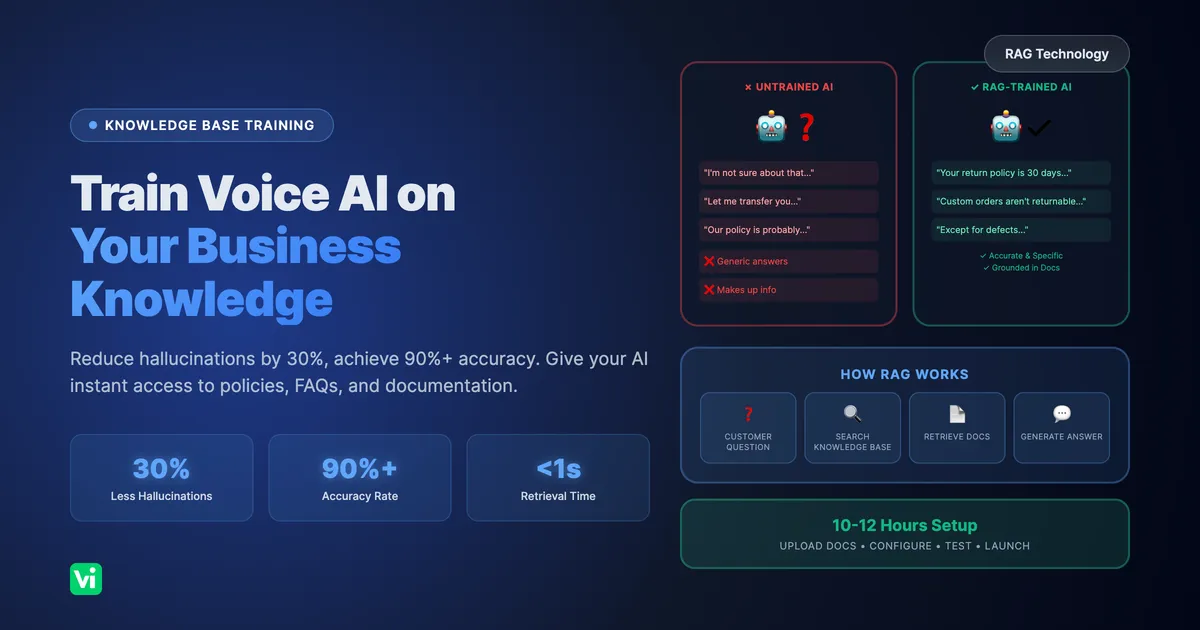
Without knowledge base training:
AI: "Our standard return policy is 30 days for all items." ❌ (Wrong custom orders aren't returnable)
AI: "Let me transfer you to someone who can help." ❌ (Defeats the purpose of AI)
AI: "I'm not sure about that specific policy." ❌ (Unhelpful)
With knowledge base training:
AI: "Custom orders are made specifically for you and aren't eligible for returns. However, if there's a defect or error on our part, we'll remake it at no charge. Would you like me to check if your order qualifies?" ✅
The difference? Your AI has instant access to your actual policies, documentation, and business knowledge.
The Numbers:
30% reduction in hallucination rates with RAG vs. traditional AI (Dataversity, 2024)
67% improvement in retrieval accuracy with proper knowledge base structure (Anthropic, 2024)
Sub-second retrieval times for knowledge base queries in production systems
85%+ accuracy achievable with well-structured knowledge bases
What is RAG (And Why You Should Care)
RAG = Retrieval-Augmented Generation
Think of it like this:
Traditional AI: Relies only on what it learned during training (like a student taking a test from memory)
RAG-powered AI: Can look up information in real-time from your knowledge base (like a student taking an open-book test)
How it works:
Customer asks a question
AI searches your knowledge base for relevant information
AI uses that information to generate an accurate, grounded response
Customer gets the right answer based on YOUR business knowledge
Why it matters:
✅ AI answers are grounded in your actual documentation
✅ Dramatically reduces "hallucinations" (making up information)
✅ Easy to update, just update your knowledge base, not the AI model
✅ Works with your existing documents (PDFs, websites, docs, FAQs)
What to Include in Your Knowledge Base
Your knowledge base should contain everything your AI needs to answer customer questions accurately.
1. FAQs and Common Questions
What to include:
Frequently asked questions and answers
Common customer inquiries
Troubleshooting guides
"How do I..." questions
Example:
Q: What are your business hours?
A: We're open Monday-Friday 9 AM to 6 PM EST, and Saturday 10 AM to 4 PM EST. We're closed on Sundays and major holidays.
Q: Do you offer same-day delivery?
A: Yes, same-day delivery is available for orders placed before 2 PM EST within our local delivery zone (zip codes 10001-10099). The fee is $25.
Pro tip: Use actual customer questions from your support tickets, emails, and call transcripts.
2. Policies and Procedures
What to include:
Return/refund policies
Shipping policies
Cancellation policies
Payment terms
Example:
Policy: Return Policy
- Standard items: 30 days from purchase, unused with tags
- Refund: Original payment method within 5-7 business days
- Custom orders: Non-returnable (exception: defects/errors on our part)
- Damaged items: Contact within 48 hours with photos for replacement

Policy: Cancellation Policy
- Cancel 24+ hours before: Full refund
- Cancel 12-24 hours before: 50% refund
- Cancel <12 hours: No refund
- Emergency exception: Medical emergencies with documentation
Pro tip: Format clearly with conditions and exceptions so AI knows exactly when each rule applies.
3. Product/Service Information
What to include:
Product specifications
Service descriptions
Pricing (if public)
Features and benefits
Compatibility information
Example:
Product: Premium Support Plan
- Price: $99/month
- Features: 24/7 phone support, priority tickets, dedicated account manager
- Response time: <2 hours critical, <4 hours standard
- Best for: Businesses with 10+ employees
- Includes: Unlimited support requests, quarterly strategy calls

Product: Wireless Headphones Model X200
- Battery life: 30 hours
- Bluetooth: 5.2 (range up to 100 feet)
- Compatibility: iOS, Android, Windows, Mac
- Warranty: 2 years
- Colors: Black, Silver, Navy Blue
4. Process Documentation
What to include:
How to place orders
How to schedule appointments
How to request support
Account setup processes
Example:
Process: Scheduling an Appointment
1. AI asks: "What service do you need?" (cleaning, exam, emergency)
2. AI checks: Real-time calendar availability
3. Customer provides: Preferred date/time
4. AI confirms: "I've scheduled your cleaning for Tuesday, March 15 at 2 PM with Dr. Smith"
5. Confirmation sent: SMS and email with appointment details
6. Reminder: Automated reminder 24 hours before
7. To reschedule: Call or text at least 4 hours before appointment

Process: Requesting a Refund
1. Verify purchase: Order number or email used
2. Check eligibility: Within 30 days, unused condition
3. Provide reason: Optional but helps us improve
4. Return label: Emailed within 24 hours
5. Refund processed: 5-7 business days after we receive item
5. Company Information
What to include:
Business hours
Locations and contact info
Certifications or credentials
Accepted payment methods
Example:
Business Hours:
- Monday-Friday: 9 AM - 6 PM EST
- Saturday: 10 AM - 4 PM EST
- Sunday: Closed
- Holidays: Closed (Thanksgiving, Christmas, New Year's Day)
- After-hours: AI assistant available 24/7 for appointments and FAQs

Locations:
- Main Office: 123 Main Street, New York, NY 10001
- Phone: (555) 123-4567
- Email: support@company.com
- West Coast Office: 456 Market St, San Francisco, CA 94102

Payment Methods:
- Credit cards: Visa, Mastercard, Amex, Discover
- Digital: PayPal, Apple Pay, Google Pay
- Other: ACH bank transfer, checks (by mail)
- Payment plans: Available for orders over $500
How to Structure Your Knowledge Base for AI
The format matters. AI performs better with well-structured information.
Best Practices:
1. Use Clear Q&A Format
✅ "Q: Do you accept insurance? A: Yes, we accept Blue Cross, Aetna, Cigna..."
❌ "Insurance stuff: We take some insurance. Call to check."
2. Be Specific and Complete
Include timeframes, conditions, and exceptions
✅ "Ships 1-2 business days via USPS Priority. Delivery 2-3 days domestic."
❌ "We ship fast. Usually a few days."
3. Use Consistent Formatting
Q&A format for FAQs
Policy: [Name] for policies
Process: [Name] for procedures
4. Keep It Updated
Review quarterly
Update when policies change
Add new FAQs based on actual customer questions
Step-by-Step: Training Your Voice AI
Step 1: Gather Your Knowledge (Week 1)
Collect existing docs: Website FAQs, support docs, policies, product manuals
Analyze customer questions: Review support tickets, emails, calls; identify top 20-30 questions
Fill gaps: Document questions that aren't currently answered
Time: 4-6 hours
Step 2: Format Your Knowledge Base (Week 1-2)
Choose format: Plain text (.txt), Markdown (.md), PDFs, or web pages
Structure content: One topic per document with clear headings
Organize by category: FAQs, Policies, Products, Processes
Time: 3-5 hours
Step 3: Upload to VoiceInfra (15 minutes)
Log into VoiceInfra dashboard → Knowledge Base section
Upload documents (drag-and-drop, paste text, or connect URL)
VoiceInfra automatically processes, creates embeddings, and indexes
Supported: .txt, .md, PDF, .docx, web pages, CSV
Pro tip: Start with the top 10-15 questions, add more later.
Step 4: Configure Retrieval Settings (10 minutes)
1. Relevance Threshold: 70-80% similarity (how closely the question must match) 2. Number of Results: 3-5 results per query 3. Fallback Behavior: What AI says when it can't find info ("Let me transfer you...")
Step 5: Test and Refine (Week 2-3)
Test with:
Common questions (hours, policies, payment)
Edge cases (custom order returns, damaged items)
Unclear questions ("How do I get my money back?")
Monitor weekly:
Review call transcripts
Identify AI struggles
Add missing Q&As
Update unclear entries
Quick fixes:
AI says "I don't know" → Lower threshold to 70-75%
Irrelevant answers → Raise threshold to 80-85%
Slow responses → Reduce to 3 results
Outdated info → Update knowledge base
Advanced Tips for Better Results
1. Use Customer Language
❌ "What is your merchandise return procedure?"
✅ "Can I send this back if it doesn't fit?"
2. Include Question Variations
Q: What are your hours? / When are you open? / What time do you close?
A: We're open Monday-Friday 9 AM to 6 PM EST...
3. Add Context to Answers Don't just answer; anticipate follow-ups. Include timeframes, costs, and exceptions.
4. Use Examples for Complex Policies
Return Policy: Items must be unworn with tags attached.
✅ Can return: Tried on at home
❌ Can't return: Wore to an event
5. Update Based on Real Calls Weekly: Review 10-20 transcripts, add struggled questions, and clarify confusing entries.
6. Separate Customer vs. Internal Info Customer KB: Policies, shipping, products Internal KB: Staff procedures, escalation protocols
Common Mistakes to Avoid
❌ Information Overload: Don't upload 200-page handbooks. Start with customer FAQs only.
❌ Vague Answers: "See our website" defeats the purpose. Include complete answers.
❌ Never Updating: Policies change. Schedule monthly reviews.
❌ No Quality Control: Test before launch. Monitor ongoing.
❌ Ignoring Analytics: Review "I don't know" responses weekly, add missing info.
Measuring Success
Accuracy Metrics:
Knowledge base hit rate: 60-80% target
Accuracy rate: 90%+ target
Hallucination rate: <5% with RAG
Performance Metrics:
Retrieval time: <1 second
Response time: <3 seconds
Containment rate: 50-70%
Business Metrics:
Customer satisfaction: 4.0+/5.0
Staff time saved per week
Total calls AI handles
How to measure: Review call transcripts (20-30/week), customer surveys, VoiceInfra analytics
Frequently Asked Questions
How much content do I need to start?
Minimum: 10-15 well-written Q&As. Ideal: 30-50 Q&As plus key policies. Remember: Quality over quantity.
Can I use my existing website content?
Yes! VoiceInfra ingests website URLs, help center articles, blog posts, and product pages. May need reformatting to Q&A format for best results.
How often should I update?
Minimum: When policies change. Recommended: Monthly reviews, Best: Weekly 30-min transcript review
What if my AI gives a wrong answer?
Review transcript
Identify the retrieved entry
Update/clarify
Test fix
Prevention: Test before launch, use fallback phrases for uncertainty.
Can I have multiple knowledge bases?
Yes! Separate by department, product, or audience. Configure which KB each AI agent uses.
How technical is this?
No coding required. If you can write an FAQ and upload a file, you can do this. VoiceInfra handles the technical RAG implementation.
Knowledge base vs. prompts?
Prompts: HOW AI behaves ("Be friendly," "Confirm appointments") Knowledge Base: WHAT AI knows (policies, hours, products) You need both.
Will this work for specialized industries?
Yes! RAG excels with specialized knowledge: medical, legal, technical support, and financial services. More specialized = more valuable.
Conclusion: Knowledge is Power (for Your AI)
Training your Voice AI on your business knowledge base transforms it from a basic call router into an intelligent assistant that actually helps customers.
What you've learned:
✅ Why RAG reduces hallucinations by 30% and improves accuracy
✅ What to include in your knowledge base (FAQs, policies, processes, products)
✅ How to structure information for the best AI performance
✅ Step-by-step implementation (10-12 hours total)
✅ How to test, measure, and continuously improve
The bottom line:
Setup time: 10-12 hours initially
Maintenance: 1-2 hours/month
Results: 60-80% of calls handled by AI with 90%+ accuracy
ROI: Typically positive within the first month
Start small, iterate fast:
This week: Gather your top 15 FAQs
Next week: Format and upload to VoiceInfra
Week 3: Test and refine
Week 4: Launch and monitor
Ongoing: Add 5-10 new Q&As monthly based on real calls
Your customers are already asking questions. Make sure your AI has the correct answers.
Get Started with VoiceInfra
VoiceInfra makes knowledge base training simple:
✓ Easy Upload
Drag-and-drop documents
Paste text directly
Connect website URLs
Automatic processing
✓ Smart RAG Technology
Automatic vector embeddings
Fast retrieval (<1 second)
Relevance scoring
Continuous learning
✓ No Technical Skills Required
Visual knowledge base editor
Test mode before going live
Analytics dashboard
Built-in optimization
✓ Transparent Pricing
$0.05/minute usage-based pricing
$10 free credits to start
No monthly fees or long-term contracts
Knowledge base included (no extra cost)
Ready to train your Voice AI?
👉 Start Free Trial - Upload your first knowledge base today
👉 Schedule Demo - See RAG in action
Related Resources
More Implementation Guides: