Your customers are calling your WhatsApp Business number, and you're missing those calls. WhatsApp has 3 billion monthly active users, and 35% of business calls happen after hours when your staff isn't available to answer.
The good news? You don't need to hire more staff or build a call center. You can add Voice AI to your existing WhatsApp Business setup and handle inbound calls naturally, conversationally, and 24/7.
Your customers already use WhatsApp every day. Now they can call your WhatsApp number and talk to an AI agent that handles appointments, answers questions, processes orders, and transfers to your team when needed. No new apps to download. No learning curve. Just natural voice conversations using the platform they already love.
This guide shows you exactly how to integrate voice AI with WhatsApp Business API in a practical, step-by-step way.
What We Mean by "WhatsApp Voice AI"
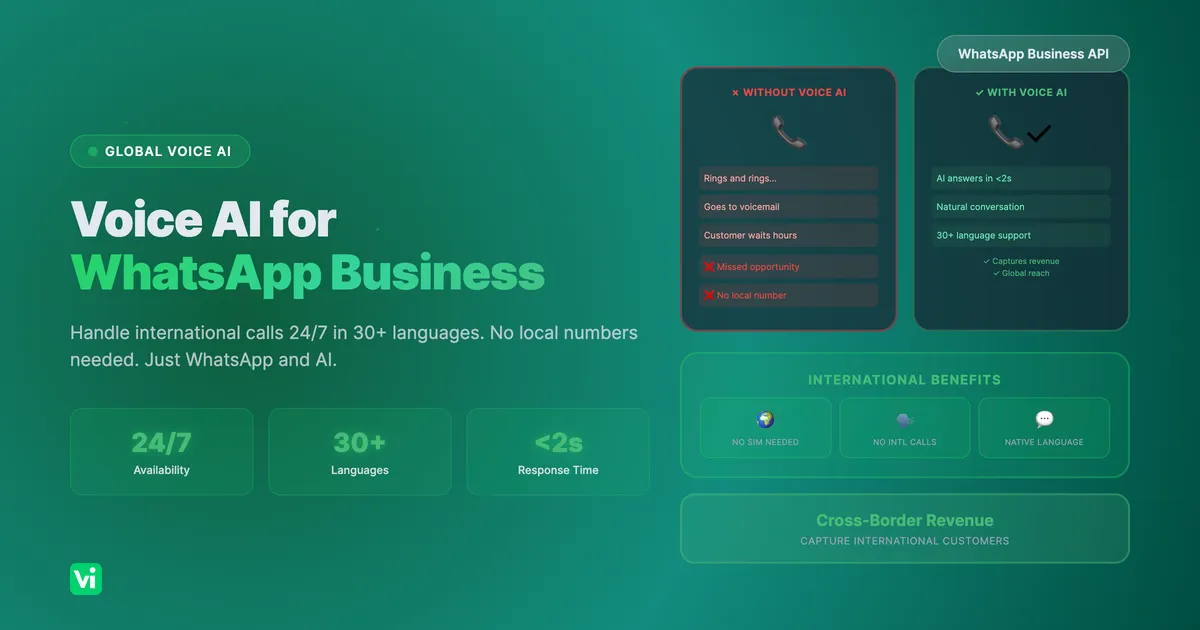
Instead of this:
Customer calls WhatsApp number → Rings and rings → Goes to voicemail
Customer has to call back during business hours or send a text message
Wait 2-4 hours for response
You get this:
Customer calls WhatsApp number → AI answers in under 2 seconds
AI: "Hi! How can I help you today?"
Customer: "I need to reschedule my appointment"
AI: "I can help with that. Let me pull up your appointment..."
Conversation completes in under 2 minutes
Same WhatsApp Business setup that your customers already use. Same phone number. Natural conversation instead of missed calls and voicemail.
Why WhatsApp Voice AI Makes Sense Now
The Problem with Traditional WhatsApp Calling
WhatsApp Business has voice calling enabled, but most businesses can't actually answer those calls:
After-hours calls go to voicemail (or aren't answered at all)
Peak times mean customers wait or call multiple times
Single-language support excludes international customers
Limited capacity, you can only handle as many calls as you have staff
The real cost:
Each missed call represents $200-2,000 in lost opportunity
67% of customers will try a competitor if they can't reach you immediately
35% of business calls happen after hours, prime time for missed opportunities
Why Now? WhatsApp Business API Voice Calling Is Mature
It wasn't always this way. WhatsApp Business API has evolved:
2020-2021: Basic messaging API only
2022-2023: Voice calling API introduced, limited testing
2024: Full voice calling API with SIP support
2025: Enterprise-grade with 1,000+ concurrent call support
What changed:
WhatsApp Business API now supports full SIP integration
1,000 concurrent voice channels are free with enterprise accounts
Zero cost for inbound WhatsApp calls (you only pay for the AI processing)
Robust documentation and proven implementation patterns
The result: You can now add enterprise voice AI to WhatsApp without infrastructure investment, and it works at scale.
Real Implementation: What This Actually Looks Like
Healthcare Practice: After-Hours Appointment Scheduling
The Challenge:
Medical practice with 15,000+ patients
40+ calls per day after hours going to voicemail
Patients are frustrated waiting until the next day to schedule
Front desk staff spending 60% of their time on appointment-related calls during business hours
What They Can Do:
Week 1: Set up WhatsApp Business API and VoiceInfra AI agent
Week 2: Configured for appointment scheduling and basic FAQs
Week 3: Integrated with practice management system
Week 4: Launched for after-hours calls only
The Customer Experience:
Patient calls WhatsApp number: (555) 555-1234
[AI answers in under 2 seconds]
AI: "Hi! I can help you schedule appointments, check your next visit, or answer questions about our practice. What would you like to do?"
Patient: "I need to reschedule my appointment from next Tuesday"
AI: "I can help with that. Let me look up your appointment. What's your phone number?"
Patient: "555-123-4567"
AI: [Checks practice management system] "Found you, Maria. You have a dental cleaning with Dr. Rodriguez scheduled for Tuesday, January 14th at 10:30 AM. When would you like to reschedule to?"
Patient: "Next Friday works for me"
AI: "Let me check availability. Dr. Rodriguez has openings on Friday at 9:00 AM, 11:30 AM, or 3:00 PM. Which time works best?"
Patient: "11:30 AM is perfect"
AI: "Great! I've rescheduled your cleaning for Friday, January 17th at 11:30 AM with Dr. Rodriguez. I'll send a confirmation to your phone. Is there anything else I can help you with?"
Patient: "No, that's all. Thanks!"
AI: "You're welcome, Maria! Have a great day."
Key Benefit: Capture appointments that would otherwise go to voicemail, allowing patients to schedule outside business hours without waiting until the next day.
Cost:
WhatsApp Business API: FREE (included with verified business account)
VoiceInfra: ~80−120/month (usage−based at 0.05/minute)
Value: Capture revenue from after-hours appointments
E-commerce Business: Multilingual Customer Support
The Challenge:
Online retailer with customers in 25 countries
Limited support to 2 languages (English and Spanish)
Customers are calling and waiting hours for responses
No 24/7 coverage despite a global customer base
What They Can Do:
Week 1: Set up WhatsApp Business with voice calling enabled
Week 2: Configured VoiceInfra AI with 5 languages (English, Spanish, French, German, Portuguese)
Week 3: Integrated with order management system
Week 4: Launched 24/7 with automatic language detection
The Customer Experience:
Customer in Spain calls WhatsApp number: +34-123-456-789
[AI answers in under 2 seconds]
AI: "¡Hola! Thank you for calling GlobalShop. Hablo español también. \nI can help track orders, process returns, or answer product questions. How may I assist you today?"
Customer: "Quiero saber el estado de mi pedido" [I want to know my order status]
AI: "Perfecto! Let me look up your order. What's your order number or email address?"
Customer: "john@email.com"
AI: [Looks up in order system] "I found your order #12345 placed on January 10th. Your package shipped yesterday via DHL Express. Tracking number: 1Z999AA10123456784. Expected delivery: Thursday, January 16th."
Customer: "Muchas gracias"
AI: "¡De nada! Is there anything else I can help you with today?"
Customer: "No, eso es todo"
AI: "Perfecto. Have a great day!"
Key Benefit: Serve global customers 24/7 in their preferred languages without expanding the support team size.
Cost:
WhatsApp Business API: FREE
VoiceInfra: ~$250-400/month (higher volume due to international usage)
Value: Expand global reach and customer satisfaction
International Travel Services: Cross-Border Communication
The Challenge:
UK-based taxi company with 300+ drivers across London, Manchester, and Birmingham
Tourists and business travelers calling from the US, Canada, Australia, and Europe
No local phone numbers, travelers don't want expensive international calls
Language barriers with international callers
Missed bookings from travelers who prefer WhatsApp over phone calls
The Value Proposition: When someone travels internationally, they don't have a local phone number. They find your business online, see your WhatsApp Business number, and can call you directly without:
Expensive international phone calls
Buying local SIM cards
Language barriers (AI handles 30+ languages)
Time zone issues (24/7 availability)
What They Can Do:
Week 1: Set up WhatsApp Business with voice calling enabled
Week 2: Configured VoiceInfra AI for booking, ride tracking, pricing
Week 3: Set up 5 language assistants (English, Spanish, French, German, Arabic)
Week 4: Launched 24/7 for international bookings
The Customer Experience (Traveler from Australia in London):
Australian tourist calls WhatsApp: +44-20-7946-0000
[AI answers in under 2 seconds]
AI: "Hello! Thank you for calling London Cabs. I can help you book a ride, check prices, or track your driver. How may I assist you today?"
Traveler: "Hi, I need to get from Heathrow Airport to Kensington Hotel"
AI: "I can help with that. When would you like the ride?"
Traveler: "I'm landing at 8 PM tonight, flight QF9"
AI: "Perfect. Let me check driver availability. For a ride from Heathrow to Kensington at 8 PM, I have several options. Standard ride is £45-55 depending on traffic, luxury car is £85-95. Which would you prefer?"
Traveler: "Standard ride is fine"
AI: "Got it. Standard ride booked for 8 PM tonight from Heathrow to Kensington Hotel. Total fare will be approximately £45-55 depending on traffic. I'll send you confirmation with your driver's details and tracking link. Will you need anything else?"
Traveler: "Perfect, thanks!"
AI: "You're welcome! Have a great stay in London. Safe travels!"
Key Benefits:
Access international customers without local phone numbers
No international calling fees, WhatsApp calls over WiFi/data
Multilingual AI handles language barriers automatically
Instant booking without navigating unfamiliar phone systems
Works even if the traveler doesn't have a UK SIM card
Cost:
WhatsApp Business API: FREE
VoiceInfra: ~$350-500/month (international volume + multi-language AI)
Value: Open a new international customer segment that was previously inaccessible
Key Insight: International travelers actively seek businesses that accept WhatsApp calls. It's a competitive advantage.
Technical Architecture: How It Works
Don't worry, you don't need to understand the technical details to use this. But here's the overview in case you're curious:
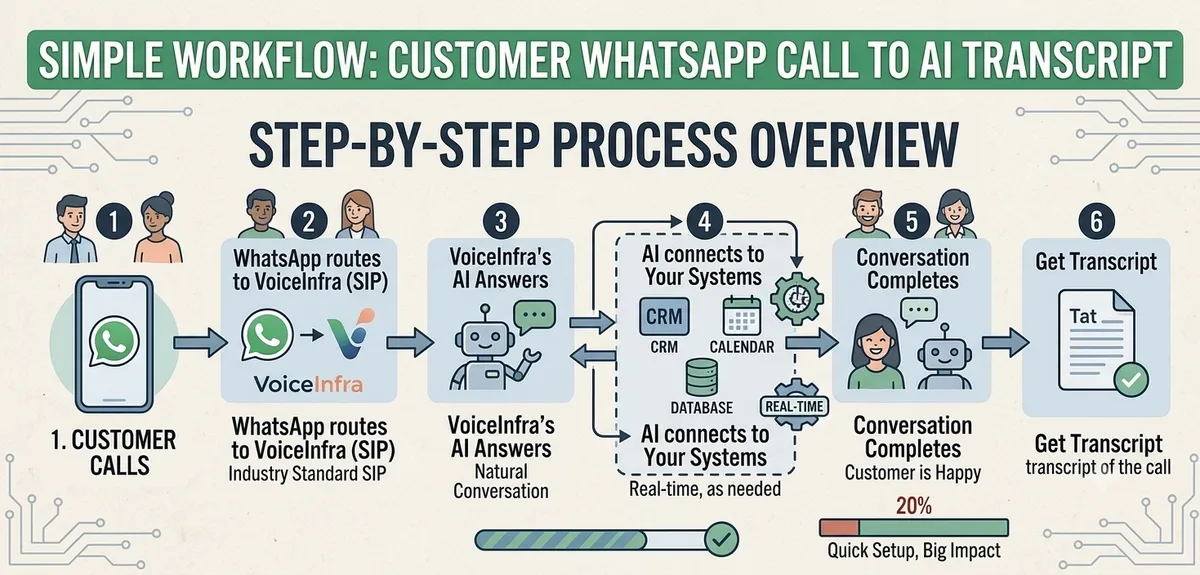
In simple terms:
Customer calls your WhatsApp Business number
WhatsApp routes the call to VoiceInfra via SIP (industry standard)
VoiceInfra's AI answers and has a natural conversation
AI connects to your systems (CRM, calendar, etc.) in real-time as needed
Conversation completes, customer is happy, you get a transcript of the call
What you need:
✅ WhatsApp Business account (verified)
✅ WhatsApp Business API access
✅ VoiceInfra account for the AI agent
✅ That's it, no new infrastructure, no servers, no technical team required
Step-by-Step Implementation Guide
Let's walk through the complete setup process. I'll break this down into manageable phases.
Phase 1: WhatsApp Business Setup (15 minutes)
Prerequisites: Before you start, you'll need:
WhatsApp Business account (you can create this if you don't have one)
Meta Business Manager access
Business verification completed
Step 1: Verify Your WhatsApp Business Account
If you don't already have a verified WhatsApp Business account:
# Via Meta Business Manager

1. Go to business.facebook.com
2. Business Settings → Accounts → WhatsApp Business Accounts
3. Click "Add" → "Create a new WhatsApp Business Account"
4. Enter your business phone number
5. Verify phone ownership via SMS or voice call
6. Complete business verification (upload business documents)
Step 2: Enable Voice Calling on Your WhatsApp Number
Once you have a verified WhatsApp Business account:
# In Meta Business Manager

1. Go to Business Settings → Accounts → WhatsApp Business Accounts
2. Select your phone number
3. Click "Account Tools" → "Phone Numbers"
4. Click on your phone number to open details
5. Go to the "Call Settings" tab
6. Toggle "Allow Voice Calls" to ENABLED
7. Save changes
Step 3: Create a Meta Developer App
To access WhatsApp Business API:
# Via Meta for Developers

1. Go to developers.facebook.com
2. Click "Create App"
3. App type: Select "Business"
4. App name: Enter a name (e.g., "My Business WhatsApp Integration")
5. Contact email: Your business email
6. Click "Create App"
7. On the app dashboard, find "WhatsApp" in the products section
8. Click "Set up" next to WhatsApp
9. Select "Other" when asked about app use cases (or select your category)
10. Complete the setup wizard
11. Once setup is complete, refresh the page
12. You'll see "WhatsApp" in the left sidebar, click it
13. Click "Start using the API"
Step 4: Generate Access Token and Phone Number ID
# In the WhatsApp API Setup section

1. Select your verified phone number from the dropdown
2. Click "Generate Access Token"
3. Copy the access token (save this securely, you'll need it)
4. Copy the Phone Number ID (you'll need this too)

IMPORTANT: Treat your access token like a password. Don't share it publicly.
Phase 1 Complete: You now have WhatsApp Business API access with voice calling enabled.
Phase 2: VoiceInfra AI Agent Setup (20 minutes)
Step 1: Create Your VoiceInfra Account
1. Go to voiceinfra.ai/signup
2. Sign up (free trial with $10 credit)
3. No credit card required for initial setup
4. Create your first workspace
Step 2: Create Your AI Agent
# In VoiceInfra Dashboard

1. Navigate to "Assistants" (or "Agents") section
2. Click "Create New Assistant"
3. Choose a template or start from scratch
For WhatsApp, select:
- Agent name: "WhatsApp Customer Support"- Call type: "Inbound only" (or "Both"if you want outbound later)
- Industry: Select your industry (healthcare, retail, services, etc.)
Step 3: Configure Agent Personality
This is where you define how your AI agent sounds and behaves:
// Agent Configuration Example

Agent name: WhatsApp Customer Support
Greeting: Hi! How can I help you today?

Personality
Tone: Professional and friendly
Speaking rate: Normal (not too fast, not too slow)
Empathy: High
Formality: Medium

Voice
Provider: ElevenLabs
Voice name: Rachel
Language: English (US)
Accent: American

Behavior
Allows interruptions
Uses natural fillers (um, ah)
Uses natural pauses
Confirms before taking actions
Step 4: Define What Your Agent Can Do
# In the Agent Builder, define capabilities:

Primary Capabilities (examples):
- Answer business hours and location questions
- Schedule or reschedule appointments
- Check order status
- Process simple returns or refunds
- Answer product/service questions
- Transfer to human agent for complex issues
Limitations (what NOT to do):
- Never provide medical/legal advice
- Never make up information
- Never process large payments without confirmation
- Never access sensitive data without verification
Phase 2 Complete: Your AI agent is created and configured.
Phase 3: Knowledge Base Integration (15 minutes)
Your AI agent needs to know about your business. Let's give it that knowledge.
Step 1: Upload Documents
# In VoiceInfra Dashboard

1. Navigate to "Knowledge Base" section
2. Click "Add Documents"3. Upload files:
   - FAQ documents (PDF, Word, or text)
   - Service descriptions
   - Pricing information
   - Return policies
   - Any customer-facing content

Tip: Start with 5-10 key documents. You can add more later.
Step 2: Crawl Your Website
# In Knowledge Base section

1. Click "Add Website"2. Enter your website URL (e.g., https://yourbusiness.com)
3. Configure crawling:
   - Start URL: Your homepage or FAQ page
   - Crawl depth: 1-2 (don't go too deep initially)
   - Include pages: FAQ, services, about, contact
   - Exclude pages: Login, admin, employee-only pages
4. Click "Start Crawling"

The AI will read your website content and use it to answer customer questions.
Step 3: Create Business-Specific Questions
# In Knowledge Base, create Q&A entries:

Example Q&A pairs:
Q: "What are your business hours?"
A: "We're open Monday through Friday, 9 AM to 6 PM, and Saturday 10 AM to 4 PM."

Q: "What payment methods do you accept?"
A: "We accept all major credit cards, PayPal, Apple Pay, and Google Pay."

Q: "What's your return policy?"
A: "You can return items within 30 days of purchase with the original receipt."

Q: "Do you offer same-day appointments?"
A: "Yes, we have same-day appointments available for urgent needs. Call to check availability."

Add 10-20 Q&A pairs covering your most common customer questions.
Phase 3 Complete: Your AI agent now knows about your business.
Phase 4: Connect WhatsApp to VoiceInfra (10 minutes)
Step 1: Integrate WhatsApp Business Number
# In VoiceInfra Dashboard

1. Navigate to "Phone Numbers" section
2. Click "Add Phone Number"
3. Select "WhatsApp Business" from the options
4. Enter:
   - Phone Number ID (from Phase 1, Step 4)
   - Access Token (from Phase 1, Step 4)
5. Click "Continue"
6. Verify the details are correct
7. Click "Integrate WhatsApp"

VoiceInfra will verify the connection with WhatsApp Business API.
Step 2: Assign Your AI Agent
# In Phone Numbers section

1. Find your newly integrated WhatsApp number
2. Click on it to open details
3. Under "Assigned Assistant", select the AI agent you created
4. Configure:
   - Inbound Calls: ENABLED
   - Outbound Calls: DISABLED (unless you need outbound)
5. Save settings
Step 3: Verify Integration
# Check that everything is connected:

1. In VoiceInfra, go to the WhatsApp number details
2. Look for "Status: Connected" or "Status: Active"
3. Test with a quick call from your phone

If status shows "Connected," you're ready to test!
Phase 4 Complete: WhatsApp Business is now connected to your AI agent.
Phase 5: Testing & Go-Live (15 minutes)
Don't skip testing! This is crucial to ensure everything works as expected.
Test 1: Basic Conversation
Call your WhatsApp number from your phone
[AI should answer in under 2 seconds]
You: "What are your business hours?"
[AI should answer with your hours from knowledge base]
You: "Where are you located?"
[AI should answer with your address]
You: "How much does your basic service cost?"
[AI should answer with pricing info]
Test 2: Appointment/Order Handling
You: "I need to schedule an appointment"
[AI should ask for your phone number or email]
You: "555-123-4567"
[AI should look up in CRM (if integrated) or proceed]
You: "I'd like next Tuesday at 2 PM"
[AI should attempt to book or offer alternatives]
You: "That works, confirm it"
[AI should confirm and offer to send a confirmation]
Test 3: Call Transfer
You: "I need to speak with a human"
OR
You: "I have a billing question that's complex"
OR
You: "This is an emergency"
[AI should transfer the call to your designated phone number or team]
Test 4: Edge Cases
You: [Mumble or speak unclearly]
[AI should ask for clarification, not make things up]
You: "What's the capital of France?" (unrelated question)
[AI should either answer if in knowledge base, or politely redirect]
You: "I want to cancel everything and get a full refund right now!" (angry tone)
[AI should detect frustration and offer to transfer to human]
Go-Live Checklist Before Going Live:
All tests pass successfully
AI voice quality is clear and natural
Conversation flows smoothly without awkward pauses
Call transfer works correctly
Knowledge base answers are accurate
The team knows how to handle transferred calls
The monitoring dashboard is set up to track calls
Go-Live Options (Choose One):
Option A: Immediate Launch (Confident)
Make live for all calls
Monitor the first 50 calls closely
Adjust based on real conversations
Option B: Gradual Launch (Recommended)
Start with after-hours calls only
OR start with overflow calls (when your team is busy)
OR start with one specific use case (e.g., appointments only)
Monitor for 1-2 weeks
Expand gradually
Phase 5 Complete: Your WhatsApp Voice AI is live!
Real Implementation Timeline
Here's what a realistic implementation looks like, based on actual deployments:
Day 1: Setup
Complete Phase 1 (WhatsApp Business): 15 minutes
Complete Phase 2 (VoiceInfra AI): 20 minutes
Status: Everything configured, ready for the knowledge base
Day 2: Knowledge Base & Integration
Complete Phase 3 (Knowledge Base): 15 minutes
Complete Phase 4 (Connect WhatsApp): 10 minutes
Status: Ready to test
Day 3: Testing
Complete Phase 5 (Testing): 15-30 minutes
Fix any issues found during testing
Status: Ready for soft launch
Day 4-7: Soft Launch
Go live with after-hours calls only
Monitor 20-50 real calls
Collect feedback from the team
Adjust AI responses based on real conversations
Status: Optimizing based on real data
Week 2: Optimization
Add new Q&A pairs based on actual customer questions
Fine-tune AI personality and tone
Improve the knowledge base with discovered gaps
Train team on escalation procedures
Status: Expanding functionality
Week 3-4: Gradual Expansion
Add more use cases (e.g., add order status if starting with appointments only)
Expand to overflow calls during business hours
Implement advanced features (emotion detection, language detection)
Status: Scaling up
Month 2+: Full Operations
Make AI primary for all inbound WhatsApp calls
Implement specialized assistants for different functions
Add advanced analytics and reporting
Status: Fully operational at scale
Total Time to Value: 1 week to start seeing results, 1 month to be fully operational
Common Challenges and Solutions
Challenge 1: "AI Doesn't Understand Our Customers"
Reality Check: Modern speech recognition is excellent, but no system is perfect. The key is graceful handling of uncertainty.
Solution:
Confidence thresholds: If AI is less than 70% confident it understands, ask for clarification
Natural clarification: "I'm sorry, could you repeat that? I want to make sure I understand correctly."
Context awareness: Use previous parts of the conversation to disambiguate
Knowledge base expansion: Add common phrases and variations customers use
Challenge 2: "Customers Want to Speak to a Human"
Reality Check: Some customers will always prefer human interaction. That's okay. Provide easy escalation.
Solution:
Always offer escalation: "Say 'representative' anytime to speak with someone."
Make it obvious in greeting: "I can help with [X, Y, Z]. Say 'representative' if you'd like to speak with someone."
Smooth transfers: When transferring, give context: "I'm connecting you with Sarah, who can help with billing. She knows you're calling about an invoice question."
Track escalations: Monitor why customers ask for humans and improve AI in those areas
Challenge 3: "Integration with Our Systems Is Complex"
Solution:
Start simple: Don't integrate everything at once. Start with read-only (looking up data)
Use pre-built integrations: VoiceInfra can connect with Google Calendar, Salesforce, HubSpot, etc.
Custom API integration: VoiceInfra's CURL Function Creator lets you connect to any REST API without coding
Email fallback: Worst case, have AI collect information and email it to your team
Challenge 4: "We're Concerned About Data Privacy"
Valid concern. Here's how to handle it:
Solution:
End-to-end encryption: All communications are encrypted
Configurable data retention: Set how long call transcripts are stored
Access controls: Restrict who can view call logs and transcripts
Explicit consent: AI can ask for permission before accessing sensitive data
Challenge 5: "What If AI Makes a Mistake?"
Solution:
Confirmation for important actions: "Just to confirm, you want to cancel your appointment on Tuesday at 2 PM. Is that correct?"
Human review for high-stakes: Payments, cancellations, or sensitive data can require human approval
Confidence-based escalation: If AI is <70% confident, ask for clarification or transfer
Start with low-risk use cases: Begin with appointments, FAQs, business hours, not payments or cancellations
Daily monitoring: Review call transcripts to catch and fix issues quickly
Measuring Success
Track these metrics to know if your WhatsApp Voice AI is working:
Customer Experience Metrics
Call answer rate (should be 95%+, AI answers almost every call)
Call completion rate (% of calls that complete without transfer)
Average call duration (should be 1-3 minutes for simple tasks)
Customer satisfaction (ask "How was your experience? 1-5"), aim for 80%+
First-call resolution (% of issues resolved in one call)
Operational Metrics
% of calls handled by AI (start with 50-70%, aim for 80%+)
Average time to answer (AI answers in under 2 seconds)
After-hours calls handled (should capture 90%+ of after-hours calls)
Staff time saved (track reduction in time on phone)
Business Impact Metrics
Revenue from previously missed calls (after-hours appointments, etc.)
Customer retention (compare before/after AI implementation)
Cost per call (AI calls should cost 0.10-0.50 vs 3-6 for humans)
Customer acquisition (are new customers choosing you for 24/7 support?)
AI Performance Metrics
Intent recognition accuracy (Does AI understand what the customer wants?)
Knowledge base coverage (% of questions AI can answer)
Transfer rate (% of calls transferred to humans, lower is better, but 10-20% is normal)
Escalation reasons (why do customers ask for humans? Use this to improve AI)
Advanced Features to Consider
Once you have the basics working, VoiceInfra offers additional capabilities you can leverage:
Multi-Language Support
VoiceInfra supports 30+ languages with native-quality voices. You can create separate AI agents for different languages or use the multilingual capabilities of supported AI models like Google Gemini.
What this enables:
Support international customers in their native language
Create language-specific assistants with appropriate cultural context
Expand your global reach without hiring bilingual staff
Implementation approach:
Create a dedicated AI agent for your primary language
Add additional agents for secondary languages as needed
Route calls based on customer preference or phone number
Multiple AI Agents
VoiceInfra allows you to create multiple AI assistants for different business functions or departments. Each agent can have its own:
Knowledge base and training data
Voice and personality settings
Integration settings (CRM, calendar, etc.)
Specific capabilities and limitations
Use cases:
General support vs. specialized departments (billing, technical support)
Different languages or regions
Different business units or locations
Enhanced Voice Quality
VoiceInfra offers premium voice synthesis through providers like ElevenLabs and Cartesia:
ElevenLabs (Premium quality)
Professional, human-like voices
Advanced voice cloning capabilities
Multiple language and accent options
Background noise removal for clarity
Cartesia (Ultra-low latency)
Response times under 200ms
Optimized for real-time conversations
Excellent for high-volume scenarios
Custom Integrations
Beyond pre-built connectors, VoiceInfra supports custom API integrations:
Function Calling
Create custom functions to connect your APIs
Real-time data access during calls
Update external systems based on conversations
Fetch customer information, order status, etc.
MCP (Model Context Protocol) Servers
Enable advanced function calling capabilities
Real-time API integrations during conversations
Connect to business systems for live data access
Example use case: During a call, AI can check your CRM for customer information, query your database for order status, or create support tickets directly in your helpdesk system.
Cost Analysis & ROI
What This Actually Costs
WhatsApp Business API:
FREE for inbound voice calls
FREE for 1,000+ concurrent call channels
No monthly fees or minimums
You only pay if you make outbound calls (even then, very low cost)
VoiceInfra AI Processing:
$0.05 per minute platform fee (fixed)
Additional costs vary by call duration and AI model choice
$10 free credits to start (200+ minutes of testing)
Usage-based, pay only for what you use
No monthly fees or long-term contracts
Real-World Cost Ranges (per call)
• Simple queries (FAQs, hours): 2–3 min, $0.10–$0.20
• Appointment scheduling: 3–5 min, $0.15–$0.35
• Order status/updates: 2–4 min, $0.10–$0.25
• Customer support: 4–6 min, $0.20–$0.45
• Complex inquiries: 6–9 min, $0.30–$0.65
Monthly Cost Examples
• 100 calls: ~$20/month
• 500 calls: ~$125/month
• 1,000 calls: ~$300/month
• 2,000 calls: ~$700/month
• 5,000 calls: ~$2,000/month
Comparison (1,000 calls/month)
• VoiceInfra AI: $200–$400
• Human call center: $3,000–$5,000
• Answering service: $500–$1,000
• Additional staff: $3,000–$5,000
Estimated AI savings: 60–95% vs traditional options.
ROI Examples
Healthcare Practice (After-Hours Scheduling):
Scenario: 200 after-hours calls/month, 4 minutes average
VoiceInfra cost: 200 calls × 4 min × ~0.30 = 240/month
Alternative (voicemail + callbacks): $0 revenue + staff time
Additional revenue captured: 200 appointments × 50−200 = 10,000-40,000/month
First-month ROI: Positive from new revenue alone
E-commerce Business (Customer Support):
Scenario: 1,000 calls/month, 3 minutes average
VoiceInfra cost: 1,000 calls × 3 min × ~0.25 = 750/month
Traditional support (2 agents): $12,000/month
Reduction needed: 1 agent saved = $6,000/month
Monthly savings: $5,250
Annual value: $63,000 (8,400% return on investment)
Real Business Results:
From actual VoiceInfra implementations:
Healthcare practices: 342 after-hours appointments/month → $18,000+ additional revenue
E-commerce: 85% first-call resolution → 32% higher customer satisfaction
Service businesses: 78% of calls handled by AI → 47% reduction in support costs
Break-Even Timeline
Most businesses see positive ROI within 30-60 days:
Week 1-2: Setup and testing ($0-50 total cost)
Week 3-4: Start capturing previously missed calls
Month 1-2: Operational savings exceed platform costs
Month 3+: Ongoing positive cash flow
Key insight: After-hours revenue alone typically covers the entire platform cost in the first month.
Frequently Asked Questions
Can I use my existing WhatsApp Business number?
Yes! That's the whole point. You don't need a new number. Just enable voice calling on your existing verified WhatsApp Business number and connect it to VoiceInfra.
Do customers need to download anything new?
No. Customers call your WhatsApp number just like they always have. The AI handles the call transparently. Customers don't know or care that AI is handling the conversation; they just get fast, helpful service.
What happens if AI can't handle a call?
Easy transfer to humans. AI automatically transfers when:
Customer asks for a human ("representative", "person", etc.)
AI confidence drops below threshold
Specific keywords detected ("emergency", "legal", "complaint")
Multiple failed attempts to understand
Transfers include full conversation context, so your team knows what was discussed.
Can I use this for outbound calls too?
Yes. You can configure AI to make outbound calls for:
Appointment reminders
Order follow-ups
Customer satisfaction surveys
Payment reminders
Any scheduled proactive outreach
Outbound calling is available but has separate pricing (WhatsApp charges for outbound calls).
How does this compare to hiring more staff?
AI is 60–90% cheaper than human agents.
Key differences:
• Cost per call: Humans $3–$6 vs AI $0.10–$0.50
• Availability: Humans 8–10 hrs/day vs AI 24/7
• Concurrent calls: Humans 1 vs AI unlimited
• Training: Humans 2–4 weeks vs AI instant
• Language support: Humans 1–2 vs AI 30+
• Consistency: Humans vary vs AI consistent
Best approach:
Use AI for 70–90% of routine calls and humans for 10–30% complex or sensitive cases.
Most businesses reduce staff by 50–70% while improving customer experience.
What if my business has complex call flows?
Start simple, expand gradually. You don't need to automate everything at once.
Recommended approach:
Week 1: Automate 3-5 simple use cases (FAQs, business hours, basic appointments)
Month 1: Expand to 10-15 use cases, add integrations
Month 3: Handle 70-80% of calls with AI
Month 6+: Continuously optimize and add advanced features
Can I test this before committing?
Absolutely. Here's how to test risk-free:
1. Free Trial (Immediate)
Sign up for VoiceInfra ($10 free credits = 200 minutes)
Set up WhatsApp integration
Test internally with your team
No credit card required
2. Soft Launch (Week 1)
Go live with after-hours calls only (zero risk, these would go to voicemail anyway)
OR start with overflow calls (when your team is busy)
Monitor real customer interactions
Adjust based on feedback
3. Gradual Rollout (Week 2-4)
Expand to more use cases
Increase coverage hours
Keep humans available for complex calls
Continuously optimize
You can cancel anytime (no contracts), and you only pay for what you use. Most businesses know within 1-2 weeks if WhatsApp Voice AI is working for them.
Do I need technical skills to set this up?
No. The entire setup is no-code, web-based:
What you can do without technical skills:
✅ Set up WhatsApp Business API (guided wizard)
✅ Create AI agents (visual builder)
✅ Configure conversations (natural language)
✅ Upload knowledge base documents (drag-and-drop)
✅ Connect calendar/CRM (one-click integrations)
✅ Monitor calls and analytics (dashboard)
What might need technical help:
Custom API integrations (but VoiceInfra's CURL function creator helps)
Complex database queries
Authentication flows (though OAuth integrations are built-in)
Most businesses complete the setup in 1-2 hours without any technical expertise.
Next Steps: Your Action Plan
Ready to add Voice AI to WhatsApp? Here's what to do:
This Week
Audit your current situation:
How many WhatsApp calls do you receive per week?
What % go unanswered or go to voicemail?
What are the top 5 reasons customers call?
Which hours have the most missed calls?
Prepare your business:
Ensure the WhatsApp Business account is verified
Gather documents for knowledge base (FAQs, pricing, policies)
Identify the team member who will handle transferred calls
Decide on go-live approach (immediate vs. gradual)
Next Week
Set up WhatsApp Business API (15 minutes)
Create a VoiceInfra account and an AI agent (20 minutes)
Build knowledge base (upload documents + crawl website) (15 minutes)
Connect WhatsApp to VoiceInfra (10 minutes)
Test thoroughly with your team (30 minutes)
Week 3-4
Soft launch with after-hours or overflow calls
Monitor 20-50 real calls
Collect feedback from the team and customers
Adjust AI responses based on real conversations
Add new Q&A pairs to the knowledge base
Month 2+
Expand to more use cases (increase AI coverage to 70-80%)
Add advanced features (multi-language, emotion detection, etc.)
Optimize based on analytics (review call transcripts, improve weak areas)
Consider specialized assistants for different business functions
Conclusion: Transform Your WhatsApp Without Starting Over
You've just learned how to add Voice AI to WhatsApp Business without building new infrastructure or hiring more staff. Let's recap:
✅ It's Simple to Implement
1-2 hours total setup time
No coding required
Visual, web-based tools
Guided wizards for each step
✅ It Works with What You Have
Your existing WhatsApp Business number
Your current business systems (CRM, calendar, etc.)
Your existing team (AI handles routine, humans handle complex)
Your customers' preferred platform (WhatsApp)
✅ The Results Are Real
80-90% of calls handled by AI without human intervention
24/7 availability without overtime costs
30+ language support without hiring bilingual staff
60-90% cost reduction compared to human agents
Positive ROI in the first month for most businesses
✅ It's Low-Risk
Start with a free trial (no credit card)
Test with after-hours or overflow calls (zero risk)
Gradual rollout (expand at your own pace)
Easy escalation to humans when needed
Cancel anytime (no contracts)
✅ Your Customers Will Love It
No more missed calls or long wait times
Fast, helpful responses in under 2 seconds
Support in their preferred language
24/7 availability
Natural, pleasant conversations
The Bottom Line:
Your customers are calling your WhatsApp number. They want answers now, not tomorrow. They want to speak, not type. They're already on WhatsApp, they don't want to download another app or learn a new system.
With WhatsApp Voice AI, you can give them exactly what they want: instant, natural voice support on the platform they already use and love.
The best part? You can start testing this week. Sign up for a free trial, set up the integration, and see how Voice AI handles real customer calls. No commitment, no risk, just real results.
Ready to make your WhatsApp calls intelligent?
Get Started with VoiceInfra
VoiceInfra makes WhatsApp Voice AI integration simple and reliable:
✓ No-Code Setup
Visual AI agent builder
No programming required
Complete in 1-2 hours
✓ Easy Integrations
WhatsApp Business API (guided setup)
Google Calendar, Salesforce, HubSpot (one-click)
Custom APIs with CURL Function Creator
✓ Flexible Deployment
Works with your existing WhatsApp number
Gradual rollout options (after-hours, overflow, etc.)
Easy human escalation when needed
✓ Transparent Pricing
$0.05/minute usage-based
$10 free credits to start (200 minutes)
No monthly fees or long-term contracts
WhatsApp Business API calls are FREE
Ready to add Voice AI to WhatsApp?
👉 Start Free Trial - Test with your business today
👉 Schedule Demo - See it in action with your use cases
Related Resources
More Implementation Guides:
WhatsApp Business Resources: