Your event team is drowning in registration calls, attendee questions, and last-minute changes. Meanwhile, 47% of event organizers cite no-shows as their biggest challenge, and the average event sees 10-60% no-show rates depending on the type.
Here's the reality: 64% of attendees say immersive experiences are the most critical event element, yet your team is stuck answering "What time does registration open?" for the hundredth time.
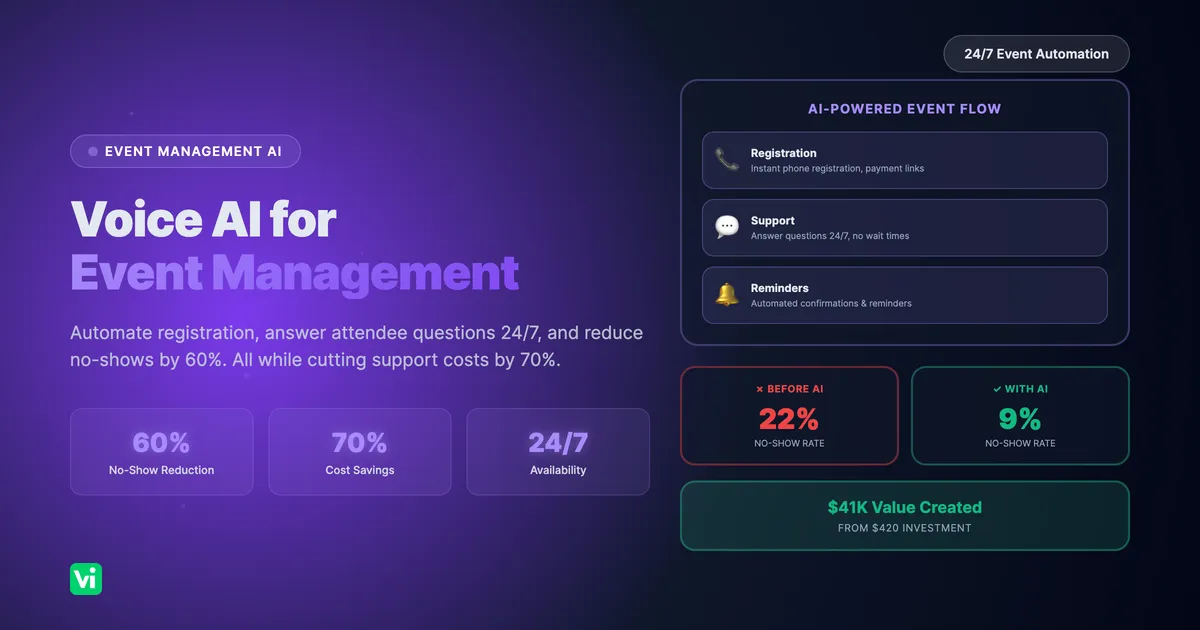
Voice AI changes this. Automate registration, provide instant attendee support 24/7, send smart reminders, and free your team to focus on creating those immersive experiences attendees actually want.
This guide shows you exactly how to implement Voice AI for event management, with real examples, costs, and ROI data.
Why Event Management Needs Voice AI Now
The Current State of Event Operations
Registration Challenges:
Manual phone registrations take 5-8 minutes per call
After-hours calls go to voicemail (30-40% of inquiries)
Peak registration periods overwhelm staff
Data entry errors create downstream problems
Attendee Support Issues:
Same questions asked repeatedly (venue location, parking, schedule)
Support desk staffed only during business hours
Last-minute changes require manual outreach
No-show rates average 20-30% for free events, 10-15% for paid events
The Cost: According to industry data, event staff costs represent 15-25% of total event budgets. For a mid-sized conference (500 attendees), that's 15,000−30,000 in registration and support labor alone.
What Voice AI Solves
24/7 Registration & Support:
Handle registrations any time, any day
Answer common questions instantly
Process changes and cancellations automatically
No wait times, no voicemail
Proactive Engagement:
Automated confirmation calls
Smart reminder sequences (reduces no-shows by 40-60%)
Last-minute update notifications
Post-event follow-up
Operational Efficiency:
70% reduction in support call volume to human staff
90% faster registration processing
Zero data entry errors
Scales infinitely during peak periods
The Numbers:
$736.8B global events market (2025)
68.7% of planners use technology to improve attendee experience
74.5% of planners are adopting hybrid/virtual event strategies
40%+ adoption rate for event technology solutions
Voice AI isn't experimental; it's becoming standard for competitive event operations.
Real-World Use Cases
Use Case 1: Conference Registration
Scenario: Annual industry conference, 800 expected attendees
What Voice AI Handles:
Registration Calls:
AI: "Thank you for calling TechCon 2025. I can help you register, answer questions about the event, or modify an existing registration. What can I help with?"
Caller: "I'd like to register for the conference"
AI: "Great! I'll need a few details. What's your full name?"
Caller: "Sarah Chen"
AI: "Thanks Sarah. What's your email address?"
Caller: "sarah.chen@techcorp.com"
AI: "Perfect. We have three ticket types: General Admission at $299, VIP at $599 with workshop access, and Student at $99. Which interests you?"
Caller: "VIP please"
AI: "Excellent choice. I'm sending a secure payment link to sarah.chen@techcorp.com right now. Once you complete payment, you'll receive your confirmation and badge information. Is there anything else?"
Common Questions:
"What's the venue address?" → Instant answer
"Is parking included?" → Details provided
"Can I get a refund?" → Policy explained, cancellation processed if needed
"What sessions are available?" → Schedule overview provided
Results:
60% of registrations handled by AI (480 registrations)
Average call time: 3 minutes (vs. 8 minutes with a human)
After-hours registrations: 180 (previously lost to voicemail)
Staff time saved: 120 hours
Use Case 2: Wedding & Event Venue
Scenario: Event venue hosting 150+ events annually
What Voice AI Handles:
Availability Inquiries:
AI: "Thank you for calling Riverside Events. I can check availability, provide pricing, schedule tours, or answer questions about our venue. How can I help?"
Caller: "I'm looking for a wedding venue for next June"
AI: "Wonderful! Congratulations on your engagement. What's your preferred date in June?"
Caller: "June 14th, 2026"
AI: [Checks calendar integration] "June 14th is available! We have two package options: Garden Package for up to 150 guests at $8,500, and Grand Ballroom for up to 300 guests at $12,500. Both include tables, chairs, and basic décor. Which sounds right for your guest count?"
Caller: "We're expecting about 120 people, so the Garden Package"
AI: "Perfect fit. I can schedule a venue tour for you to see the space. What days work best for you this week or next?"
Existing Client Support:
Menu changes: "I need to update our dinner selections."
Guest count updates: "We're now at 135 guests instead of 12.0."
Vendor questions: "Can we bring our own DJ?"
Timeline confirmations: "What time can we access the venue for setup?"
Results:
85% of initial inquiries handled by AI
Tours scheduled automatically (40% increase in bookings)
Client questions answered 24/7 (previously 9-5 only)
Staff focuses on high-value consultations
Use Case 3: Multi-Day Festival
Scenario: 3-day music festival, 5,000 attendees
What Voice AI Handles:
Pre-Event:
Ticket sales and upgrades
Camping reservations
Parking pass sales
General information (lineup, schedule, rules)
During Event:
Lost & found coordination
Schedule changes and announcements
Emergency information routing
Real-time FAQ support
Post-Event:
Feedback collection
Lost item claims
Next year's early bird registration
Smart Reminder Campaign:
Day -7: "Your festival wristband ships this week. Confirm your address?"
Day -3: "Festival starts Friday! Here's what to bring: ID, wristband, sunscreen..."
Day -1: "Gates open at 10am tomorrow. Parking lots open at 8am. See you soon!"
Day 0: "Welcome! Lost something? Call this number. Need help? We're here 24/7."
Results:
No-show rate reduced from 18% to 7% (550 more attendees)
2,400 pre-event questions handled by AI
800+ during-event support calls managed
95% attendee satisfaction with support access
How to Implement Voice AI for Your Events
Step 1: Identify Your Use Cases (Week 1)
Start with high-volume, repetitive tasks:
Registration & Ticketing:
New registrations
Ticket upgrades/downgrades
Group registrations
Cancellations and refunds
Attendee Support:
Venue information (address, parking, accessibility)
Schedule and agenda questions
Speaker/performer information
Hotel and travel information
Dietary restrictions and special requests
Event Changes:
Schedule updates
Venue changes
Cancellation notifications
Weather-related updates
Pull your data:
How many registration calls do you receive?
What are the top 10 questions attendees ask?
When do calls peak? (likely evenings/weekends)
What percentage goes to voicemail?
Step 2: Set Up Your Voice AI Agent (Week 1-2)
Using VoiceInfra:
1. Create Your Agent
Choose voice and personality (professional, friendly, energetic)
Set greeting: "Thank you for calling [Event Name]. I can help with registration, answer questions, or connect you with our team."
Configure business hours (or 24/7 operation)
2. Build Conversation Flows
Registration Flow:
Collect: Name, email, phone, company (if applicable)
Present ticket options with pricing
Capture selection
Send payment link via SMS/email
Confirm registration
Offer additional help
FAQ Flow:
Understand the question category
Provide an accurate answer from the knowledge base
Offer related information
Ask if anything else is needed
Modification Flow:
Verify identity (email or confirmation number)
Understand the requested change
Process update in the system
Confirm change
Send updated confirmation
3. Integrate with Your Systems
Event Management Platforms:
Eventbrite: Registration sync
Cvent: Attendee data integration
Whova: Schedule and session data
Custom platforms: API integration via CURL Function Creator
Payment Processing:
Stripe: Secure payment links
PayPal: Payment collection
Square: Transaction processing
Calendar Systems:
Google Calendar: Availability checking
Outlook: Schedule management
Custom booking systems
4. Build Your Knowledge Base
Add 50-100 Q&As covering:
Event basics (date, time, location)
Registration and pricing
Venue details (parking, accessibility, amenities)
Schedule and programming
Policies (refunds, transfers, code of conduct)
Travel and accommodations
COVID-19 protocols (if applicable)
Step 3: Test Thoroughly (Week 2)
Internal Testing:
Call as a new registrant
Call with complex questions
Test payment link delivery
Verify data flows to your event platform
Test escalation to human staff
Try to break it (edge cases, unclear requests)
Beta Testing:
Invite 10-20 early registrants to use AI
Collect feedback
Review call transcripts
Identify gaps in the knowledge base
Refine conversation flows
Step 4: Launch Strategically (Week 3-4)
Soft Launch Options:
Option 1: After-Hours Only
AI handles calls outside business hours
Human staff available during normal hours
Low risk, immediate value
Option 2: Overflow Handling
AI takes calls when the staff is busy
Reduces wait times
Maintains human option
Option 3: Specific Use Cases
AI handles only registration calls
Humans handle complex inquiries
Gradual expansion
Monitor Closely:
Review 100% of calls in the first week
Track completion rates
Measure customer satisfaction
Identify improvement areas
Step 5: Optimize & Expand (Week 4-8)
Add Proactive Outreach:
Confirmation Calls (Day 1):
AI: "Hi [Name], this is the TechCon AI assistant. I'm calling to confirm your registration for TechCon 2025 on March 15th. Can you confirm you received your confirmation email?"Reminder Calls (Day -7, Day -3, Day -1):
AI: "Hi [Name], TechCon is one week away! Just a friendly reminder: March 15th at the Convention Center. Have you booked your hotel? We have a discount code: TECH2025. Reply YES if you're all set, or call us if you need help."No-Show Prevention (Day -1 for no-shows):
AI: "Hi [Name], we noticed you registered but haven't confirmed your attendance. We'd love to see you tomorrow! If plans changed, let us know so we can offer your spot to someone on the waitlist."Post-Event Follow-Up:
AI: "Hi [Name], thanks for attending TechCon! We'd love your feedback. On a scale of 1-5, how would you rate your experience? [Collects rating and comments] Thank you! Early bird tickets for next year are now available at 40% off. Interested?"Results from Proactive Campaigns:
40-60% reduction in no-shows
25% increase in early registration for next event
80%+ feedback collection rate (vs. 10-15% with email surveys)
Advanced Features for Events
Multi-Language Support
For International Events:
Detect the caller's language preference
Respond in English, Spanish, French, German, Portuguese, etc.
Expand your attendee base globally.
Example:
AI: "Thank you for calling Global Summit 2025. For English, say 'English'. Para español, diga 'español'."VIP Attendee Experience
Personalized Service:
AI: [Recognizes phone number] "Welcome back, Dr. Martinez! I see you're registered for our VIP experience. How can I help you today?"
Caller: "I need to adjust my workshop selections"
AI: "Of course. You're currently registered for 'AI in Healthcare' and 'Digital Transformation'. Which would you like to change?"
Real-Time Event Updates
During-Event Support:
Session room changes
Speaker cancellations
Schedule adjustments
Emergency notifications
Example:
AI: [Outbound call to affected attendees] "Hi, this is Summit AI. The 2pm keynote has moved from Ballroom A to Ballroom C due to higher-than-expected attendance. See you there!"Waitlist Management
Automated Waitlist:
AI: "I'm sorry, the VIP tier is currently sold out. Would you like me to add you to the waitlist? If a spot opens, I'll call you immediately."
[Spot opens]
AI: [Calls waitlist] "Great news! A VIP spot just opened. Would you like to claim it? I can process your registration right now."
Common Challenges & Solutions
Challenge 1: "Our Event Details Change Frequently"
Solution:
Update knowledge base in real-time (takes 2 minutes)
AI immediately uses new information
No retraining required
Version control tracks all changes
Challenge 2: "What About Complex Group Registrations?"
Solution:
AI handles individual registrations within groups
Escalates group pricing/contracts to humans
Collects group information for staff follow-up
Hybrid approach: AI for volume, humans for complexity
Challenge 3: "Attendees Might Prefer Email"
Solution:
Offer multi-channel support
AI can send follow-up emails
SMS confirmations and reminders
Voice for urgent/complex issues
Let attendees choose their preference
Challenge 4: "What If AI Gives Wrong Information?"
Solution:
The knowledge base is your single source of truth
Regular audits (weekly during active registration)
Call transcript review catches errors
Easy escalation: "Let me connect you with our team for that specific question."
Measuring Success
Track These Metrics:
Efficiency:
% of calls handled by AI without escalation (target: 60-80%)
Average call duration (target: 3-5 minutes)
After-hours registrations (previously lost revenue)
Staff hours saved
Attendee Experience:
Call satisfaction ratings (ask at the end of the call)
Registration completion rate
Response time (AI: instant vs. email: 24-48 hours)
No-show rate reduction
Financial:
Cost per registration (AI vs. human)
After-hours revenue captured
Staff cost savings
ROI calculation
Typical Results:
60-70% call automation rate
40-60% no-show reduction
70-80% staff time savings
300-1000% ROI
Frequently Asked Questions
How much does Voice AI for events cost?
VoiceInfra Pricing:
Inbound calls: $0.05/minute
Outbound calls: $0.30/minute (reminders, confirmations)
No monthly fees or setup costs
$10 free credits to test
Example Event Costs (350 attendees):
210 inbound registration calls (3 min avg): 630 min × 0.05=31.50
380 inbound support calls (2 min avg): 760 min × 0.05=38
1,400 outbound reminder calls (1 min avg): 1,400 min × 0.30=420
Total: ~$490
Compare to:
Staff time (320 hours @ 25/hr):8,000
Answering service (2−3/call):1,180-1,770
Savings: $7,500+
Can Voice AI handle multiple events simultaneously?
Yes. Create separate agents for each event, or one agent that handles multiple events:
AI: "Thank you for calling Premier Events. I can help with TechCon 2025, Healthcare Summit, or the Annual Gala. Which event are you calling about?"Each event has its own knowledge base, registration flow, and integrations.
What if someone needs to speak to a human?
Easy escalation:
The caller can say "representative" or "human" anytime
AI recognizes complex requests beyond its scope
Transfers to staff with context: "I'm transferring you to Sarah. I've let her know you need help with group pricing."
Staff sees the call transcript and collects information
Best practice: AI handles 70%, humans handle 30% (complex, high-value interactions)
How long does setup take?
Timeline:
Day 1: Create account, build basic agent (2 hours)
Week 1: Build knowledge base, set up integrations (6-8 hours)
Week 2: Testing and refinement (4-6 hours)
Week 3: Soft launch
Total time investment: 12-16 hours spread over 2-3 weeks
Most event planners are fully operational within 3 weeks.
Will attendees know they're talking to AI?
Transparency is best practice:
AI: "Hi, I'm the [Event Name] AI assistant. I can help you register, answer questions, or connect you with our team. How can I help?"Reality: Most callers don't care if it's AI or human; they care about:
Getting their question answered quickly
Completing registration easily
Receiving accurate information
If AI delivers these, satisfaction is high regardless of whether it's human or AI.
Can Voice AI collect dietary restrictions and special requests?
Absolutely:
AI: "Do you have any dietary restrictions we should know about?"
Caller: "Yes, I'm vegetarian and gluten-free"
AI: "Got it, vegetarian and gluten-free. I've noted that in your registration. Anything else?"
All information flows directly to your event management system.
What about accessibility needs?
Voice AI excels at accessibility:
AI: "Do you need any accessibility accommodations?"
Caller: "I use a wheelchair"
AI: "Thank you for letting us know. We'll ensure you have accessible seating and easy venue access. Do you need accessible parking as well?"
Information is flagged in your system for proper planning.
Your Action Plan
This Week:
Calculate your current event support costs (staff hours × hourly rate)
Identify your top 10 most-asked questions
Estimate after-hours call volume (check voicemail)
Calculate potential ROI
Next Week:
Sign up for VoiceInfra (free $10 credit)
Create your first event agent
Build a knowledge base with your top 20 Q&As
Test with your team
Week 3:
Set up integrations (event platform, payment processor)
Configure registration flow
Soft launch (after-hours or overflow)
Monitor and refine
Week 4-6:
Expand to full coverage
Add proactive reminder campaigns
Optimize based on call data
Measure ROI
Conclusion: Transform Your Event Operations
Event management is evolving. 74.5% of planners are adopting new technology strategies, and 68.7% are using technology to improve attendee experience. Voice AI isn't just another tool; it's becoming essential infrastructure.
What You Gain:
✅ 24/7 registration and support (capture after-hours revenue)
✅ 70% reduction in support costs (staff focuses on high-value work)
✅ 40-60% fewer no-shows (proactive reminders work)
✅ Instant attendee satisfaction (no wait times, accurate answers)
✅ Infinite scalability (handle 10 or 10,000 calls)
What Your Attendees Gain:
✅ Register anytime, anywhere
✅ Instant answers to questions
✅ Helpful reminders (never miss your event)
✅ Personalized experience at scale
✅ Easy modifications and support
The Bottom Line:
The events industry is projected to grow from 736.8B to 2.5T by 2035. Events that deliver seamless, technology-enabled experiences will capture that growth. Those stuck with manual processes will struggle.
Voice AI lets you deliver the immersive, personalized experiences that 64% of attendees demand, without hiring an army of support staff.
Start small: After-hours registration for your next event. Test it. Measure it. Then expand.
The technology is ready. The ROI is proven. Your attendees are waiting.
Get Started with VoiceInfra
VoiceInfra makes it easy to add Voice AI to your event operations:
✓ No-Code Setup
Visual conversation builder
Pre-built event templates
No programming required
✓ Event Platform Integrations
Eventbrite, Cvent, Whova
Stripe, PayPal, Square
Custom platforms via API
✓ Flexible Deployment
Works with your existing phone system
Dedicated event phone number or call forwarding
Multi-event support
✓ Transparent Pricing
0.05/mininbound,0.30/min outbound
$10 free credits to start
No monthly fees or contracts
Ready to automate your event operations?
👉 Start Free Trial - Test with your next event
👉 Schedule Demo - See event automation in action
Related Resources
More Implementation Guides: