Call Transfer Smart Routing
Hand off live conversations to agents, departments, or external numbers with cold, warm, or attended warm transfers and keypad routing.
Stop forcing customers to repeat themselves. VoiceInfra's Call Transfer lets your AI agent smoothly hand off live calls to human agents, team queues, or external numbers. Choose between fast cold transfers, reassuring warm transfers, or the new attended warm transfer, where the AI stays connected to both parties while briefing the human agent before stepping back. Map keypad digits for self-service routing and manage destinations with bulk CSV import. Seamless handoffs. Better customer experience.
What Makes This Feature Special
Discover the powerful capabilities that drive real business results
Cold, Warm & Attended Warm Transfer Types
Use Cold Transfer (SIP Refer) for fast, low-latency handoffs, Warm Transfer (SIP Invite) to stay on the line during the switch, or the new Attended Warm Transfer, where the AI stays connected to both parties, briefs the human agent with context instructions, and only steps back once the handoff is complete.
Attended Warm Transfer with Context Briefing
With Attended Warm Transfer, your agent remains connected to both the caller and the human agent simultaneously. Add context instructions so the AI briefs the human before stepping back, and configure a decline message for when the transfer target is unavailable.
Flexible Transfer Destinations
Route calls to phone numbers, SIP URIs, or internal extensions. Add custom transfer messages and configure post-answer extension dialing for precise routing.
Keypad Routing (AI-Driven IVR)
Let callers press digits mid-conversation to reach specific departments. Map 1–5 digit codes to destinations for self-service navigation without rebuilding your menu.
Bulk Management via CSV
Add destinations quickly with CSV import/export. Download a pre-formatted template, fill in your routing rules, and upload to configure everything at once.
Agent-to-Agent Transfer
Hand the conversation from one AI agent to another specialist agent mid-call or mid-chat. No human needed, no session restart. The caller keeps talking and the specialist picks up with the full transcript behind it. Every message stays attributed to the agent that produced it.
Rules, Delays & Transfer Messages
Each handoff is a rule: a plain-language condition describing the user need, a target agent, and an optional minimum delay before it fires. Add a transfer message so the caller hears what is happening, and choose whether the specialist inherits the session's voice and model or brings its own.
Get started with this feature in a few simple steps
Everything you need to transform your voice operations from start to finish
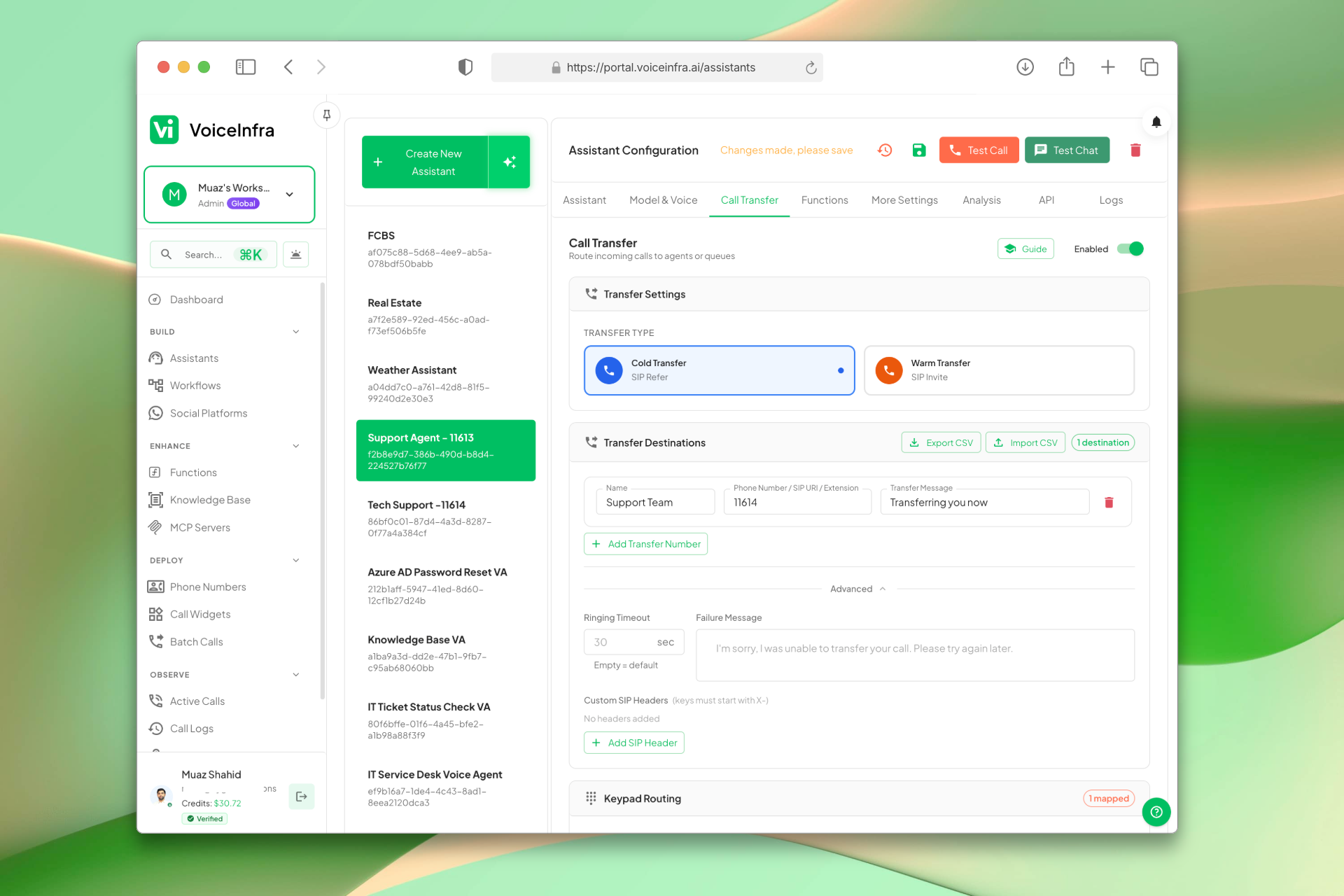
Configure Transfer Type & Destinations
Choose between Cold Transfer (SIP Refer) for fast handoffs, Warm Transfer (SIP Invite) to stay on the line, or the new Attended Warm Transfer to have the AI bridge and brief the human agent before stepping back. Add phone numbers, SIP URIs, or extensions as destinations, with custom transfer messages and bulk CSV import for large setups.
- Cold Transfer for speed, Warm Transfer for reassurance
- Attended Warm Transfer: AI stays connected to both parties during handoff
- Caller ID control on warm transfers
- Phone, SIP URI & extension destinations
- CSV bulk import & export
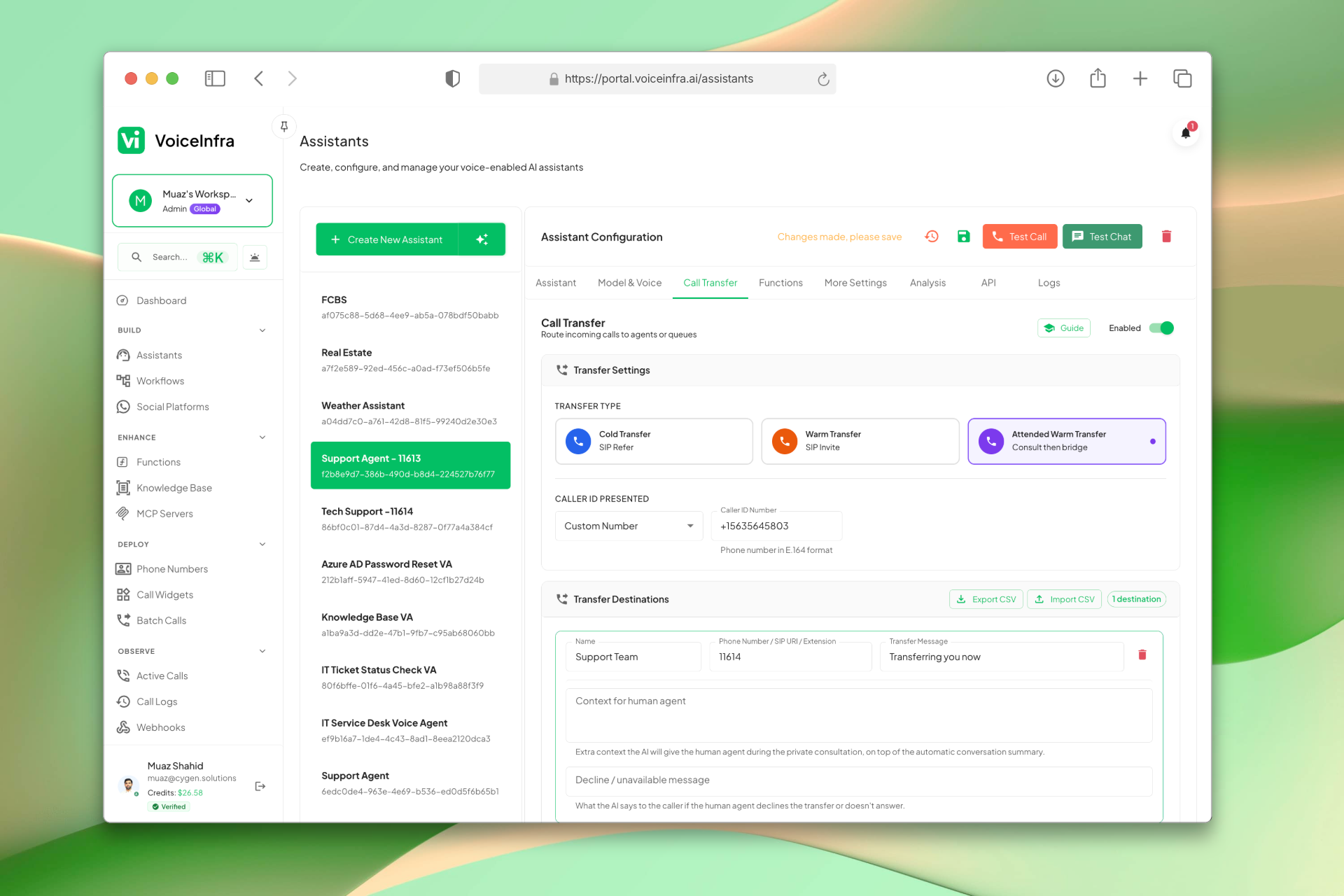
Attended Warm Transfer with Agent Briefing
Attended Warm Transfer keeps your AI agent connected to both the caller and the human agent at the same time. Add context instructions so the AI automatically briefs the human with relevant call details before stepping back. Configure a decline message for when the transfer target is unavailable.
- AI stays on the line with both parties simultaneously
- Custom context instructions for agent briefing
- Configurable decline message for unavailable targets
- Works alongside Cold and Warm Transfer modes
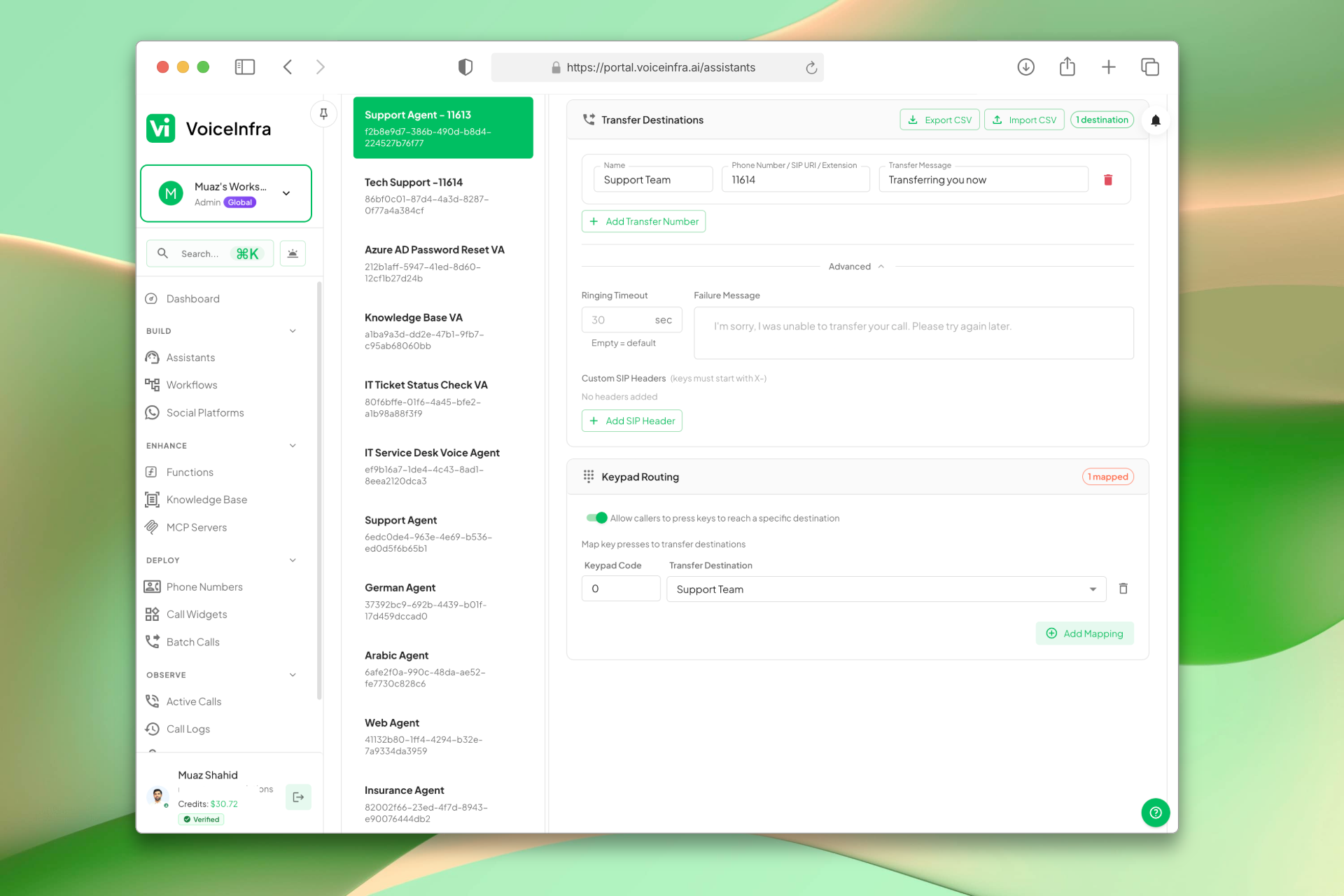
Keypad Routing
Map 1–5 digit codes to transfer destinations so callers can self-route mid-conversation. Enable keypad routing per assistant and assign codes directly, or include them in your CSV upload.
- 1–5 digit code mapping to any destination
- Self-service department routing
- Toggle-based enable/disable per assistant
- Assign codes via CSV or manual entry
Transform Your Business
Discover the measurable impact and advantages that drive real business growth
Reduce customer frustration with smooth, context-aware handoffs
Choose transfer type based on caller needs (speed, reassurance, or full attended briefing)
Attended Warm Transfer keeps AI connected to both parties until the human is ready
Context instructions let the AI brief human agents before stepping back
Decline message handles unavailable transfer targets gracefully
Route to any destination: phone, SIP, or internal extension
Hand off between AI agents mid-call with no human in the loop
Specialist agents inherit the full conversation transcript
Each message stays attributed to the agent that produced it
Rules fire on plain-language conditions with an optional delay
Self-service keypad routing reduces agent workload
Bulk CSV import saves time on large routing setups
Custom transfer messages keep callers informed
Caller ID control ensures proper identification on handoff
Seamless integration with existing PBX and SIP infrastructure
Industry Solutions
Discover how this feature powers tailored solutions across industries
AI-Powered Contact Center Automation Build Custom Voice AI Agents
Build a Voice AI agent for your contact center. Reduce costs by 40-60% while delivering superior customer experience.
Explore SolutionAI Phone System for Technical Support 24/7 Troubleshooting & Issue Resolution
Build a Voice AI agent for your technical support center. Handle troubleshooting, ticketing, and escalation around the clock.
Explore SolutionAI Phone System for Healthcare Call Centers 24/7 Patient Triage & Support
Build a Voice AI agent for your healthcare call center. Handle patient triage, support inquiries, and appointment routing around the clock.
Explore SolutionSee How Our Customers Use This
Real businesses getting real results with this feature. Read their stories.
How a Telecom MSP Replaced Their Customer Service Team with VoiceInfra AI Agents
A US-India telecom MSP replaced their human customer service with VoiceInfra AI agents that handle new leads, troubleshoot issues, report incidents, and transfer callers to the right extension
Read Success StoryHow a London Plumbing & Heating Company Deployed a VoiceInfra AI Agent on Yeastar P-Series for Out-of-Hours Call Handling
A London-based plumbing and heating company deployed a VoiceInfra AI agent on their Yeastar P-series PBX to handle emergency and out-of-hours calls, ensuring no customer goes unanswered after business hours
Read Success StoryStill have questions about Call Transfer Smart Routing? Just ask.
The people who built this feature answer every question in plain English. Want to see it running on your own setup instead? Tick the box and we'll include a live demo.
- Answered by the people who built it
- Live demo on your setup, if you want one
- A reply within one business day
Technical Specifications
Enterprise-grade infrastructure built for reliability and scale
Transfer Types
Cold (SIP Refer), Warm (SIP Invite) & Attended Warm
Keypad Routing
1–5 digit code mapping
Bulk Management
CSV import/export support
Destination Formats
Phone, SIP URI & Extensions
Frequently Asked Questions
Find answers to common questions about this feature
Continue Exploring VoiceInfra
Discover more ways VoiceInfra can transform your voice AI experience
Version Control & Rollback
Editing a live AI agent is nerve-wracking when the change goes straight to production. VoiceInfra separates draft from live: you edit freely, see exactly what will change, and choose when it becomes what callers actually hear. Every publish is kept as a version you can inspect, preview in read-only mode, and roll back to. Diffs include not just the agent's own settings but its attachments: the functions, MCP servers and knowledge documents it depends on. Nothing changes silently. Auto-saved work becomes a version too, meaning even an accidental edit is recoverable.
Explore FeatureAutomated Post-Call Emails
Stop manually sending follow-up emails after calls. Our Email Configuration feature automatically sends professional post-call summaries via email. Connect any SMTP server (Gmail, Outlook, SendGrid, AWS SES), configure sender details, and enable automated emails for every call. Complete with call recordings, transcripts, AI analysis, and next steps – all in a beautifully formatted email. Setup in 5 minutes. Impress customers forever.
Explore FeatureMultilingual 30+ Languages
Break language barriers with AI that understands 30+ languages instantly. VoiceInfra connects you to leading transcription engines (ElevenLabs, OpenAI, Cartesia, Deepgram, Groq, Speechmatics, Hamsa) so you get the best accuracy for every accent and dialect. Your agents respond naturally, no matter where your customers call from.
Explore FeatureReady to transform your operations?
Contact our sales team to see how the platform works for your industry.