Everyone wants to build or buy a voice AI agent. Far fewer people understand what's actually inside one.
That's a problem. Because when something breaks in production, or a vendor promises you "full AI capabilities" for a suspiciously low price, you need to know what you're actually evaluating. You need to know which component is failing, which one is missing, and which one is being replaced with something cheaper that will hurt you later.
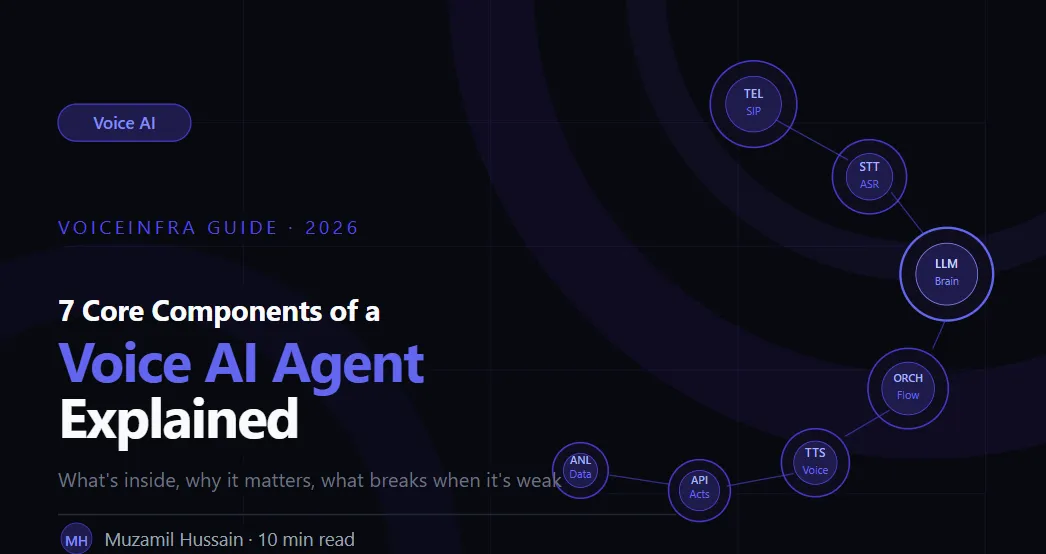
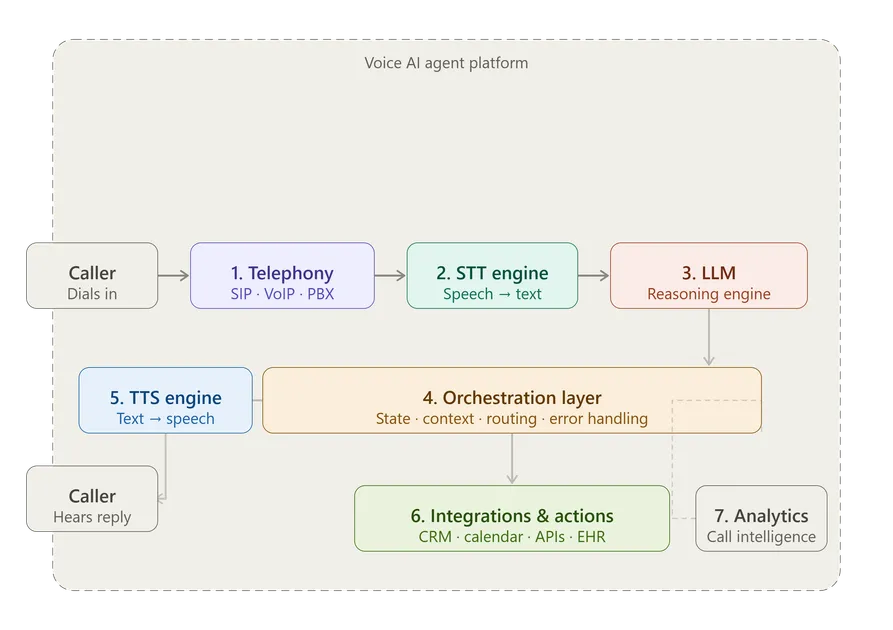
This guide breaks down all 7 components that every production voice AI agent needs, what each one does, why it matters, and what happens when it's weak or missing entirely.
Why Components Matter More Than the Demo
Every voice AI demo sounds good. The agent responds naturally, handles the test questions perfectly, and the sales rep on the call looks confident.
Production is different.
In production, callers have accents. They talk over the agent. They ask things that weren't in the test script. The CRM returns an unexpected format. The call drops mid-sentence. Two hundred calls come in at once.
That's where component quality separates systems that work from systems that looked like they'd work.
The 7 components below aren't a nice-to-have list. They're the complete architecture. A voice AI agent is only as strong as its weakest one.
Component 1: Telephony Layer
The telephony layer is where the call actually lives. It's the bridge between the global phone network and every other component in the system.
This includes SIP trunk management, phone number provisioning, PSTN connectivity, audio stream handling, call routing, and connection stability. If this layer has latency issues or drops packets, the audio quality degrades and every component downstream suffers, regardless of how good the LLM is.
Why it matters more than most people think:
Most voice AI discussions skip straight to the LLM. The telephony layer gets treated as a commodity, something you just plug in and forget. That's a mistake.
A poorly configured telephony layer introduces jitter into the audio stream. Jitter means the STT engine receives garbled input. Garbled input means the LLM gets inaccurate text. Inaccurate text means wrong responses. The whole chain breaks, and everyone blames the AI.
What good looks like: Sub-50ms audio latency, reliable SIP trunk connections, clean integration with existing PBX systems (3CX, Yeastar, FreePBX) without requiring hardware replacements, and proper handling of call drops and reconnections.
What bad looks like: Choppy audio, frequent disconnects, inability to connect to an existing phone system without replacing infrastructure.
Component 2: Speech-to-Text (STT) Engine
The STT engine has one job: convert what the caller says into text that the LLM can read. It sounds simple. It's not.
The STT engine is processing a live audio stream in real time, not a clean recording in a quiet room. It's dealing with background noise, regional accents, fast talkers, people who trail off mid-sentence, and the occasional caller who's clearly on a moving train.
The accuracy-latency tradeoff:
Two numbers define STT quality: accuracy (how often it gets the words right) and latency (how fast it delivers the transcript). Both matter enormously.
Poor accuracy means the LLM receives wrong text and generates wrong responses. The caller says "I need to reschedule my Thursday appointment" and the agent hears "I need to reschedule my thirsty appointment." The LLM does its best with what it gets.
High latency means the agent feels slow. If the STT engine takes 800ms to return a transcript, you've already used up most of your response time budget before the LLM has even started thinking.
The best production STT engines stream transcription in real time, word by word, as the caller speaks. This allows the LLM to begin processing before the caller has even finished their sentence, shaving critical milliseconds off the end-to-end response time.
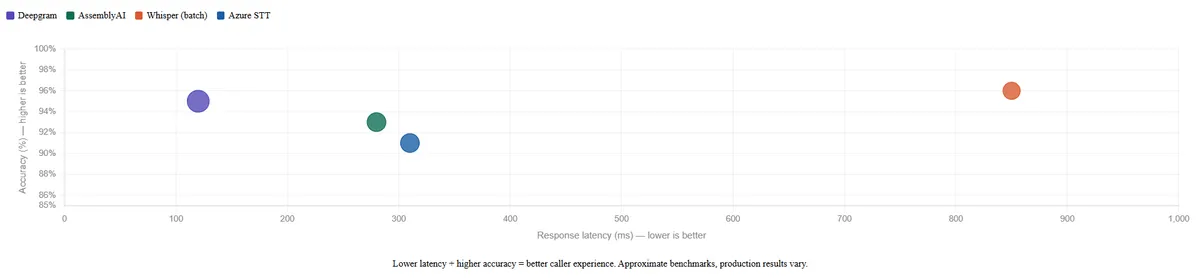
Leading providers: Deepgram, AssemblyAI, OpenAI Whisper. Each has different tradeoffs on accuracy, speed, language support, and cost. Choosing the right one for your use case matters.
Component 3: Large Language Model (LLM)
The LLM is the brain. Everything else in the system exists to feed it input and deliver its output. This is where language understanding, reasoning, and decision-making happen.
When a caller says something to a voice AI agent, the LLM reads the transcribed text and decides three things: what the caller actually wants (intent), what information is needed to respond (context), and what to do next (action or response).
The system prompt is everything:
The LLM doesn't arrive knowing it's a healthcare scheduling agent for a clinic in Chicago. It knows that because of the system prompt, the set of instructions that defines its role, its knowledge base, its personality, its constraints, and the actions it's allowed to take.
A well-written system prompt is the difference between an agent that handles 70% of calls cleanly and one that handles 40%. This isn't about the model, it's about how the model is instructed. Two deployments using the same LLM with different system prompts will perform completely differently.
Multi-LLM routing:
Not every call needs GPT-4o. A caller asking "what are your business hours" doesn't require the most powerful model available. Routing simple queries to lighter, faster, cheaper models and reserving the heavier models for complex conversations can reduce inference costs by 60 to 70% without any drop in quality that callers would notice.
This is one of the most underutilized levers in production voice AI deployments.
Leading models: GPT-4o, Claude 3.5 Sonnet, Gemini 1.5 Pro. Each has different strengths on reasoning, instruction-following, speed, and cost.
Component 4: Orchestration Layer
This is the component that gets the least attention and causes the most production failures.
The orchestration layer is the system that coordinates everything else. It manages conversation state across turns, tracks variables extracted during the call (name, account number, appointment date), decides which workflow node is currently active, routes between tools and knowledge bases, handles errors gracefully, and determines when to escalate to a human agent.
Why orchestration failures get blamed on the LLM:
When a voice AI agent loses context after three turns, people say the LLM has poor memory. When the agent asks for information it already collected, people say the LLM isn't smart enough. When the agent gives a strange response after a tool call fails, people say the model isn't ready for production.
Most of the time, none of that is true. The LLM is fine. The orchestration layer is broken.
The LLM doesn't automatically know what stage of the conversation it's in. It doesn't automatically track extracted variables across turns. It doesn't automatically know what to do when an API call returns an error instead of a result. The orchestration layer handles all of that. When it doesn't, the LLM does the best it can with incomplete information, and the results look like model failures.
What good orchestration looks like: Clear conversation state management, reliable variable extraction and storage, graceful error handling when tool calls fail, intelligent escalation triggers, and workflow logic that holds up under edge cases, not just the happy path.
We covered this in much more detail in our post on why conversational AI agents fail in production. If you're building or evaluating voice AI, that's required reading.
Component 5: Text-to-Speech (TTS) Engine
Once the LLM generates a response, the TTS engine converts it from text back into audio that the caller hears.
Voice quality is not a cosmetic concern. It is a direct driver of whether callers stay on the line, complete their task, and hang up satisfied, or ask to speak to a human within the first thirty seconds.
The abandonment problem:
Callers don't consciously evaluate TTS quality. They don't think "this text-to-speech engine has poor prosody." They think "something feels off" and they lose patience. They ask to speak to a human faster. They abandon the call sooner. They call back and ask for a person immediately.
The data from real deployments is consistent: robotic-sounding agents have measurably higher abandonment rates than natural-sounding ones, even when the underlying workflow and LLM are identical.
What natural TTS actually requires:
It's not just about the voice sounding human in a demo. It's about proper intonation on questions versus statements. Natural pacing and pauses. Handling numbers, dates, and abbreviations correctly. Not sounding mechanical when reading back an address or a confirmation number.
The difference between a mediocre TTS engine and a good one isn't obvious in a 10-second sample. It becomes obvious in a 3-minute conversation.
Leading providers: ElevenLabs, PlayHT, OpenAI TTS, Cartesia. Premium providers cost more. For most business deployments, the improvement in caller experience is worth it.
Component 6: Real-Time Actions & Integrations
A voice AI agent that can hold a conversation but can't do anything with it is a very expensive FAQ page.
The integrations layer connects the agent to the actual systems that run the business, and real-time function calling is what allows the agent to use those integrations during the conversation, not after it ends.
What real-time means:
When a caller asks to reschedule an appointment, the agent doesn't say "I'll look into that and someone will follow up." It checks the scheduling system right now, while the caller is on the line, finds available slots, confirms one, updates the record, and sends a confirmation SMS, all within the natural flow of the conversation.
The caller experiences a smooth interaction. The system executes a series of API calls in the background. The outcome is a completed task.
Common integrations in production deployments:
CRMs: Salesforce, Zoho, HubSpot
Scheduling: Calendly, Google Calendar, practice management systems
Ticketing: Zendesk, Freshdesk, ServiceNow
Healthcare: EHR systems, insurance verification APIs
Payments: Stripe, payment gateway APIs
Internal databases: account lookup, order status, policy information
The integration quality test: Can the agent handle a failed API call gracefully? If the CRM is down and the agent freezes or gives a nonsensical response, that's not a production-ready integration. A well-built integrations layer handles failures, retries where appropriate, and falls back to a natural response that doesn't confuse the caller.
Component 7: Analytics & Call Intelligence
This is the component most platforms treat as an afterthought. It shouldn't be.
Analytics and call intelligence is what turns a voice AI deployment from a black box into something you can actually improve. Without it, you don't know why calls are failing, which workflows are breaking, where callers are dropping off, or what your containment rate actually is.
What useful call analytics looks like:
Full call transcripts, not just recordings. Sentiment analysis across the conversation. Intent classification for every call. Variable extraction logs so you can see what information the agent collected and when. Transfer reason tracking, why did the agent hand off to a human? Containment rate broken down by call type, not just overall.
Why this matters for the business:
The first version of any voice AI deployment is not the best version. It gets better through iteration, and iteration requires data. Which intents are being misclassified? Which workflow branches are causing confusion? At what point in the conversation are callers asking to speak to a human?
Without call intelligence, you're guessing. With it, you have a clear roadmap for improving the agent, one that's driven by actual call data rather than assumptions.
What to track from day one:
| Metric | What it tells you |
|---|---|
| Containment rate | % of calls resolved without human |
| Transfer rate & reasons | Where the agent is struggling |
| Response latency | How fast the agent feels to callers |
| Abandonment rate | Whether callers are losing patience |
| Intent accuracy | How often the agent understands correctly |
| Call duration by outcome | Efficiency of successful resolutions |
How the 7 Components Work Together
Each component handles a specific job. But voice AI quality isn't determined by any single component in isolation, it's determined by how well all seven work together.
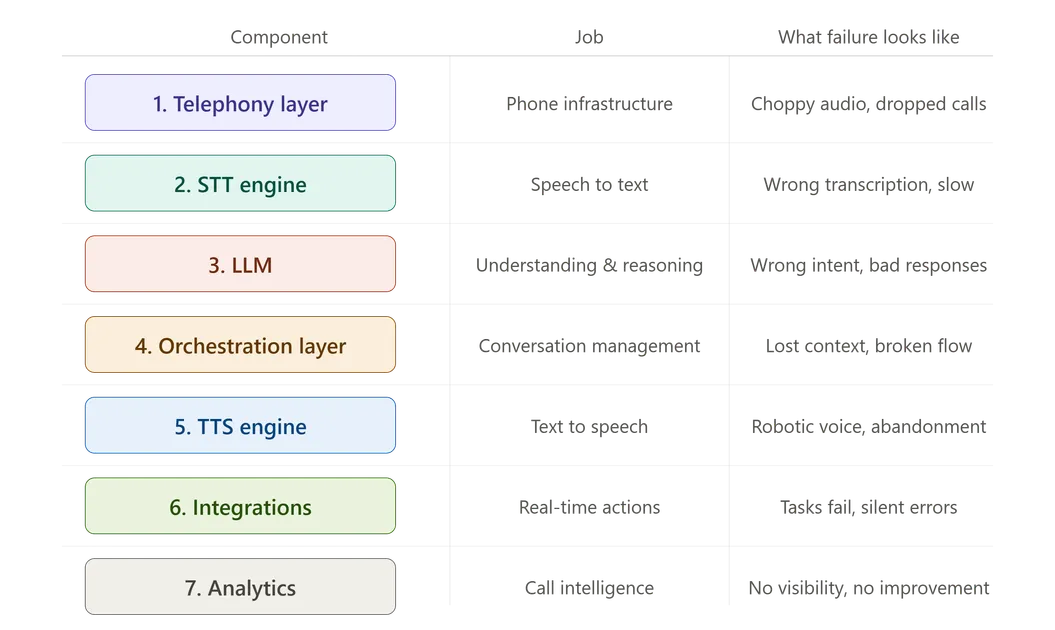
| Component | Job | Failure looks like |
|---|---|---|
| Telephony layer | Phone infrastructure | Choppy audio, dropped calls |
| STT engine | Speech to text | Wrong transcription, slow response |
| LLM | Understanding and reasoning | Wrong intent, bad responses |
| Orchestration layer | Conversation management | Lost context, broken workflows |
| TTS engine | Text to speech | Robotic voice, high abandonment |
| Integrations | Real-time actions | Can't complete tasks, silent failures |
| Analytics | Call intelligence | No visibility, no improvement path |
The weakest component determines the ceiling. A state-of-the-art LLM sitting on a poor telephony layer with mediocre TTS will still produce a bad caller experience. A well-orchestrated system with clean integrations but weak STT will misunderstand callers and frustrate them.
This is why evaluating a voice AI platform means evaluating all seven components, not just asking which LLM it uses.
Build vs Buy: What This Means in Practice
If you're building a voice AI agent from scratch, you're making seven separate technology decisions and then figuring out how to make them all work together in production. That's a significant engineering undertaking.
Each component has multiple vendor options. Each vendor has different pricing, reliability, latency characteristics, and support quality. Integrating them cleanly, handling failures across vendor boundaries, and maintaining the whole stack as each vendor releases updates is ongoing engineering work.
Using a platform that has already assembled and integrated all seven components, production-tested the combinations, and built the orchestration layer on top shifts that burden off your team. You configure the agent for your use case. The component architecture is already there.
| Build yourself | Use a platform (VoiceInfra) | |
|---|---|---|
| Time to production | 3–6 months | Days to weeks |
| Engineering required | High (multiple vendor APIs) | Low (configure, don't build) |
| Ongoing maintenance | You own every vendor update | Platform handles it |
| Customization | Maximum | High, within platform constraints |
| Best for | Large teams with specific infra needs | Most businesses moving fast |
Neither approach is universally right. What doesn't change is the requirement: all seven components need to be present and working well together. That's the baseline. Everything above it is execution.
Final Thought
The voice AI agents that perform well in production aren't the ones with the most impressive demo or the most advanced LLM. They're the ones where someone thought carefully about all seven components, made good decisions at each layer, and built the orchestration logic to hold it together under real conditions.
If you're evaluating a voice AI platform, use this list as your checklist. Ask about each component specifically. Ask what happens when each one fails. The answers will tell you a lot about whether you're looking at something that's production-ready or something that's demo-ready.
Those are not the same thing.
Want to see all 7 components working together in a live deployment? Schedule a demo with the VoiceInfra team and we'll walk you through the full architecture in your industry context.
Related reading:
What is a Voice AI Agent? How It Works, Components & Real Examples