Most people who want to build a voice AI agent start in the wrong place.
They open a tutorial, pick an LLM, write a system prompt, and wonder why the agent sounds robotic, loses context after three turns, and breaks the moment a caller says something unexpected.
The problem isn't the LLM. The problem is they built a chatbot and called it a voice agent.
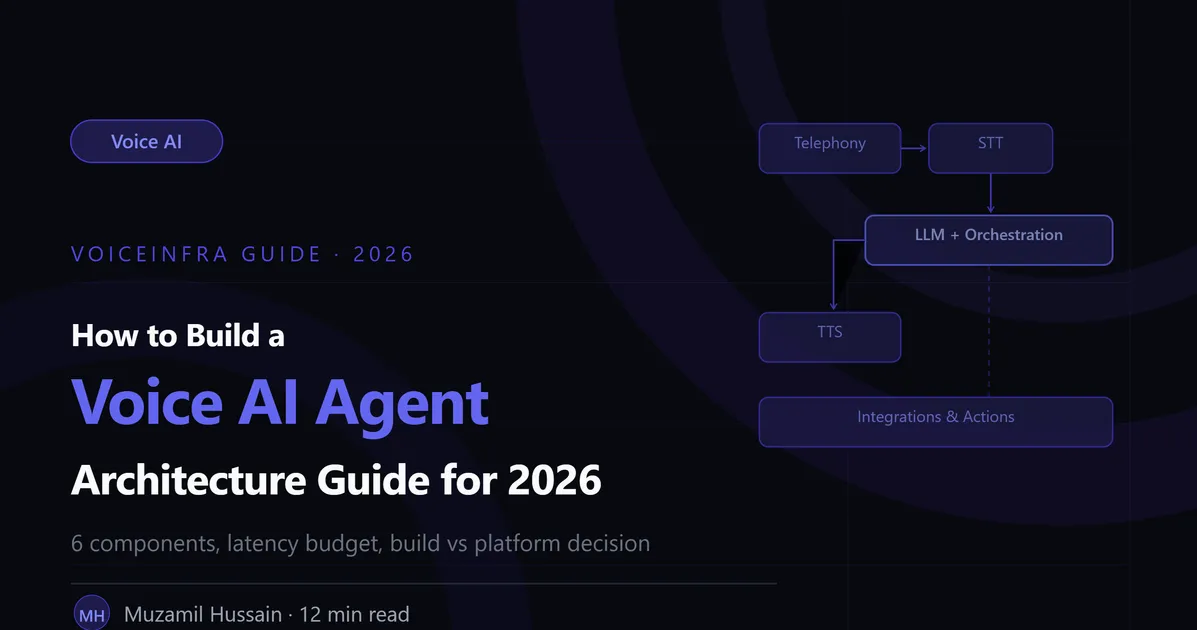
A production voice AI agent is an architecture, not a prompt. It has six distinct components that need to work together, latency constraints that shape every design decision, and integration requirements that determine whether the agent can actually do anything useful during a call.
This guide covers the complete architecture for building a voice AI agent, the decisions that matter, the tradeoffs you'll face, and where most builds go wrong.
What You're Actually Building
Before getting into architecture, it's worth being specific about what a production voice AI agent actually needs to do.
It needs to receive a live phone call over standard telephony infrastructure. It needs to convert the caller's speech to text in real time, with low enough latency that responses feel natural. It needs to understand what the caller wants, maintain context across the full conversation, and decide what to do next. It needs to execute real actions during the call, not after it. And it needs to convert its responses back to natural-sounding speech and deliver them to the caller.
All of this needs to happen in under 500 milliseconds from when the caller stops speaking to when the agent starts responding. That's the latency constraint that shapes everything else.
If you're building for anything less than that, you're building a demo, not a production system.
The Complete Architecture: 6 Components
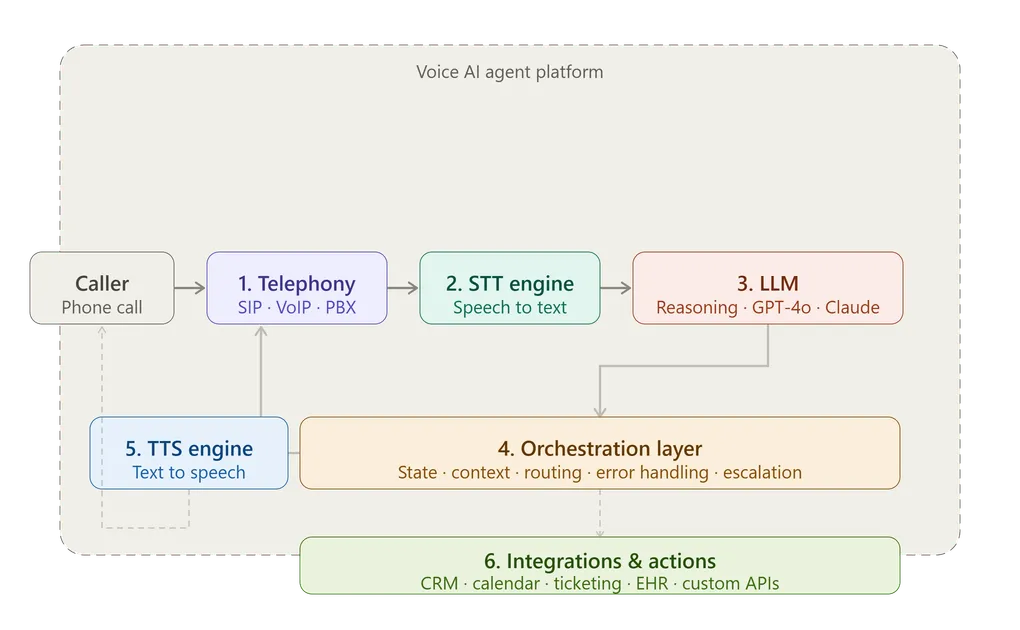
A production voice AI agent requires six components. Remove any one of them and the system either doesn't work or falls apart under real conditions.
Component 1: Telephony Layer
This is where the call lives. The telephony layer handles everything related to the phone network: receiving inbound calls, making outbound calls, managing SIP trunks, provisioning phone numbers, streaming audio in and out, and maintaining connection stability.
What you need to decide:
SIP trunk provider. Your options include Twilio, Telnyx, Vonage, SignalWire, and others. They differ on pricing per minute, geographic coverage, call quality, and API reliability. For most builds, Twilio or Telnyx are the practical starting points.
PBX integration. If you're deploying into an existing business phone system, the agent needs to integrate as an extension rather than replacing the infrastructure. 3CX, Yeastar, and FreePBX are the common platforms. This integration is often underestimated in complexity.
Audio format. Phone calls use 8kHz PCM audio over the PSTN. Your STT engine needs to handle this format. Some STT providers perform better with 16kHz, which means you may need resampling in your audio pipeline.
In VoiceInfra: The telephony layer is fully managed. You connect your existing SIP trunk or PBX in 60 seconds, or provision numbers directly through the platform. No infrastructure to configure or maintain.
Component 2: Speech-to-Text (STT) Engine
The STT engine converts the caller's live audio stream into text that the LLM can process. For production voice AI, streaming STT is essential, the engine returns partial transcripts word by word as the caller speaks, allowing the LLM to start processing before the caller finishes.
What you need to decide:
Provider. Deepgram Nova-2 leads on latency for production voice applications (~120ms). AssemblyAI adds useful analytics features. OpenAI Whisper has excellent accuracy but its standard implementation is batch-only, not suitable for live calls without significant engineering.
End-of-speech detection. The STT engine needs to detect when the caller has finished speaking so the LLM knows to respond. Too aggressive and the agent interrupts. Too conservative and there's an unnatural pause. Tuning this for your caller population matters.
Language and accent coverage. If your callers span multiple languages or have strong regional accents, test your STT engine on representative audio from your actual caller base before committing to a provider.
In VoiceInfra: STT is built in with streaming support. You select your preferred provider or let the platform route automatically based on the call language detected.
Component 3: Large Language Model (LLM)
The LLM is the reasoning engine. It reads the transcript, understands what the caller wants, decides what to do, and generates a response. It also decides when to call tools, when to ask for clarification, and when to transfer to a human.
What you need to decide:
System prompt design. This is the most important decision in your entire build. The system prompt defines who the agent is, what it knows, how it behaves, what it's allowed to do, and how it handles edge cases. A well-designed system prompt is the difference between 70% and 40% containment rate, with the same underlying model.
Keep the system prompt focused and concise. Every unnecessary token adds latency to every single response. A 600-token prompt that achieves the same results as a 3,000-token prompt is 200ms faster per call.
Model selection. Not every query needs GPT-4o. Routing simple queries ("what are your hours?") to smaller models like GPT-4o Mini or Claude Haiku and reserving heavier models for complex conversations reduces latency by 200-400ms and cost by 70% on those calls.
Context management. As the conversation grows, the context the LLM processes grows with it. Without active management, long calls become slow calls. Summarise older turns, extract key variables explicitly, and store them in your state management layer rather than relying on the LLM to re-derive them from raw history.
In VoiceInfra: Multi-LLM routing is built in. You configure which models to use for which intent types, and the platform handles routing automatically. System prompt management, version control, and A/B testing are supported from the dashboard.
Component 4: Orchestration Layer
This is the component that separates production-ready voice AI from demo-ready voice AI.
The orchestration layer coordinates the entire conversation. It manages state across turns, tracks variables extracted during the call, decides which workflow node is active, routes between tools and knowledge bases, handles errors when API calls fail, and determines when to escalate to a human agent.
What you need to decide:
Workflow design. Map out the conversation flows your agent needs to handle. Not just the happy path, every edge case, every unexpected input, every error condition. The orchestration layer needs logic for all of them.
State management. What information needs to persist across the conversation? Name, account number, stated intent, previous answers, extracted variables. Where does this state live and how is it updated?
Error handling. What happens when a tool call returns an error? What happens when the STT engine returns low-confidence text? What happens when the caller says something completely outside the agent's scope? Every failure mode needs a defined response.
Escalation logic. When does the agent hand off to a human? On explicit request, on detected frustration, on exceeded retry attempts, on certain intent types? Escalation logic that's too aggressive defeats the purpose of the agent. Escalation logic that's too conservative frustrates callers who genuinely need a human.
In VoiceInfra: The orchestration layer is the core of the platform. Visual workflow builder, state management, error handling, and escalation rules are all configurable without writing infrastructure code.
Component 5: Text-to-Speech (TTS) Engine
The TTS engine converts the LLM's text response into audio the caller hears. Voice quality directly affects whether callers trust the agent and stay on the line.
What you need to decide:
Provider. ElevenLabs produces the most natural-sounding output in most evaluations. Cartesia leads on latency (~90ms to first audio). OpenAI TTS balances quality and language coverage. For most deployments, ElevenLabs or Cartesia are the right starting points.
Streaming. Use a TTS engine that streams audio as it generates, not one that delivers a complete file. Streaming TTS starts playing the first words of the response while the rest is still being generated, reducing perceived response time significantly.
Voice selection. Choose a voice that fits your brand and use case. A healthcare agent and a logistics dispatch agent have different requirements. Test your chosen voice on real content from your deployment, not a generic demo script.
In VoiceInfra: TTS provider selection is built into the platform. You choose from supported providers, select a voice, and preview it on your actual content before going live.
Component 6: Integrations and Actions
A voice AI agent that can hold a conversation but can't take action is a sophisticated FAQ page. The integrations layer connects the agent to the systems that actually run the business and enables real-time function calling during the call.
What you need to decide:
What actions does the agent need to take? Booking appointments, looking up account information, creating tickets, sending SMS confirmations, updating CRM records, transferring calls with context. Define the complete list before you start building.
Integration reliability. External APIs fail. What happens when the CRM is down mid-call? The agent needs graceful fallback logic for every integration point, not just the happy path.
Authentication and security. The agent is making API calls on behalf of real callers. Authentication, authorisation, and data handling need to meet your security requirements and any applicable compliance standards (HIPAA for healthcare, PCI for payments).
In VoiceInfra: Native integrations for Salesforce, Zoho, HubSpot, Calendly, Zendesk, and others are built in. Custom integrations via webhook and REST API are supported. Real-time function calling is handled by the platform.
The Latency Budget
Every architecture decision you make affects latency. Here's how the budget breaks down for a well-optimised deployment:
| Component | Target Latency |
|---|---|
| STT (streaming, first token) | 80 to 120 ms |
| LLM routing classifier | 10 to 20 ms |
| LLM inference (simple query) | 100 to 180 ms |
| TTS (first audio) | 80 to 120 ms |
| Total | 270 to 440 ms |
For complex queries using a larger model, the LLM inference time increases to 280 to 380ms, pushing the total to 450 to 640ms. That's acceptable for a minority of calls.
The decisions that most affect this budget: streaming at every layer (STT, LLM, TTS), multi-LLM routing for simple queries, and system prompt length. Get these right and sub-500ms is achievable in production.
Build vs Platform: The Real Decision
Once you understand the architecture, the build vs platform decision becomes clearer.
Building from scratch means making and maintaining six separate technology decisions. STT provider contract, integration, and updates. LLM provider with API management, cost monitoring, and version upgrades. TTS provider with voice selection and streaming implementation. Telephony infrastructure with SIP configuration and PBX integration. Orchestration logic built from scratch. Integration layer for every business system.
Each of these is ongoing engineering work. Vendor APIs change. Models get deprecated. New providers emerge with better performance. Maintaining the stack across all six layers is a significant ongoing commitment.
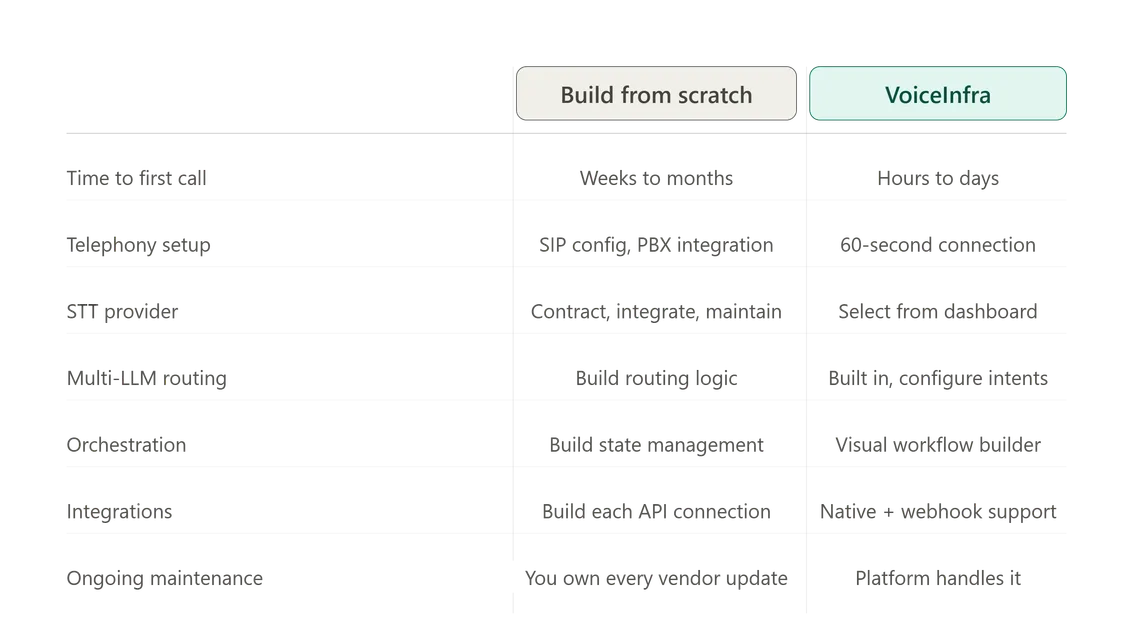
| Component | Build from scratch VoiceInfra | Modern Platform Approach |
|---|---|---|
| Time to first call | Weeks to months | Hours to days |
| Telephony setup | SIP config, PBX integration | 60-second connection |
| STT provider | Contract, integrate, maintain | Select from dashboard |
| Multi-LLM routing | Build routing logic | Built-in, configure intents |
| Orchestration | Build state management from scratch | Visual workflow builder |
| TTS provider | Integrate, stream, maintain | Select and preview |
| Integrations | Build each API connection | Native + webhook support |
| Ongoing maintenance | You own every vendor update | Platform handles it |
Building makes sense when you have specific infrastructure requirements that a platform cannot meet, or when you have the engineering resources to treat the stack as a core product investment.
For most businesses deploying voice AI to solve an operational problem, a platform is the right choice. The stack is already built, tested, and maintained. You configure the agent for your use case and deploy.
Common Architecture Mistakes
These are the mistakes that appear consistently in voice AI builds that work in demos and fail in production.
Using batch STT for live calls. Batch STT waits for the caller to finish speaking before returning a transcript. This adds 400 to 800ms of latency that streaming STT eliminates. If you're building for live conversation, streaming is not optional.
Ignoring the orchestration layer. Teams spend weeks on the LLM and hours on orchestration. Then the agent loses context after five turns, fails silently when an API call returns an error, and breaks on the first edge case. Orchestration is where most production failures live.
Oversized system prompts. A 3,000-token system prompt adds 200ms to every single call. Audit your prompt for redundancy. Instructions that appear twice should appear once. Examples that could be in a knowledge base should be there instead.
Testing on clean audio. STT benchmarks are produced in controlled conditions. Your callers are on mobile phones, in cars, in noisy offices. Test your STT engine on recordings from your actual call environment before committing to a provider.
No latency monitoring. Average latency looks fine. p95 latency is 1.4 seconds. The callers in that 5% are having a poor experience and you don't know it because you're only watching the mean.
Happy path only. Every conversation flow has edge cases. What does the agent do when the caller says something unexpected? When the CRM returns an error? When the caller asks to be transferred? If the answer is "we haven't built that yet," it will happen in production.
The Deployment Checklist
Before going live, validate these points:
| Area | What to check |
|---|---|
| Latency | p50 under 400ms, p95 under 700ms under production load |
| STT accuracy | Test on real audio from your caller base, not benchmarks |
| TTS quality | Listen to real content on a phone speaker, not headphones |
| Edge cases | Every unusual path has a defined, tested response |
| Integration failures | Every API failure has graceful fallback behaviour |
| Escalation | Human handoff works correctly with full context attached |
| Load testing | Performance holds at 2x expected peak concurrent calls |
| Compliance | Data handling meets applicable regulatory requirements |
Final Thought
Building a voice AI agent. is a solved problem at the component level. The STT engines exist. The LLMs exist. The TTS engines exist. The telephony infrastructure exists.
The hard part is the architecture: getting all six components working together with sub-500ms latency, robust orchestration, reliable integrations, and the operational maturity to maintain it in production.
Whether you build from scratch or use a platform like VoiceInfra, the architecture requirements don't change. Every component needs to be present. Every failure mode needs to be handled. Every layer needs to be streaming.
The difference is how much of that work you want to do yourself.
Ready to build your first voice AI agent? Schedule a demo with VoiceInfra and we'll walk you through the complete architecture with your specific use case.
Related reading:
What is a Voice AI Agent? How It Works, Components & Real Examples
7 Core Components of a Voice AI Agent Explained
What is LLM Latency in Voice AI & How to Reduce It Below 500ms