A voice AI agent that can only talk is a very expensive way to read an FAQ page out loud.
The thing that actually makes voice AI useful isn't the conversation. It's what happens because of the conversation. A patient reschedules an appointment and the calendar actually updates. A policyholder reports a claim and a claim record actually gets created. A customer asks about their order and the agent actually looks up the real answer instead of guessing.
All of that happens through real-time function calling, the mechanism that lets an LLM trigger actions in external systems while a call is still in progress, not after it ends.
This guide explains exactly how real-time function calling works, what makes it different from a regular API integration, and what separates function calling that holds up in production from function calling that breaks the moment something goes wrong.
What Is Function Calling in Voice AI?
Function calling is the mechanism that lets an LLM decide, based on the conversation, that it needs to execute a specific action, and then actually trigger that action through a defined interface.
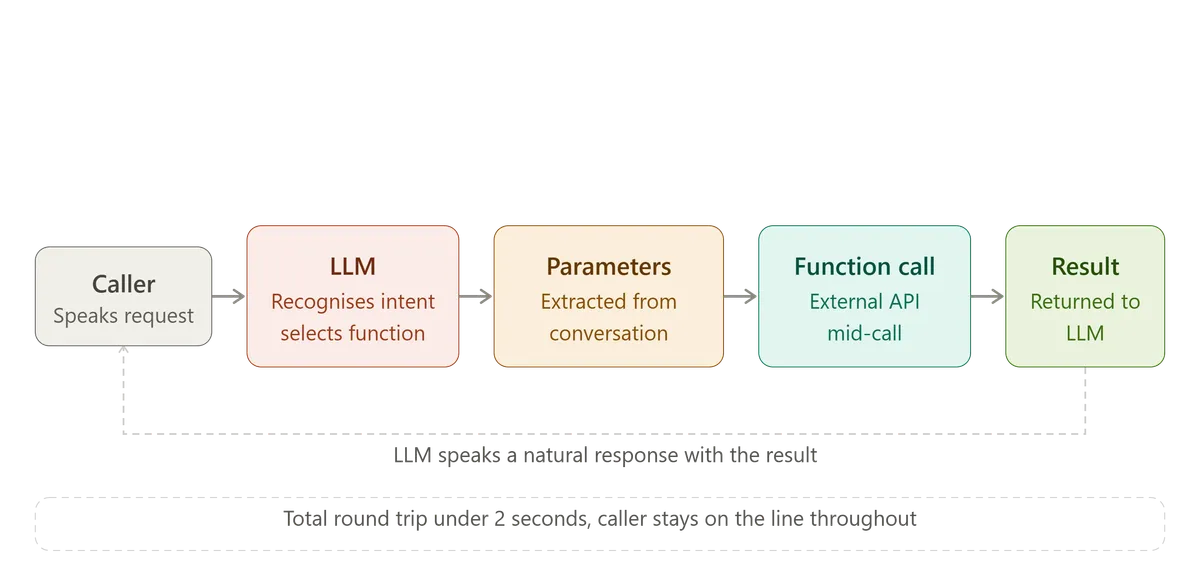
In a voice AI agent, this happens live, mid-call. The caller says something. The LLM understands the intent. Instead of just generating a text response, the LLM recognises that fulfilling this request requires checking a calendar, looking up an account, or updating a record. It calls the appropriate function, waits for the result, and then continues the conversation using that result.
The caller experiences this as a natural pause followed by a specific, accurate answer. "Let me check that for you... I can see you have an appointment on Thursday at 2pm. Would you like to move it to Friday instead?" The system experiences this as an API call, a response, and the LLM incorporating that response into its next turn.
This is fundamentally different from a chatbot that can only generate text. Function calling gives the LLM hands. It can reach into the real world, retrieve real information, and make real changes, all within the natural flow of a phone conversation.
How Function Calling Actually Works
Step 1: Function Definitions
Before any call happens, the system defines a set of functions the LLM is allowed to call. Each function definition includes a name, a description of what it does, and a schema describing what parameters it requires.
For example, a check_appointment_availability function might require a date parameter and a service_type parameter, and return a list of available time slots. A create_support_ticket function might require issue_description, priority, and customer_id.
These definitions are passed to the LLM as part of the system configuration. The LLM doesn't need custom training to use them, modern LLMs are trained to recognise when a function should be called based on its description and the conversation context.
Step 2: Intent Recognition and Function Selection
During the conversation, the LLM continuously evaluates whether the caller's request maps to one of the available functions. This happens automatically as part of the LLM's reasoning process, not through separate rule-based logic.
If a caller says "Can you check if you have anything available next Tuesday?", the LLM recognises this maps to check_appointment_availability and determines the parameters from context: date equals next Tuesday, service type inferred from earlier in the conversation or asked for if not yet known.
Step 3: Parameter Extraction
The LLM extracts the required parameters from the conversation. This is where careful conversation design matters. If the caller hasn't provided enough information to populate all required parameters, a well-designed agent asks a clarifying question rather than guessing or calling the function with incomplete data.
"What date were you thinking?" is a better outcome than calling check_appointment_availability with a null date parameter and producing a confusing error.
Step 4: Function Execution
The system executes the actual function, typically an API call to an external system, a database query, or a webhook to a custom backend. This happens in real time, while the caller is still on the line.
This step needs to be fast. The caller is waiting, mid-conversation, for this to complete. A function call that takes 3 seconds creates an awkward silence. A well-designed system either completes the call quickly or uses natural bridging language ("Give me just a moment to check that") to cover the latency.
Step 5: Result Integration
The function returns a result, and the LLM incorporates that result into its next response. This is where the conversation feels natural rather than mechanical. The LLM doesn't just read back raw data, it constructs a natural response using the data.
"I found two openings next Tuesday, 10am and 2:30pm. Which works better for you?" is the LLM taking a raw API response (a list of timestamps) and turning it into a natural conversational turn.
Common Function Types in Production Voice AI
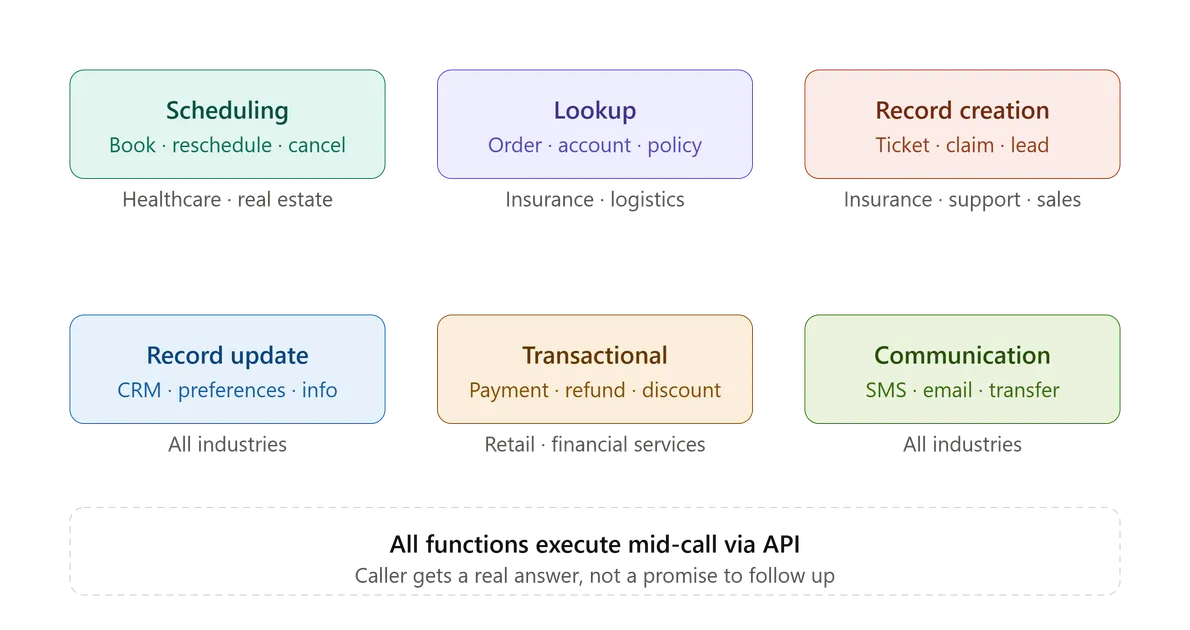
| Function Category | Example Functions | Common Industries |
|---|---|---|
| Scheduling | Check availability, book appointment, reschedule, cancel | Healthcare, real estate, services |
| Lookup | Check order status, verify account, retrieve policy details | Insurance, retail, logistics |
| Record Creation | Create ticket, log claim (FNOL), create lead | Insurance, support, sales |
| Record Update | Update contact info, update preferences, update CRM | All industries |
| Transactional | Process payment, apply discount, issue refund | Retail, financial services |
| Communication | Send SMS confirmation, send email, trigger follow-up | All industries |
| Escalation | Transfer to human, flag for review, create urgent ticket | Contact centres, support |
The specific functions a voice AI agent needs are entirely dependent on the use case. A healthcare scheduling agent needs calendar functions and EHR lookups. An insurance FNOL agent needs claim creation and policy verification. A logistics dispatch agent needs load status lookups and driver check-in logging.
What Makes Function Calling Hard in Production
Function calling sounds straightforward in a demo. It gets significantly harder once real callers, real systems, and real edge cases are involved.
Latency under pressure. Every function call adds latency to the conversation. If the underlying API takes 2 seconds to respond, the caller experiences a 2-second pause. Production systems need bridging language, parallel function calls where possible, and aggressive timeout handling to keep the conversation feeling natural.
Parameter ambiguity. Callers don't always provide complete or unambiguous information. "Next week" could mean five different dates. "My usual appointment" requires looking up history the LLM doesn't automatically have. Good orchestration handles this by asking clarifying questions rather than guessing, but knowing when to ask versus when to infer is a genuine design challenge.
Function call failures. APIs go down. Databases time out. Authentication tokens expire. A production voice AI agent needs defined behaviour for every failure mode, not just the happy path. What does the agent say when the CRM is unreachable? Does it retry? Does it apologise and offer to have someone call back? Does it transfer to a human immediately?
Incorrect function selection. Occasionally the LLM selects the wrong function, or calls a function when it should have asked a clarifying question instead. This is rarer with well-designed function descriptions and good prompt engineering, but it happens, and the orchestration layer needs to handle unexpected or malformed function calls gracefully.
Multi-step function chains. Some tasks require multiple function calls in sequence: check availability, then book the appointment, then send a confirmation, then update the CRM. If one step fails partway through the chain, the system needs to handle partial completion without leaving the caller confused or the data inconsistent.
Security and authorisation. The agent is taking real actions on behalf of real callers, often involving sensitive data. Every function call needs proper authentication, scoped permissions, and audit logging. A voice AI agent that can update any customer record without verifying caller identity first is a security incident waiting to happen.
Real-Time vs Asynchronous: Why the Difference Matters
Not every action needs to happen during the call. Understanding the difference between real-time and asynchronous actions shapes good system design.
| Aspect | Real-time Function Calling | Asynchronous Processing |
|---|---|---|
| When it Executes | During the call, caller waits | After the call, caller doesn't wait |
| Caller Experience | Immediate confirmation | Told "we'll follow up" |
| Best For | Booking, lookups, simple updates | Complex processing, batch jobs, non-urgent tasks |
| Latency Tolerance | Low, under 2–3 seconds ideally | High, can take minutes or hours |
| Examples | Check availability, verify account | Generate detailed report, complex underwriting review |
The mistake some deployments make is trying to do everything in real time, including tasks that genuinely take too long to complete during a call. A complex insurance underwriting calculation that takes 45 seconds shouldn't hold a caller on the line. The right design tells the caller "I've logged your request and someone will follow up within 24 hours" and processes the heavier task asynchronously.
Knowing which actions belong in which category is part of good voice AI architecture, not an afterthought.
Function Calling and the Caller Experience
The technical mechanism matters less than how it feels to the person on the phone. A few principles separate function calling that feels natural from function calling that feels robotic.
Acknowledge before executing. "Let me check that for you" before a function call sounds natural. Silence followed by an answer feels like the call dropped.
Don't over-explain the mechanism. Callers don't need to hear "I'm now querying the database." They need a natural conversational bridge and then the answer.
Handle partial information gracefully. If a function call returns incomplete data, the agent should work with what's available rather than failing entirely. "I can see your account, though I don't have your latest order details handy. Let me get someone who can help with that specifically."
Confirm before consequential actions. Booking an appointment is low-risk to confirm casually. Processing a refund or cancelling a policy deserves an explicit confirmation step before execution. "Just to confirm, you'd like me to cancel your policy effective today, is that right?"
How VoiceInfra Handles Real-Time Function Calling
In VoiceInfra, real-time function calling is built into the core platform rather than something you need to engineer from scratch.
Pre-built integrations. Native connections to common business systems, Salesforce, Zoho, HubSpot, Calendly, Zendesk, and others, mean many common functions (booking, lookup, ticket creation) are available without custom development.
Custom function definitions. For business systems without a native integration, you define custom functions via webhook or REST API, specify the parameters, and the platform handles the LLM-side integration, parameter extraction, and execution.
Built-in latency handling. The platform automatically inserts natural bridging language during function execution and handles timeout scenarios with graceful fallback behaviour, so you're not building this logic yourself for every function.
Error handling and retries. Failed function calls trigger configurable fallback behaviour, retry once, apologise and offer a callback, or transfer to a human, depending on what makes sense for that function and your business rules.
Audit logging. Every function call is logged with timestamp, parameters, result, and outcome, giving you full visibility into what actions your agent took on every single call.
Authentication and scoping. Function calls respect defined authorisation scopes, so an agent verifying a caller's identity before exposing sensitive account data is a configuration, not a custom build.
This means the engineering effort of building reliable, secure, production-grade function calling, the part that takes most teams weeks to get right, is already handled. You define what actions the agent should take, and the platform handles how those actions execute reliably during a live call.
Final Thought
The conversation is not the product. The action is the product.
A voice AI agent that talks beautifully but can't book the appointment, can't update the record, can't actually resolve the reason someone called, hasn't automated anything. It's added a layer of natural language on top of a problem that still requires a human to actually solve.
Real-time function calling is what closes that gap. It's the mechanism that turns "I understand what you want" into "I've done what you asked," within the same phone call, without the caller needing to wait, follow up, or repeat themselves to someone else.
Get the conversation right. Then make sure the agent can actually act on it.
Want to see real-time function calling working with your actual business systems? Schedule a demo with VoiceInfra and we'll show you how it connects to your CRM, calendar, or custom backend live.
Related reading:
7 Core Components of a Voice AI Agent Explained
How to Build a Voice AI Agent: Architecture Guide for 2026
What is a Voice AI Agent? How It Works, Components & Real Examples