IVR Detection Auto Navigation
Skip the 'Press 1 for Sales' loops. Your AI agent navigates IVR menus automatically to reach the right department instantly.
Stop wasting time listening to automated phone menus. With IVR Detection enabled, your agent listens for keypad prompts and presses the right buttons automatically based on your instructions. It navigates complex menu structures on outbound calls to reach live agents or specific departments without manual dialing.
What Makes This Feature Special
Discover the powerful capabilities that drive real business results
Automatic Keypad Navigation
The agent detects IVR prompts and presses the correct keys (DTMF tones) to navigate menus. No manual button pressing required.
System Prompt Guidance
You tell the agent which buttons to press for specific goals (e.g., 'Press 1 for Sales, then 2 for Support'). The agent follows your instructions precisely.
Outbound Call Efficiency
Perfect for calling service providers, partners, or vendors where you need to reach a specific human quickly. Skips the waiting and menu navigation.
Multi-Level Menu Support
The agent can navigate through multiple levels of menus as long as you provide clear step-by-step instructions in the system prompt.
Get started with this feature in a few simple steps
Everything you need to transform your voice operations from start to finish
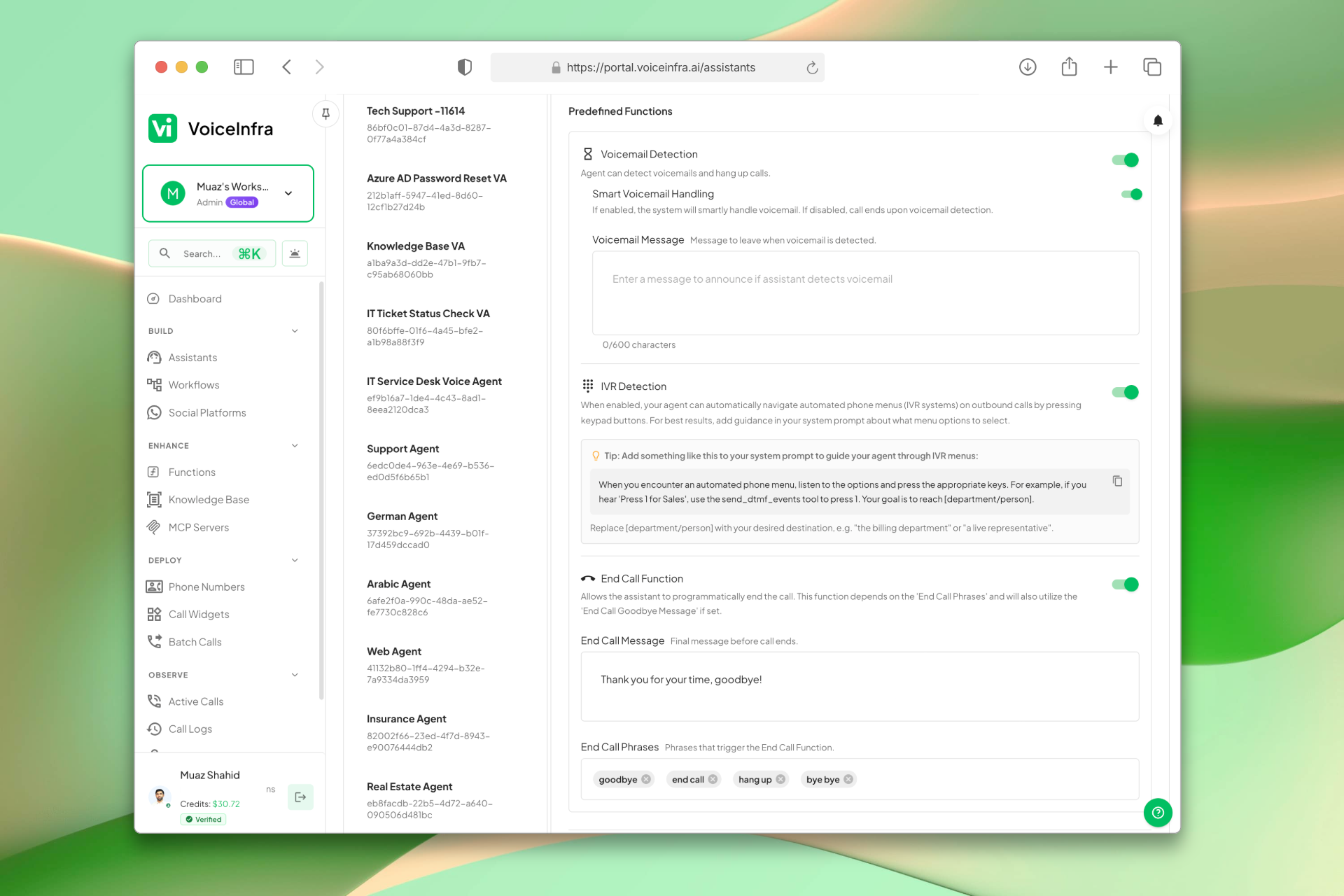
Enable & Configure IVR Detection
Turn on IVR Detection in your assistant's Functions tab. Once enabled, the agent automatically listens for keypad prompts during outbound calls and presses the correct buttons based on your system prompt instructions.
- One-click enable in the Functions tab
- Agent navigates multi-level menus automatically
- Instructions defined in the system prompt
- Applies to all outbound calls for that assistant
Transform Your Business
Discover the measurable impact and advantages that drive real business growth
Automates the boring part of outbound calling (menu navigation)
Reaches the right person or department faster
Reduces errors in pressing wrong buttons
Works with complex, multi-level IVR systems
Saves time on every outbound call
Consistent navigation based on your instructions
Improves agent productivity by eliminating manual dialing
Seamless integration with your existing outbound workflows
Industry Solutions
Discover how this feature powers tailored solutions across industries
AI-Powered Contact Center Automation Build Custom Voice AI Agents
Build a Voice AI agent for your contact center. Reduce costs by 40-60% while delivering superior customer experience.
Explore SolutionAI Voice Automation for BPO Companies Scale Operations & Reduce Costs
Build a Voice AI agent for your BPO operations. Handle customer service, data collection, and support tasks around the clock.
Explore SolutionAI Phone System for Collections BPO 24/7 Payment Recovery & Compliance
Build a Voice AI agent for your collections BPO. Handle payment reminders, negotiations, and compliance around the clock.
Explore SolutionSee How Our Customers Use This
Real businesses getting real results with this feature. Read their stories.
How a Spanish Telecom Operator Runs 500+ Daily Outbound AI Calls on Yeastar with 5 Languages
A CNMC-registered Spanish telecom operator deployed 10 VoiceInfra AI agents on Yeastar PBX, running 500+ outbound calls daily with 30%+ transfer rate across Spanish, Arabic, English, French, and Portuguese
Read Success StoryHow a National Medical Waste Company Runs AI Cold Calling from a Twilio Number
A national medical waste management company brought their Twilio phone number to VoiceInfra and built an AI outbound calling agent that cold calls healthcare businesses about their medical waste disposal services
Read Success StoryStill have questions about IVR Detection Auto Navigation? Just ask.
The people who built this feature answer every question in plain English. Want to see it running on your own setup instead? Tick the box and we'll include a live demo.
- Answered by the people who built it
- Live demo on your setup, if you want one
- A reply within one business day
Technical Specifications
Enterprise-grade infrastructure built for reliability and scale
IVR Navigation
Automatic keypad pressing
Prompt Guidance
System prompt instructions
Fast Navigation
Skips menu waiting
Outbound Calls
Automatic department routing
Frequently Asked Questions
Find answers to common questions about this feature
Continue Exploring VoiceInfra
Discover more ways VoiceInfra can transform your voice AI experience
Knowledge Base
Stop feeding your AI outdated information. Our Knowledge Base lets you upload company documents, crawl entire websites, or paste custom text then instantly connect it to any AI agent. No retraining, no hardcoding, no hallucinations. Just accurate, real-time answers that scale with your business. Upload product manuals, FAQ documents, pricing sheets, or website content. The AI automatically references this information during conversations pulling exact details in under 100ms.
Explore FeatureNo-Code AI Voice Agents
Design intelligent AI voice assistants using a simple step-by-step wizard. Define how your agent should behave, attach knowledge resources, configure call routing, and deploy ready-to-use assistants. No prompt engineering or coding skills needed.
Explore FeatureWebsite Crawler
Your website contains answers to 80% of customer questions, but your team fumbles through browser tabs searching for information while customers wait. VoiceInfra's Website Crawler eliminates the scramble by automatically absorbing every FAQ, product spec, and policy page - making your AI agents instant experts on everything you've published online.
Explore FeatureReady to transform your operations?
Contact our sales team to see how the platform works for your industry.